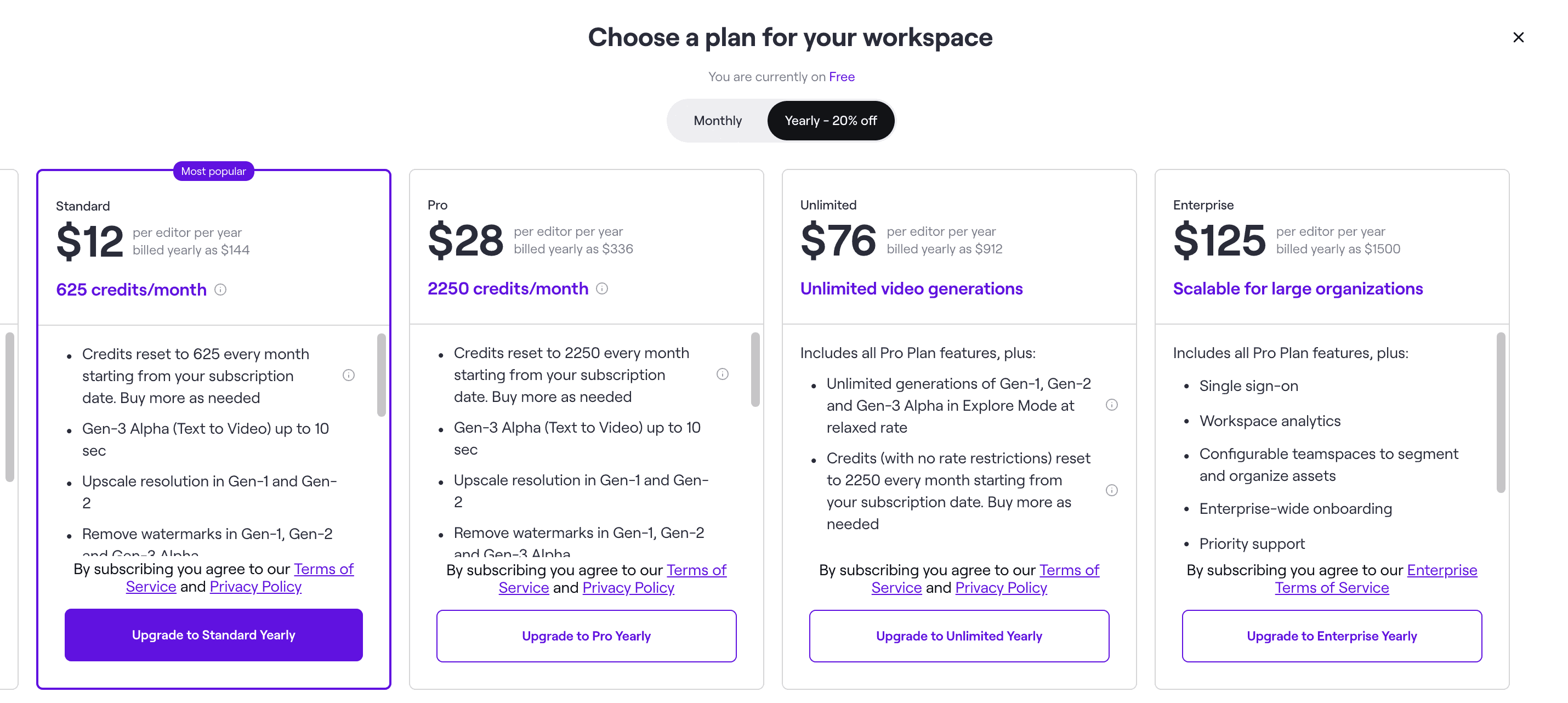
Officially: Runway's GEN-3 Alpha video model is now available to anyone for just $15, or even $12 if you purchase annual plan!
What is Gen-3?
Gen-3 Alpha is Runway’s newer-generation video model, introduced on June 17, 2024 as the first release in a model family built on infrastructure designed for large-scale multimodal training, according to Runway’s launch announcement. At launch, Runway positioned it around higher fidelity, stronger motion, and better scene consistency than Gen-2, with support for both text-to-video and image-to-video workflows. The initial rollout focused on 5-second and 10-second clips, with Runway reporting generation times of roughly 45 seconds for 5-second outputs and about 90 seconds for 10-second outputs.
The practical question is not whether runway gen 3 alpha is newer than Gen-2; it is whether the upgrade changes what you can ship. In my view, that is where runway ml gen 3 matters most.
Gen-3 Alpha vs Gen-2 at a glance
| Area | Gen-2 | Gen-3 Alpha |
|---|---|---|
| Output quality | Good for simpler concept shots and rough ideation | Stronger detail, cleaner motion, and more polished short clips |
| Motion consistency | Can drift or wobble under complex prompts | More stable motion across the clip |
| Prompt adherence | Adequate for broad concepts | Better at following specific cinematic instructions |
| Control | Useful for basic generations | Better suited to fine-grained timing and transition work |
| Best use case | Fast experiments, lower-stakes drafts, simple social visuals | Paid production workflows, client work, more cinematic outputs |
| Access | Available inside Runway depending on account features | Available through Runway plans with clear credit-based usage |
Editorially, I would not tell every user to abandon runway gen-2 / gen-3 alpha comparisons entirely. If you are testing concepts, Gen-2 can still be sufficient. If you care about prompt precision, motion realism, or making fewer throwaway generations, runway gen 3 is the version more people will actually want to pay for.
How We Evaluated Access to Runway Gen-3 Alpha
This update is based on three things we checked directly: Runway’s official product and research pages, publicly listed plan details and credit limits, and the actual in-app access path shown to users once they create an account. I focused on where Gen-3 Alpha appears, which plan unlocks it, and whether there is any realistic free path before paying.
How to Use Runway Gen-3?
The short version: create a Runway account, open the video generation workspace, choose Gen-3 Alpha as your model, then generate from either a text prompt or an uploaded image. Full ongoing access is tied to a paid plan, although Runway has also offered a limited free tier with starter credits.
Step-by-step access path
- Go to Runway and create an account through the Runway app login.
- After signing in, open Runway’s video tools workspace. In the model selector, Gen-3 Alpha appears as one of the available generative video models when your account has access.
- Choose your workflow:
- Text to Video if you want to generate a shot directly from a written prompt.
- Image to Video if you want to upload a still image and animate it into a moving clip.
- Enter your prompt or upload your source image.
- Pick clip settings, generate, and review the result.
- If you like the output, download it or iterate with another prompt revision.
If you want a broader model-comparison view before committing to a plan, this AIMVG guide is a useful side read.
Which plan gives access?
Runway’s commercial structure has become much clearer over time. A public plan summary cited by Digen AI’s pricing breakdown lists a free tier with 125 one-time credits, a Standard plan at about $15/month with 625 monthly credits, a Pro plan at about $35/month with 2,250 monthly credits, and an Unlimited plan at about $95/month with more relaxed unlimited use. The key takeaway is simple: Standard is the lowest paid entry point most individual creators should look at.
What those credits mean in practice
Using the plan math referenced in public Runway pricing discussions, here is the rough picture:
- Free tier: 125 one-time credits = enough to test, not enough for regular use.
- Standard: 625 monthly credits = workable for a handful of short clips with some retries.
- Pro: 2,250 monthly credits = much more room for iteration.
- Unlimited = better for frequent use than occasional experiments.
That is the pricing detail I think gets missed most often: Standard is enough to learn the model and make short polished clips, but it is not a high-volume production budget.
Is there any free access?
Yes, but it is limited. Public plan listings indicate a free tier with 125 one-time credits, which is enough to test the interface and produce a small amount of output before deciding whether to pay. That makes it a trial path, not full access. If you want to use runway gen-3 alpha regularly, the realistic route is a paid subscription, usually starting with Standard.
Runway Gen-3 Alpha vs Gen-2: What Changes in Practice?
The biggest difference is not that Gen-3 Alpha can produce video and Gen-2 cannot. Both can. The difference is that Gen-3 Alpha is better at holding a scene together when your prompt asks for layered motion, camera behavior, and subject continuity at the same time.
Where Gen-3 Alpha improves
- Motion quality: Gen-3 Alpha is generally stronger when movement is the point of the shot.
- Consistency: Subjects and scene elements are more likely to remain coherent across the clip.
- Prompt adherence: More specific prompt instructions tend to survive generation better.
- Production readiness: Short clips look closer to something you would keep.
Where Gen-2 can still be enough
- Simple background loops
- Fast ideation for storyboards
- Low-stakes social experiments
- Cases where you care more about speed and quantity than precision
My honest take: if you only need rough visual brainstorming, Gen-2 still has a place. If you are paying for output you hope to publish, pitch, or hand off to a client, Gen-3 Alpha is the more defensible spend. For a wider competitive context, we’ve also covered Runway Gen-3 vs. Kling AI: Comparison and a broader overview in Discover Runway 3 for Video Creation.
Capabilities
The easiest way to understand the capabilities and quality of Runway's new model is to watch the official showreel. It's impressive!
FAQ
Is Runway Gen3 free? Not in the full, ongoing sense. There has been a free tier with 125 one-time credits, which is enough to test the product and make a very small number of generations. That is useful for evaluation, but if you want regular access to Gen-3 Alpha, assume you will need a paid plan.
How much does Runway Gen 3 cost? The entry paid tier is typically around $15/month for Standard, with higher plans around $35/month for Pro and $95/month for Unlimited, based on the publicly summarized pricing structure in Digen AI’s plan overview.
Should you upgrade from Gen-2 to Gen-3 Alpha? Upgrade if you care about motion realism, consistency, and prompts that need more control. Stay with Gen-2 if your use case is fast ideation and you are still exploring concepts cheaply.
Useful Links
- Runway Gen-3 Alpha Official Website
- Blog: Runway Gen-3 vs. Kling AI: Comparison
- Blog: Discover Runway 3 for Video Creation
Sources
Frequently Asked Questions
Sources

Written by
Artem Vysotsky
Ex-Staff Engineer at Meta. Building the technical foundation to make AI accessible to everyone.

Reviewed by
Sergey Vysotsky
Ex-Chief Editor / PM at Mosaic. Passionate about making AI accessible and affordable for everyone.