Quick answer: use a native provider API when you need the newest provider-specific features immediately. Use an OpenAI-compatible API when your app already speaks OpenAI-style chat or responses requests and you want access to more models with less integration work. Use a multi-model gateway when the real problem is not syntax, but routing, cost controls, fallback policy, logs, evaluation, and team access across GPT, Claude, Gemini, open-weight models, image models, and future providers.
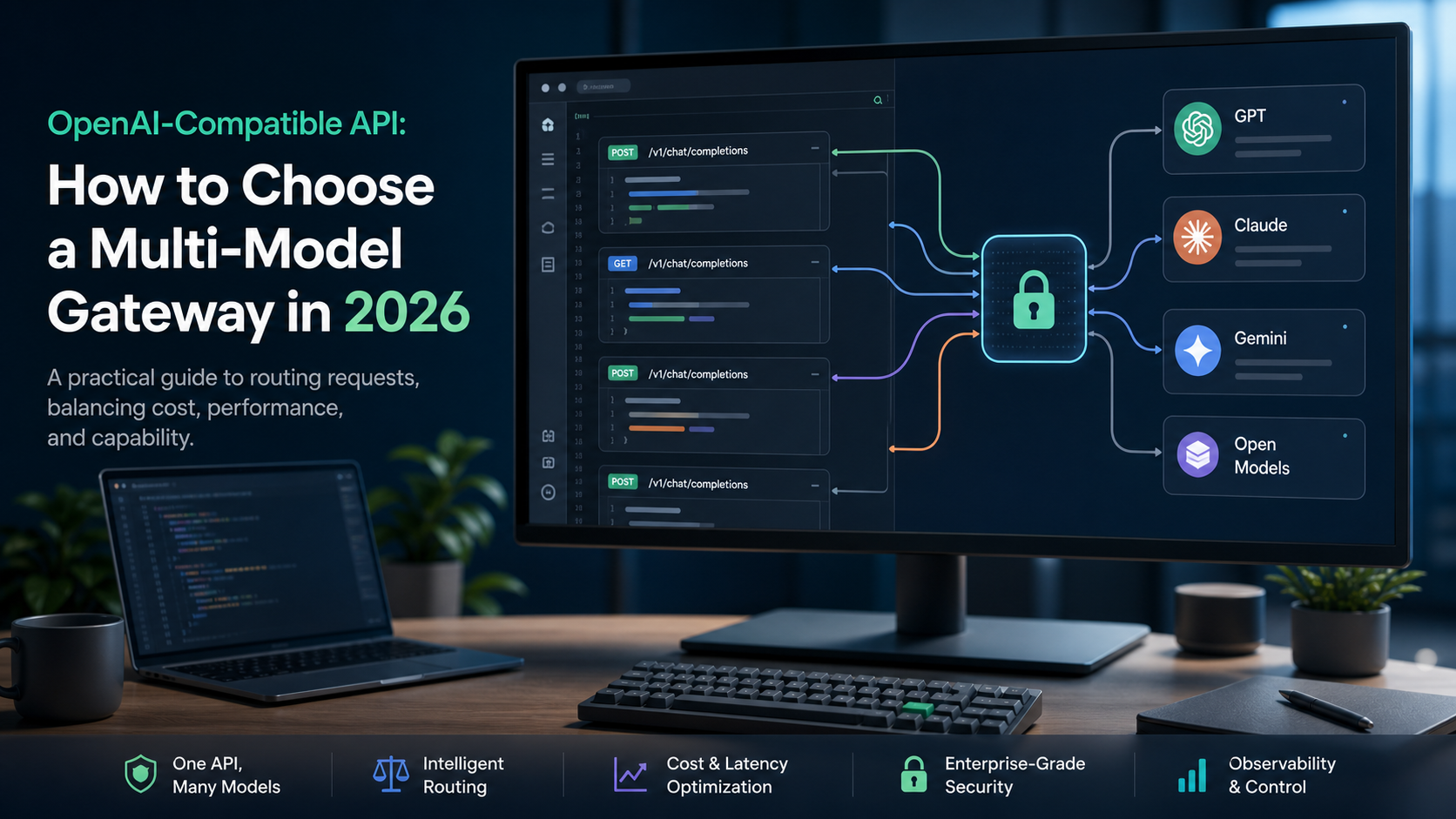
My name is Artem, and I look at AI infrastructure from the builder and buyer side. The phrase OpenAI-compatible API sounds like a small developer convenience, but in 2026 it is often a platform decision. It affects which models you can test, how fast you can ship, how much vendor lock-in you accept, and whether your team can measure quality instead of arguing from screenshots.
This guide targets the Semrush cluster around openai compatible api, gpt api, api platform, and api integration tools. If you are evaluating Writingmate while reading, keep the OpenAI-compatible API docs, model directory, pricing page, and key features guide open. The buyer question is simple: do you only need a different base URL, or do you need a durable model operations layer?
What OpenAI-compatible really means
An OpenAI-compatible API usually means the provider exposes endpoints that accept a familiar OpenAI-style request shape. In practice, developers often change the base URL, model name, and API key while keeping much of the existing client code. That is why the pattern spread: a team can prototype Claude, Gemini, Mistral, Llama, DeepSeek, Qwen, or hosted open models without rebuilding every call site.
The compatibility is not magic. Official provider docs still matter because model behavior, tool calling, streaming, structured output, image inputs, file handling, safety settings, context windows, rate limits, and billing semantics can differ. Anthropic documents OpenAI SDK compatibility as a convenience layer, while still making clear that Claude has its own Messages API and feature set. Google documents OpenAI compatibility for Gemini so existing OpenAI client libraries can point at Gemini endpoints. OpenRouter and similar routing services go further by normalizing access to many models behind one API.
The practical lesson is this: compatibility reduces the cost of the first integration. It does not remove the need to test outputs, latency, tool behavior, retries, and billing. If your product depends on model quality, you should treat OpenAI-compatible APIs as an easier starting point, not a guarantee that every provider behaves identically.
Reddit and X developer threads are useful here because the same complaint appears repeatedly: changing the endpoint is easy, but production differences show up in streaming, tool calls, response format, rate limits, and cost surprises.
Three API choices developers actually have
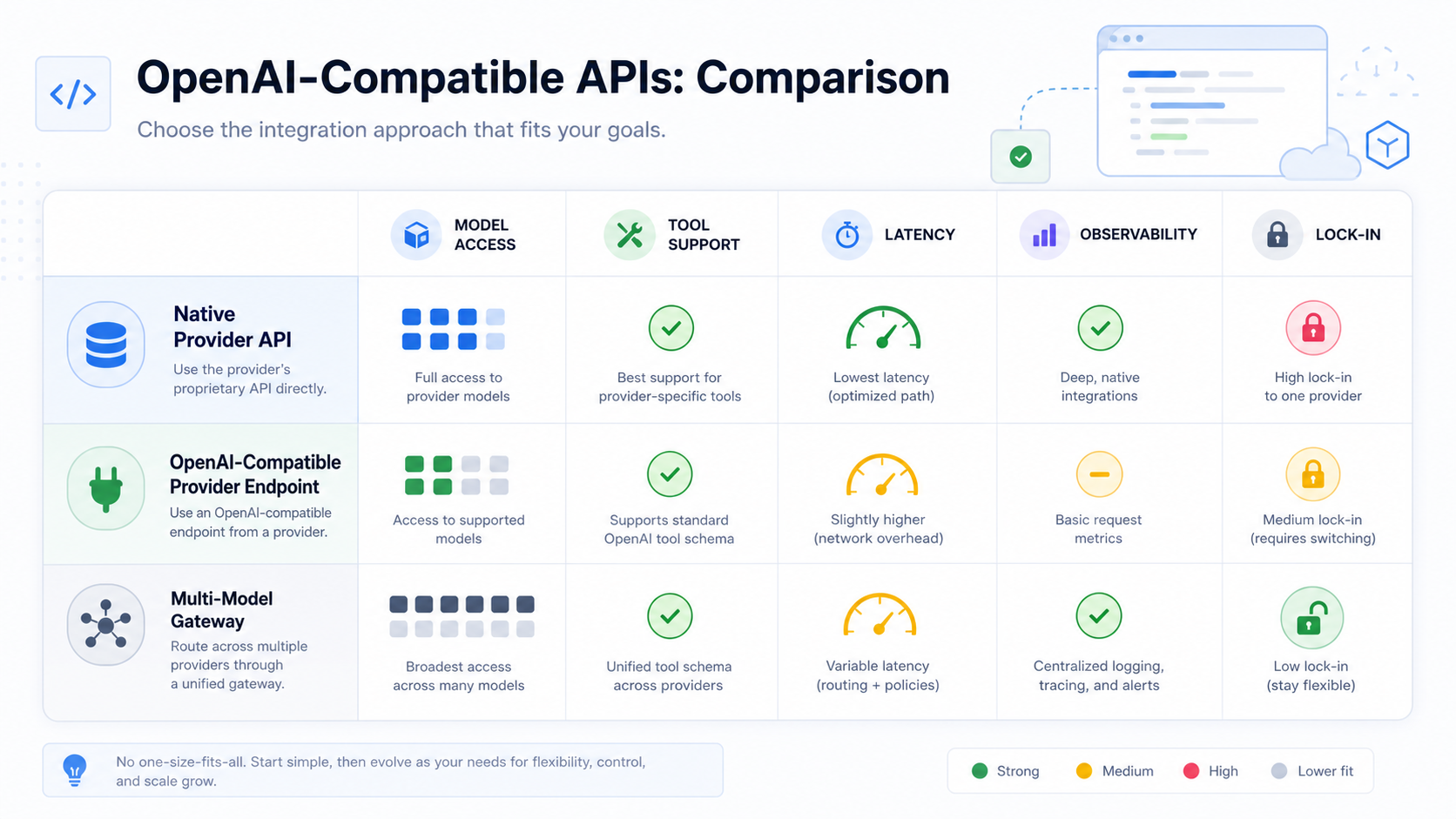
Most teams should not compare vendors as if every API layer solves the same job. There are three different choices: native APIs, provider-compatible endpoints, and multi-model gateways.
Choice | Best fit | Main advantage | Main risk |
|---|---|---|---|
Native provider API | Teams that need the newest provider-specific features | Maximum access to that provider's current capabilities | More custom integration work when you add another provider |
OpenAI-compatible provider endpoint | Apps already built around OpenAI-style requests | Fast model trial with minimal client changes | Compatibility gaps in tools, streaming, files, and response details |
Multi-model gateway | Teams comparing many models or running production routing | One control plane for model access, budgets, logs, and routing | You must trust and evaluate the gateway layer too |
Use native APIs when the provider-specific feature is the point. If you are adopting a new Responses API capability, a particular tool-use primitive, a specialized multimodal mode, or a provider's evaluation and tracing workflow, direct integration may be worth the extra code. Native APIs are also clearer when your legal, compliance, or procurement team wants a direct relationship with one model provider.
Use provider-compatible endpoints when you already have OpenAI-style code and want to test a new model quickly. This is the best first move for prototypes, internal tools, and products where a model swap might improve quality or cost. The win is speed: change the base URL, model, and key, then run the same test cases.
Use a gateway when your team keeps asking which model to use for each job. A gateway can help centralize model inventory, API keys, spend, logs, retry behavior, routing, and vendor comparison. This is where Writingmate's OpenAI-compatible API story is interesting: the value is not only a familiar syntax. It is the ability to connect app development to the broader model directory and multi-model workspace.
The buyer checklist before you switch endpoints
The easiest bad decision is to treat an OpenAI-compatible API as a drop-in replacement without a test plan. It may work for simple chat completion calls, but production applications usually depend on details: exact JSON shape, token counting, streaming chunks, tool-call semantics, refusal behavior, latency under load, and error codes.
Before switching a real app, run this checklist:
Inventory request shapes. List every place your app uses messages, system prompts, tools, JSON mode, streaming, image inputs, file uploads, or embeddings.
Map model names and capabilities. Do not assume a model supports the same context window, modalities, tool calling, or structured outputs because the endpoint accepts the request.
Build an eval set. Collect 30 to 100 real prompts with expected qualities, edge cases, and failure examples. Include messy user inputs, long context, and refusal cases.
Measure cost per useful output. Price per token is not enough. Include retries, longer prompts, slower latency, and the percentage of responses that need human repair.
Log provider differences. Track model, route, latency, finish reason, token usage, error class, and whether the output passed your quality check.
Roll out behind a flag. Start with internal users or low-risk traffic, then expand only after the new route beats or matches the old route on real examples.
This is where many API migrations fail. The team proves the syntax works and then learns that a support bot now gives shorter answers, a writing assistant ignores format rules, or a coding feature streams chunks differently. A serious migration treats endpoint compatibility as a head start, while still proving behavior.
Routing is the real reason to use a gateway
If your app only needs one model, an OpenAI-compatible endpoint may be enough. If your app has several jobs, routing becomes more valuable than compatibility. The best model for classification may not be the best model for long writing. The best model for code review may not be the best model for low-latency chat. The best model for a high-stakes answer may not be the cheapest model that passes a simple benchmark.
A practical routing policy usually starts with plain rules:
Task | Routing signal | What to optimize |
|---|---|---|
Simple classification | Short prompt, known label set, low risk | Cost and latency |
Customer-facing writing | Longer output, brand tone, factual constraints | Quality and consistency |
Research answer | Needs citations or source grounding | Retrieval quality and traceability |
Code or agent action | Tool calls, structured output, higher risk | Reliability, logs, and approval flow |
Creative prompt ideation | Many acceptable outputs, low risk | Iteration speed and variety |
Do not start with a complicated machine-learned router. Start with route names a product manager and engineer can understand: cheap-fast, balanced, best-quality, long-context, code, research, vision, and fallback. Then log whether each route is actually better for its assigned job. Once the simple policy works, you can add automatic routing, caching, or more granular model selection.
Writingmate fits this mental model because the product already assumes model choice is part of the workflow. A team can compare models in the UI, use the OpenAI-compatible API for app integration, and keep the pricing conversation connected to actual usage instead of abstract token math.
OpenAI-compatible does not mean vendor-neutral
There is a subtle lock-in trap here. If you point your app at one provider's compatible endpoint and use that provider's model names, rate limits, error behavior, and billing assumptions everywhere, you have reduced code changes but not necessarily strategic dependency. You may still be locked into one vendor's availability, policy, and pricing.
A gateway can reduce that dependency, but it introduces another one: the gateway itself. That is not automatically bad. Payments, email, analytics, and observability are all gateway-like categories where teams accept an abstraction because the operational benefits are worth it. The question is whether the abstraction is transparent enough. Can you see which model answered? Can you override the route? Can you export logs? Can you set budgets? Can you bypass the gateway for a native feature when needed?
For many teams, the right answer is hybrid. Use native provider APIs for features that demand native access. Use OpenAI-compatible calls for common chat, generation, and internal tools. Use a gateway for experiments, routing, and product areas where model choice changes often. The architecture should make model changes boring, not invisible.
How I would migrate an existing GPT API integration
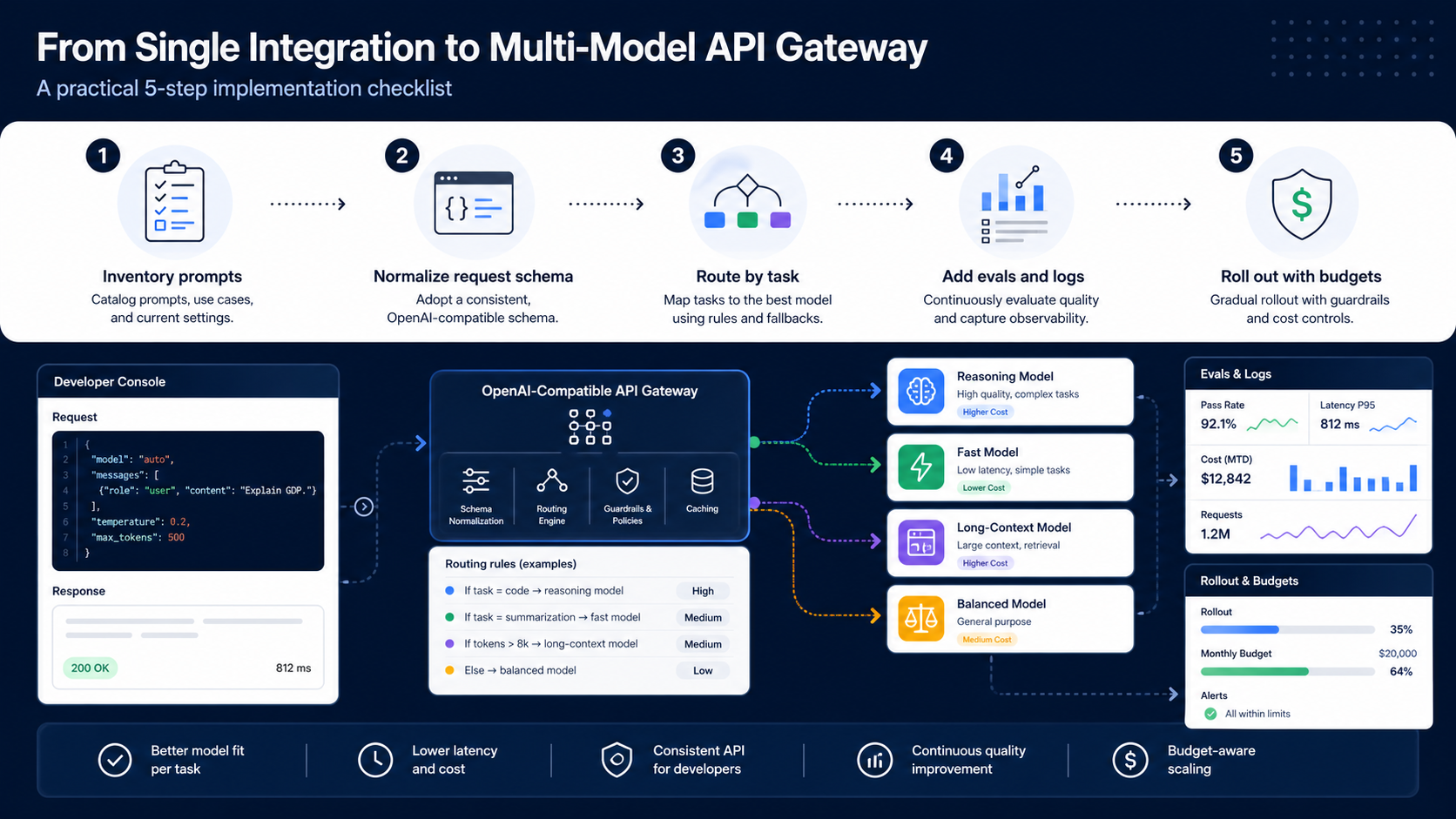
If I were moving an existing GPT API integration to a multi-model setup, I would avoid a big-bang rewrite. The migration should be boring and measurable.
First, I would wrap the current provider call behind an internal adapter if it is not already isolated. The adapter should receive a normalized request, choose a route, call the provider, and return a normalized response with usage and error details. That wrapper gives you a single place to add a second provider without editing every product feature.
Second, I would preserve the current model as the default route. Do not change behavior and architecture at the same time. Add a new route for one low-risk use case, such as internal summarization, draft generation, or classification. Compare the old route and new route on the same eval set. If the new route wins on cost but fails formatting, fix the prompt or choose a different model before exposing it.
Third, I would add human-readable reporting. Engineers need logs, but buyers and operators need the answer to simpler questions: which model is best for support drafts, which route is expensive, where do failures happen, and which prompts are unstable? A gateway is only useful if it creates this visibility. Otherwise it is just another base URL.
Finally, I would document the fallback policy. If the primary model is down, should the app retry the same model, switch providers, degrade to a cheaper model, or stop and ask the user to try again? The correct answer depends on the workflow. A casual brainstorming feature can fallback aggressively. A legal, medical, financial, or production-code workflow should fail more carefully.
My recommendation
If you are building a new app in 2026, design for model choice from day one. That does not mean abstracting every provider feature into the lowest common denominator. It means isolating model calls, logging outcomes, and making route decisions explicit.
Pick a native API when you need the newest provider-specific capability. Pick an OpenAI-compatible endpoint when speed of integration matters and the use case is simple enough to test quickly. Pick a multi-model gateway when your team is already comparing models, controlling budgets, serving multiple product features, or trying to avoid rewriting integration code every time the model landscape changes.
For Writingmate users, the strongest path is to connect product evaluation and API usage. Use the model directory to understand the available model families, test practical prompts in the workspace, then use the OpenAI-compatible API where a familiar developer interface helps you ship. The result is not just another GPT API wrapper. It is a workflow where builders can compare models, route intentionally, and keep the app ready for the next model change.
The API layer should make your team more flexible, not merely more abstract. If a provider-compatible endpoint gives you that flexibility, use it. If the work now spans models, budgets, logs, and routing, choose a gateway deliberately and measure it like production infrastructure.
Artem
Frequently Asked Questions
Sources
- OpenAI API documentation
- Anthropic OpenAI SDK compatibility
- Google Gemini OpenAI compatibility
- OpenRouter API documentation
- Writingmate OpenAI-compatible API docs
- Writingmate model directory
- Reddit discussion: OpenAI-compatible API
- X search: OpenAI-compatible API gateway
- OpenRouter Explained: One API Key for Every AI Model — Coding Fab

Written by
Artem Vysotsky
Ex-Staff Engineer at Meta. Building the technical foundation to make AI accessible to everyone.

Reviewed by
Sergey Vysotsky
Ex-Chief Editor / PM at Mosaic. Passionate about making AI accessible and affordable for everyone.