
OpenAI-Compatible API
Writingmate exposes an OpenAI-compatible API under /api/openai/v1, so you can connect your Writingmate workspace to external SDKs, coding tools, CLI workflows, and agent clients. A Developer Key is a password-like token that lets another app use this API with your Writingmate account.
The developer hub is available at writingmate.ai/developers. It is the public entry point for agent users who want to use their Writingmate plan from external clients.
The API is currently alpha and provided on a fair-use basis. It is intended for personal tools, local clients, coding assistants, and internal workspace workflows. It is not licensed for building, hosting, reselling, or operating production software or customer-facing services on top of Writingmate unless you have a separate written agreement. API access, limits, endpoints, model availability, compatibility, and uptime are not guaranteed. See the Terms of Service.
That includes:
- OpenAI SDKs
- Vercel AI SDK
- LiteLLM
- OpenCode
- Continue
- Aider
- Simon Willison’s
llmCLI - MCP hosts through the Writingmate MCP endpoint
- any other tool that accepts a custom OpenAI base URL and Bearer API key
Agent client integration hub
Use these values in clients that support custom OpenAI-compatible providers:
| Setting | Value |
|---|---|
| OpenAI-compatible base URL | https://writingmate.ai/api/openai/v1 |
| MCP endpoint | https://writingmate.ai/api/mcp |
| Auth header | Authorization: Bearer YOUR_WRITINGMATE_DEVELOPER_KEY |
| Optional workspace header | x-writingmate-workspace: WORKSPACE_ID |
| Model discovery | GET /models |
Compatibility status:
| Client or SDK | Surface | Status | Setup |
|---|---|---|---|
| OpenAI SDKs | OpenAI-compatible API | Standards-compatible | Set baseURL and apiKey |
| Vercel AI SDK | OpenAI-compatible API | Documented config | Use @ai-sdk/openai-compatible |
| LiteLLM | OpenAI-compatible API | Documented config | Add Writingmate as an OpenAI-compatible provider |
| Continue | OpenAI-compatible API | Documented config | Set provider, apiBase, apiKey, and model |
| Aider | OpenAI-compatible API | Documented config | Set OPENAI_API_BASE and an openai/ model alias |
| OpenCode / OpenClaw-style clients | OpenAI-compatible API | Configurable | Add Writingmate as a custom provider |
| MCP hosts | MCP | Standards endpoint | Connect to https://writingmate.ai/api/mcp |
Claude/Codex-style means standards-compatible agent workflows. Writingmate does not clone those products; it provides API access for clients that support custom providers or MCP servers.
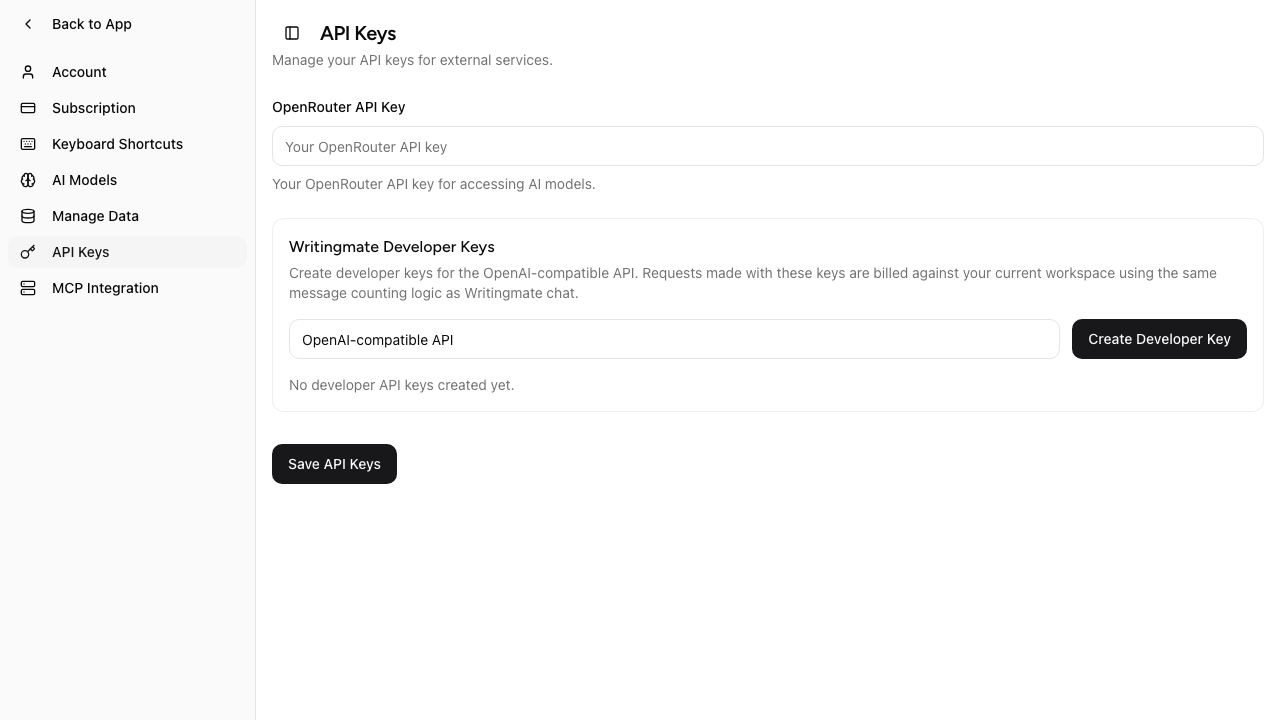
Create a Writingmate Developer Key from the API Keys tab in Settings.
Before you start
- Open Profile Settings in Writingmate.
- Go to API Keys.
- Create a Writingmate Developer Key.
- Copy the key when it is shown. The full value is displayed only once.
Developer keys look like:
wm_v2.<key-id>.<secret>.<signature>
Base URL
https://writingmate.ai/api/openai/v1
Authentication
Use your Writingmate developer key as a Bearer token:
Authorization: Bearer YOUR_WRITINGMATE_DEVELOPER_KEY
Supported endpoints
Writingmate currently supports these OpenAI-compatible endpoints:
GET /modelsGET /models/{model}POST /chat/completionsPOST /completionsPOST /responsesPOST /images/generationsPOST /images/editsGET /images/{id}/contentPOST /videosGET /videos/{id}GET /videos/{id}/content
OpenAPI spec
A full OpenAPI 3.1 spec is published at:
https://writingmate.ai/api/openai/v1/openapi.yaml
Point any OpenAPI tool at that URL — Postman, Insomnia, Swagger UI, Redoc, Stoplight, Scalar, or an SDK generator. For a quick interactive reference you can open it at https://scalar.com/reference?url=https://writingmate.ai/api/openai/v1/openapi.yaml.
Model names
Use Writingmate model slugs exactly as returned by /models, for example:
google/gemini-2.5-flashgoogle/gemini-2.5-proopenai/gpt-5-minianthropic/claude-sonnet-4.5
Fetch the live list from:
curl https://writingmate.ai/api/openai/v1/models \
  -H "Authorization: Bearer YOUR_WRITINGMATE_DEVELOPER_KEY"
GET /models lists text-compatible models for /chat/completions,
/completions, and /responses. Video generation models are not returned by
GET /models; use the explicit /videos model names below.
Example model
The examples below use google/gemini-2.5-flash. Model availability depends on the current catalog and your workspace plan, so confirm the slug with GET /models before running an example.
How message counting works
The OpenAI-compatible API uses the same counting logic as Writingmate chat.
Each request is charged in messages, not raw tokens:
- 1 message = 16,000 tokens
- every request costs at least 1 message
- cached prompt tokens are discounted by 50% before counting
Exact formula
cached_discount = floor(cached_prompt_tokens * 0.5)
effective_input = max(0, prompt_tokens - cached_discount)
counted_messages = max(1, ceil((effective_input + completion_tokens) / 16000))
What gets counted
For text-generation endpoints, the server counts:
- prompt/input tokens
- completion/output tokens
- cached prompt tokens, discounted by 50%
Example
If a request returns:
prompt_tokens = 10completion_tokens = 5cached_tokens = 0
then:
effective_input = 10
effective_total = 10 + 5 = 15
counted_messages = max(1, ceil(15 / 16000)) = 1
If a request returns:
prompt_tokens = 19000completion_tokens = 3000cached_tokens = 4000
then:
cached_discount = floor(4000 * 0.5) = 2000
effective_input = 19000 - 2000 = 17000
effective_total = 17000 + 3000 = 20000
counted_messages = ceil(20000 / 16000) = 2
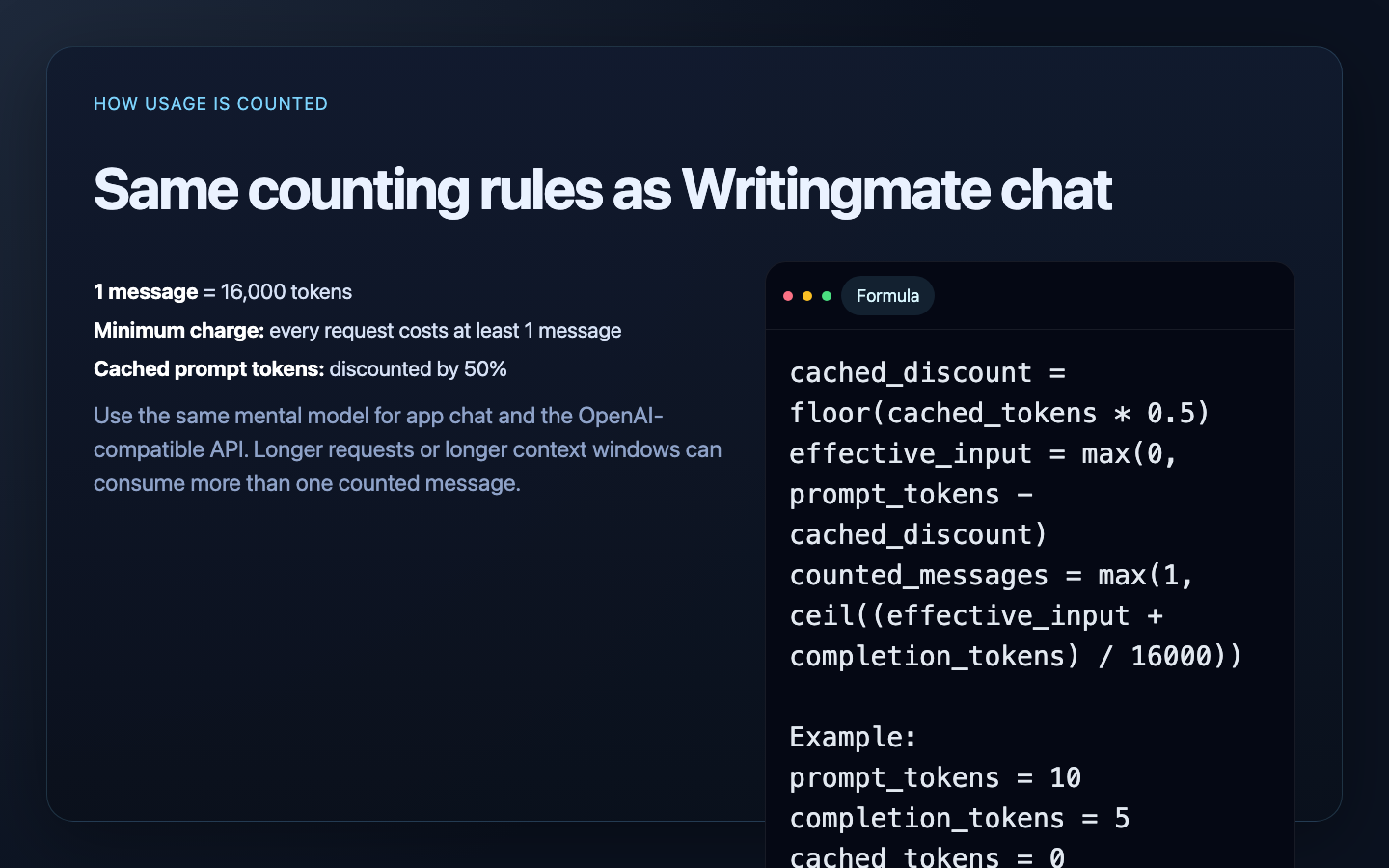
OpenAI-compatible API requests use the same token-to-message counting rules as Writingmate chat.
Limits and plan behavior
The OpenAI-compatible API follows the same access rules as the app:
- your current workspace plan controls which models are available
- daily limits and AppSumo pool limits still apply
- usage is recorded in the same
daily_message_countlogic used by Writingmate chat - if you configured your own OpenRouter key, the same BYOK behavior still applies
Basic-tier models include a generous daily allowance — significantly higher than Pro and Ultimate — so they're well-suited to everyday tasks and high-volume API work. Each tier (Basic, Pro, Ultimate) shares the same allowance between Writingmate chat and API requests. You can connect your own OpenRouter key (BYOK) to route supported requests through an OpenRouter account that you manage and pay for separately; OpenRouter's own limits still apply.
Workspace selection
By default, the API uses your current workspace.
If your client supports custom headers, you can target a specific workspace with:
x-writingmate-workspace: WORKSPACE_ID
The workspace must belong to the authenticated user.
cURL examples
Chat Completions
curl https://writingmate.ai/api/openai/v1/chat/completions \
  -H "Authorization: Bearer YOUR_WRITINGMATE_DEVELOPER_KEY" \
  -H "Content-Type: application/json" \
  -d '{
    "model": "google/gemini-2.5-flash",
    "messages": [
      { "role": "system", "content": "Be concise." },
      { "role": "user", "content": "Summarize Writingmate in one sentence." }
    ]
  }'
Completions
curl https://writingmate.ai/api/openai/v1/completions \
  -H "Authorization: Bearer YOUR_WRITINGMATE_DEVELOPER_KEY" \
  -H "Content-Type: application/json" \
  -d '{
    "model": "google/gemini-2.5-flash",
    "prompt": "Reply with exactly: HELLO_FROM_WRITINGMATE"
  }'
Responses
curl https://writingmate.ai/api/openai/v1/responses \
  -H "Authorization: Bearer YOUR_WRITINGMATE_DEVELOPER_KEY" \
  -H "Content-Type: application/json" \
  -d '{
    "model": "google/gemini-2.5-flash",
    "input": "Reply with exactly: HELLO_FROM_RESPONSES"
  }'
Image and video generation
Generate images with POST /images/generations. The response includes an
id plus either url or b64_json; use GET /images/{id}/content to download
the image bytes later with the same Developer Key.
Edit an image with POST /images/edits. This endpoint accepts OpenAI-compatible
multipart/form-data with one or more images and a prompt. Repeat the image
field (or use image[]) to reference several images: the first one is the
source and the rest are references, up to 16 in total. GPT Image models
(gpt-image-2, gpt-image-1.5, gpt-image-1, gpt-image-1-mini) are
supported, as are OpenRouter image models such as
google/gemini-3.1-flash-image-preview.
curl https://writingmate.ai/api/openai/v1/images/edits \
  -H "Authorization: Bearer YOUR_WRITINGMATE_DEVELOPER_KEY" \
  -F model=gpt-image-2 \
  -F "prompt=Put the product from the first image on the table in the second image" \
  -F image[]=@product.png \
  -F image[]=@table.jpg
With the OpenAI SDK, pass a list of files as image:
result = client.images.edit(
    model="gpt-image-2",
    image=[open("product.png", "rb"), open("table.jpg", "rb")],
    prompt="Put the product from the first image on the table in the second image",
)
Generate videos with POST /videos, poll GET /videos/{id}, then download the
completed MP4 with GET /videos/{id}/content. When the job is completed, the
status payload includes content_url and, if the file is already stored, a
short-lived url. Use GET /videos/{id}/content?format=url to get that signed
link after content is cached. Supported video content variants are
video, thumbnail, and spritesheet.
Video model names
The Developer Key API supports the same model ids as the Writingmate
/text-to-video product surface:
veo-3.1-generate-previewseedance-2.0seedance-2.5kling-3.0kling-2.6kling-01pixverse-5.5
Video request format
curl https://writingmate.ai/api/openai/v1/videos \
  -H "Authorization: Bearer YOUR_WRITINGMATE_DEVELOPER_KEY" \
  -H "Content-Type: application/json" \
  -d '{
    "model": "veo-3.1-generate-preview",
    "prompt": "A golden retriever surfing a small wave at sunset",
    "size": "1280x720",
    "seconds": "8"
  }'
Fields:
model: optional; defaults toveo-3.1-generate-previewprompt: required string, 3-5000 characterssize: optional; allowed values depend on the selected modelseconds: optional string; allowed values depend on the selected modelinputReference: optional image data URL for image-to-video modelsendFrame: optional image data URL for models with end-frame supportaudioEnabled/generateAudio: optional boolean for models with audio togglesreferenceImages/referenceVideos: optional arrays for omni-reference modelsmotionControl: optional object for Kling O1 camera control
OpenAI SDK examples
JavaScript / TypeScript
import OpenAI from "openai";

const client = new OpenAI({
  apiKey: process.env.WRITINGMATE_API_KEY,
  baseURL: "https://writingmate.ai/api/openai/v1",
});

const response = await client.responses.create({
  model: "google/gemini-2.5-flash",
  input: "Say hello from Writingmate.",
});

console.log(response.output_text);
Python
from openai import OpenAI

client = OpenAI(
    api_key="YOUR_WRITINGMATE_DEVELOPER_KEY",
    base_url="https://writingmate.ai/api/openai/v1",
)

response = client.chat.completions.create(
    model="google/gemini-2.5-flash",
    messages=[
        {"role": "user", "content": "Reply with exactly: HELLO_FROM_PYTHON"}
    ],
)

print(response.choices[0].message.content)
Vercel AI SDK
Use the OpenAI-compatible provider package when you want Writingmate models in an AI SDK app:
import { createOpenAICompatible } from "@ai-sdk/openai-compatible";
import { generateText } from "ai";

const writingmate = createOpenAICompatible({
  name: "writingmate",
  apiKey: process.env.WRITINGMATE_API_KEY,
  baseURL: "https://writingmate.ai/api/openai/v1",
});

const result = await generateText({
  model: writingmate("google/gemini-2.5-flash"),
  prompt: "Reply with exactly: WRITINGMATE_AI_SDK_OK",
});

console.log(result.text);
LiteLLM
LiteLLM can route OpenAI-compatible requests to Writingmate by setting the OpenAI API base and key for a custom model alias.
model_list:
  - model_name: writingmate-gemini-flash
    litellm_params:
      model: openai/google/gemini-2.5-flash
      api_base: https://writingmate.ai/api/openai/v1
      api_key: os.environ/WRITINGMATE_API_KEY
Then call the alias from your LiteLLM proxy or SDK:
curl http://localhost:4000/v1/chat/completions \
  -H "Authorization: Bearer YOUR_LITELLM_PROXY_KEY" \
  -H "Content-Type: application/json" \
  -d '{
    "model": "writingmate-gemini-flash",
    "messages": [
      { "role": "user", "content": "Reply with exactly: LITELLM_OK" }
    ]
  }'
OpenCode
OpenCode supports custom providers through config.json.
Use a provider like this:
{
  "$schema": "https://opencode.ai/config.json",
  "provider": {
    "writingmate": {
      "npm": "@ai-sdk/openai-compatible",
      "name": "Writingmate",
      "options": {
        "baseURL": "https://writingmate.ai/api/openai/v1",
        "apiKey": "{env:OPENAI_API_KEY}"
      },
      "models": {
        "google/gemini-2.5-flash": {},
        "openai/gpt-5-mini": {}
      }
    }
  }
}
Environment:
export OPENAI_API_KEY=YOUR_WRITINGMATE_DEVELOPER_KEY
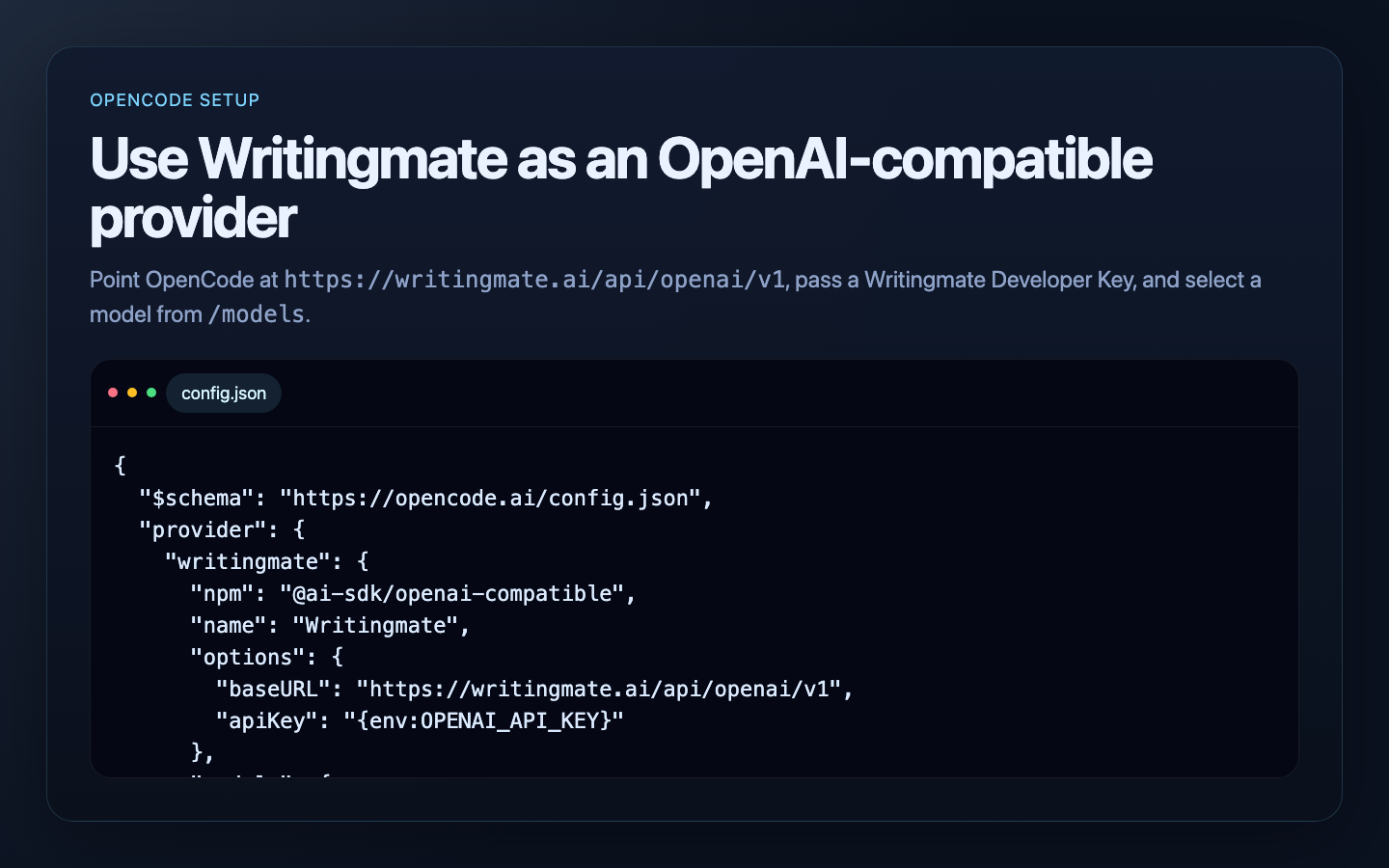
OpenCode can use Writingmate as an OpenAI-compatible provider with a custom base URL and developer key.
Continue extension
Continue can use Writingmate through its OpenAI-compatible provider configuration. The important fields are:
provider: openaiapiBase: https://writingmate.ai/api/openai/v1apiKey: ${{ secrets.WRITINGMATE_API_KEY }}model: a Writingmate model slug fromGET /models
Continue stores local configuration in config.yaml. Open it from the Continue extension by selecting the config dropdown, then clicking the gear icon next to Local Config. You can also edit the file directly:
- macOS/Linux:
~/.continue/config.yaml - Windows:
%USERPROFILE%\.continue\config.yaml
Add Writingmate models like this:
name: Writingmate
version: 0.0.1
schema: v1

models:
  - name: Writingmate Gemini Flash
    provider: openai
    model: google/gemini-2.5-flash
    apiBase: https://writingmate.ai/api/openai/v1
    apiKey: ${{ secrets.WRITINGMATE_API_KEY }}
    roles:
      - chat
      - edit
      - apply

  - name: Writingmate GPT-5 Mini
    provider: openai
    model: openai/gpt-5-mini
    apiBase: https://writingmate.ai/api/openai/v1
    apiKey: ${{ secrets.WRITINGMATE_API_KEY }}
    roles:
      - chat
      - edit
      - apply
Store your developer key as a Continue secret. For local configs, the simplest option is ~/.continue/.env:
WRITINGMATE_API_KEY=YOUR_WRITINGMATE_DEVELOPER_KEY
Continue resolves ${{ secrets.WRITINGMATE_API_KEY }} from .env files and environment variables, but IDE extensions may not see variables exported only in a terminal session. Use ~/.continue/.env when in doubt.
After saving config.yaml, reload the Continue config from the extension. Select Writingmate Gemini Flash or another Writingmate model from the model picker and start a chat.
Test the same key outside Continue
If Continue cannot connect, test the key and model slug with cURL first:
curl https://writingmate.ai/api/openai/v1/chat/completions \
  -H "Authorization: Bearer YOUR_WRITINGMATE_DEVELOPER_KEY" \
  -H "Content-Type: application/json" \
  -d '{
    "model": "google/gemini-2.5-flash",
    "messages": [
      { "role": "user", "content": "Reply with exactly: CONTINUE_OK" }
    ]
  }'
If cURL works but Continue does not, check that:
apiBaseends with/v1providerisopenai- the model value is a Writingmate slug, not a display name
- the developer key is stored in
~/.continue/.envor another secret source Continue can read - your Writingmate plan has access to the selected model
For Continue-specific options, see Continue's model providers overview, OpenAI provider guide, and local configuration guide.
Hermes Agent
Hermes Agent can use Writingmate as a custom OpenAI-compatible endpoint. The important values are:
- API base URL:
https://writingmate.ai/api/openai/v1 - API key: your Writingmate Developer Key
- model: a Writingmate model slug from
GET /models
The interactive setup path is:
hermes model
Then choose Custom endpoint (self-hosted / VLLM / etc.) and enter:
API base URL: https://writingmate.ai/api/openai/v1
API key: YOUR_WRITINGMATE_DEVELOPER_KEY
Model name: google/gemini-2.5-flash
You can also edit ~/.hermes/config.yaml directly:
model:
  provider: custom
  default: google/gemini-2.5-flash
  base_url: https://writingmate.ai/api/openai/v1
  api_key: YOUR_WRITINGMATE_DEVELOPER_KEY
If you prefer to keep the key out of config.yaml, store it in your shell or ~/.hermes/.env and point Hermes at the environment variable with a named custom provider:
WRITINGMATE_API_KEY=YOUR_WRITINGMATE_DEVELOPER_KEY
custom_providers:
  - name: writingmate
    base_url: https://writingmate.ai/api/openai/v1
    key_env: WRITINGMATE_API_KEY
    api_mode: chat_completions
Then switch to it inside a Hermes chat session:
/model custom:writingmate:google/gemini-2.5-flash
Hermes reads model provider settings from config.yaml, not from legacy OPENAI_BASE_URL or LLM_MODEL environment variables.
OpenClaw
OpenClaw can use Writingmate through a custom OpenAI-compatible provider in ~/.openclaw/openclaw.json.
If the file does not exist yet, create it first:
mkdir -p ~/.openclaw
touch ~/.openclaw/openclaw.json
Add or merge this provider configuration:
{
  "env": {
    "WRITINGMATE_API_KEY": "YOUR_WRITINGMATE_DEVELOPER_KEY"
  },
  "agents": {
    "defaults": {
      "model": {
        "primary": "writingmate/google/gemini-2.5-flash"
      }
    }
  },
  "models": {
    "mode": "merge",
    "providers": {
      "writingmate": {
        "baseUrl": "https://writingmate.ai/api/openai/v1",
        "apiKey": "${WRITINGMATE_API_KEY}",
        "api": "openai-completions",
        "models": [
          {
            "id": "google/gemini-2.5-flash",
            "name": "Writingmate Gemini Flash"
          },
          {
            "id": "openai/gpt-5-mini",
            "name": "Writingmate GPT-5 Mini"
          }
        ]
      }
    }
  }
}
If you already have an openclaw.json, merge the env, agents.defaults.model.primary, and models.providers.writingmate fields instead of replacing the full file.
Restart the OpenClaw gateway after saving:
openclaw gateway restart
You can also list models from Writingmate before adding more entries:
curl https://writingmate.ai/api/openai/v1/models \
  -H "Authorization: Bearer YOUR_WRITINGMATE_DEVELOPER_KEY"
OpenClaw model references use provider/model, so the Writingmate slug google/gemini-2.5-flash becomes:
writingmate/google/gemini-2.5-flash
Aider
Aider can target any OpenAI-compatible endpoint.
export OPENAI_API_KEY=YOUR_WRITINGMATE_DEVELOPER_KEY
export OPENAI_API_BASE=https://writingmate.ai/api/openai/v1

aider --model openai/google/gemini-2.5-flash
Important: Aider uses the openai/ prefix for OpenAI-compatible endpoints, so the Writingmate model slug becomes:
openai/google/gemini-2.5-flash
llm CLI
Simon Willison’s llm CLI can add OpenAI-compatible models using extra-openai-models.yaml.
First, store the key:
llm keys set openai
Then add a model definition to extra-openai-models.yaml:
- model_id: writingmate-gemini-flash
  model_name: google/gemini-2.5-flash
  api_base: "https://writingmate.ai/api/openai/v1"
  api_key_name: openai
Then run:
llm -m writingmate-gemini-flash "Reply with exactly: HELLO_FROM_LLM"
MCP hosts
Writingmate also exposes a standards-based MCP endpoint:
https://writingmate.ai/api/mcp
Use the same Developer Key as a Bearer token:
Authorization: Bearer YOUR_WRITINGMATE_DEVELOPER_KEY
The MCP server currently exposes tools for:
- listing Writingmate models
- retrieving model metadata
- creating chat completions
- creating Responses API responses
- generating images
- generating videos
- polling video generation status
An MCP initialize request looks like:
curl https://writingmate.ai/api/mcp \
  -H "Authorization: Bearer YOUR_WRITINGMATE_DEVELOPER_KEY" \
  -H "Content-Type: application/json" \
  -H "Accept: application/json, text/event-stream" \
  -d '{
    "jsonrpc": "2.0",
    "id": "init",
    "method": "initialize",
    "params": {
      "protocolVersion": "2025-11-25",
      "capabilities": {},
      "clientInfo": { "name": "my-agent-client", "version": "1.0.0" }
    }
  }'
Some MCP hosts require a local configuration file, while others accept a remote HTTP MCP URL directly. Use https://writingmate.ai/api/mcp as the server URL and pass your Developer Key as the Bearer token where the host supports authenticated HTTP MCP servers.
Tool calling
/chat/completions and /responses support OpenAI-style function tools. For /responses, clients can continue after tool execution by sending the previous function_call item followed by a matching function_call_output item with the same call_id.
Notes
- This API is OpenAI-compatible, not byte-for-byte identical to every OpenAI feature.
- Use
/modelsto discover the currently supported live model list.