
AI Image Generation
Writingmate can create images from a text description and edit selected areas of images saved in your library.
Select Images in the sidebar to open the image-generation workspace. You must sign in before you can generate an image. You can also open the Images tab in the new-chat model selector to find image models; some entries open the dedicated workspace directly.
Create an image
- Enter a description in Describe your image in detail... Include the subject, setting, style, lighting, composition, colors, or text that should appear.
- Select an image model. The selector is generated from the current catalog, so available models and names can change.
- Choose an output size:
- Square — 1024 × 1024
- Portrait — 1024 × 1536
- Landscape — 1536 × 1024
- Select Create. The button changes to Generating... while the request is running.
Select Suggest Idea if you want Writingmate to add an example prompt that you can edit before generation.
The current output sizes are fixed. Writing “16:9” or another ratio in the prompt can influence the composition, but it does not change the selected image dimensions.
Use a reference image
Select Image to add one JPEG, PNG, or WebP reference image. A preview appears above the prompt; select Remove to clear it.
A reference image can guide the subject, colors, composition, or style. Reference-image support depends on the selected model. If a model cannot use the reference or rejects the requested combination, choose another model or generate without the reference.
Choose an image model
The image model selector shows the current model name and provider. A NEW badge can appear for a recently added model.
The catalog is dynamic: providers can add, rename, reprice, or retire models, and some models use direct integrations while others use OpenRouter. Use the selector for the models available today rather than relying on a fixed list in this guide. See Supported AI Models for model and plan guidance.
Capabilities vary by model. These can include:
- text-to-image generation
- using a reference image
- accurate text rendering
- image editing
- different quality, speed, or style strengths
Selecting a model does not guarantee that it supports every input or editing workflow.
Work with the image library
Completed images appear below the creation form. Images generated in chat can also appear in this library.
Select an image to open Image Viewer. From the viewer, you can select Edit or Download. The image card menu can also include:
- Rename for images created in the Images workspace
- Generate Video to use the image as the starting point for a video
- Download
- Delete
The share action creates a link to the selected image. Review the image and prompt before sharing them.
Edit part of an image
- Select an image in the library to open Image Viewer.
- Select Edit.
- Paint over the area you want to change. The red overlay is the mask: it tells Writingmate which part may be edited.
- Enter an instruction in Describe your edit, such as “remove the background” or “replace this flower with a glass sculpture.”
- Select Apply. The button changes to Applying... while the edit is processed.
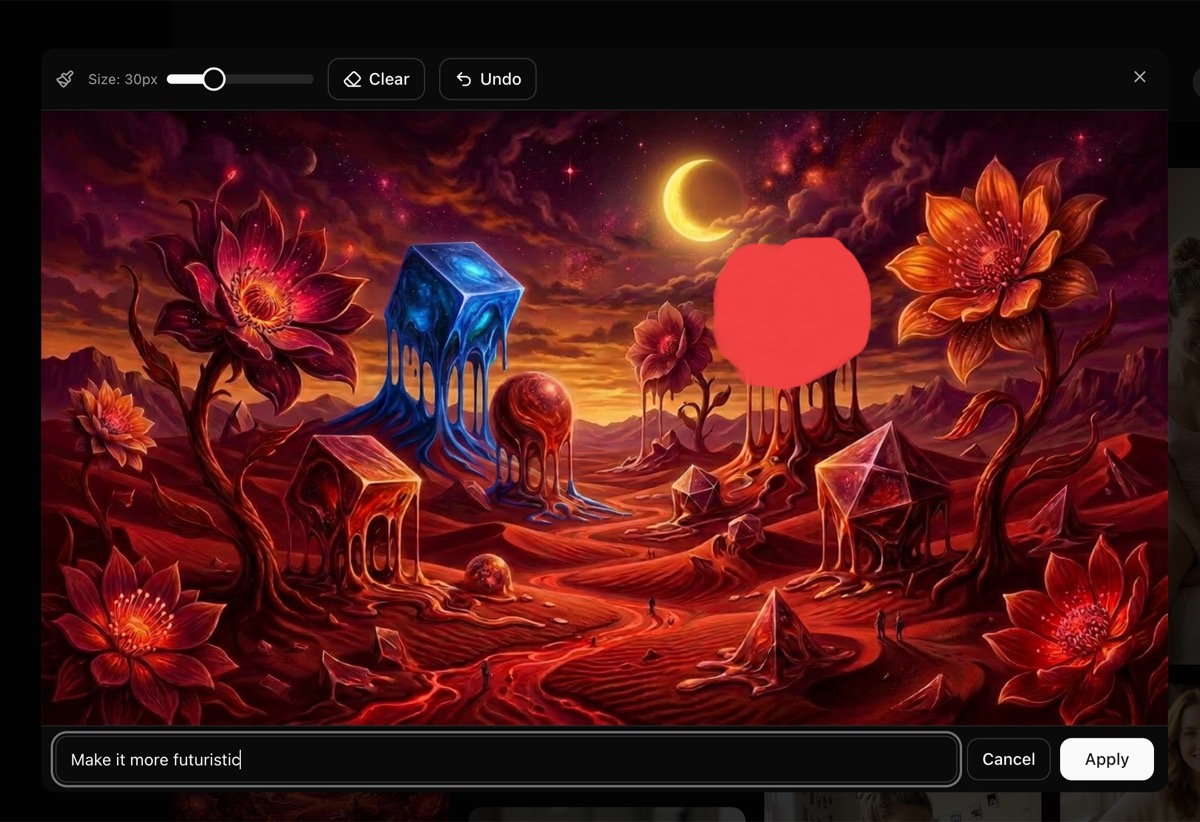
Paint the area to edit, then describe the change.
The mask and edit instruction are both required. Use the Size control to set a brush width from 10 to 80 pixels. Undo removes the latest stroke, Clear removes the full mask, and Cancel returns to the viewer without applying the edit.
Editing uses the image-editing model configured by Writingmate. It does not necessarily use the model that created the original image or the model currently selected in the creation form. The edited result is added to the library as a new image; the original remains available.
Plans and image credits
Image-generation and editing availability depends on your workspace plan and the current provider configuration. For current plan access, see Compare Subscription Plans.
AppSumo workspaces use an image-credit pool. A successful generation or mask edit uses one image credit; failed requests do not consume the success credit. You can review the pool under Profile Settings → Billing. Other subscription types follow their current plan allowances rather than the AppSumo pool.
Generating a video from an image uses the separate video allowance. See AI Video Generation.
Prompt tips
- State the main subject first.
- Add the visual style, camera angle, lighting, and mood.
- Put exact wording in quotation marks when the image must contain text.
- Change one or two details between attempts so you can compare the effect.
- For a localized edit, paint only the area that should change and explain what should remain.
For help drafting a prompt, use the free AI Art & Image Prompt Generator.