You typed "perchance ai image generator" into the search bar. I know exactly why. You needed images fast, you remembered Perchance was free and required no login, and you figured it was worth trying again. Maybe you got decent results once. Maybe you're hoping this time will be different.
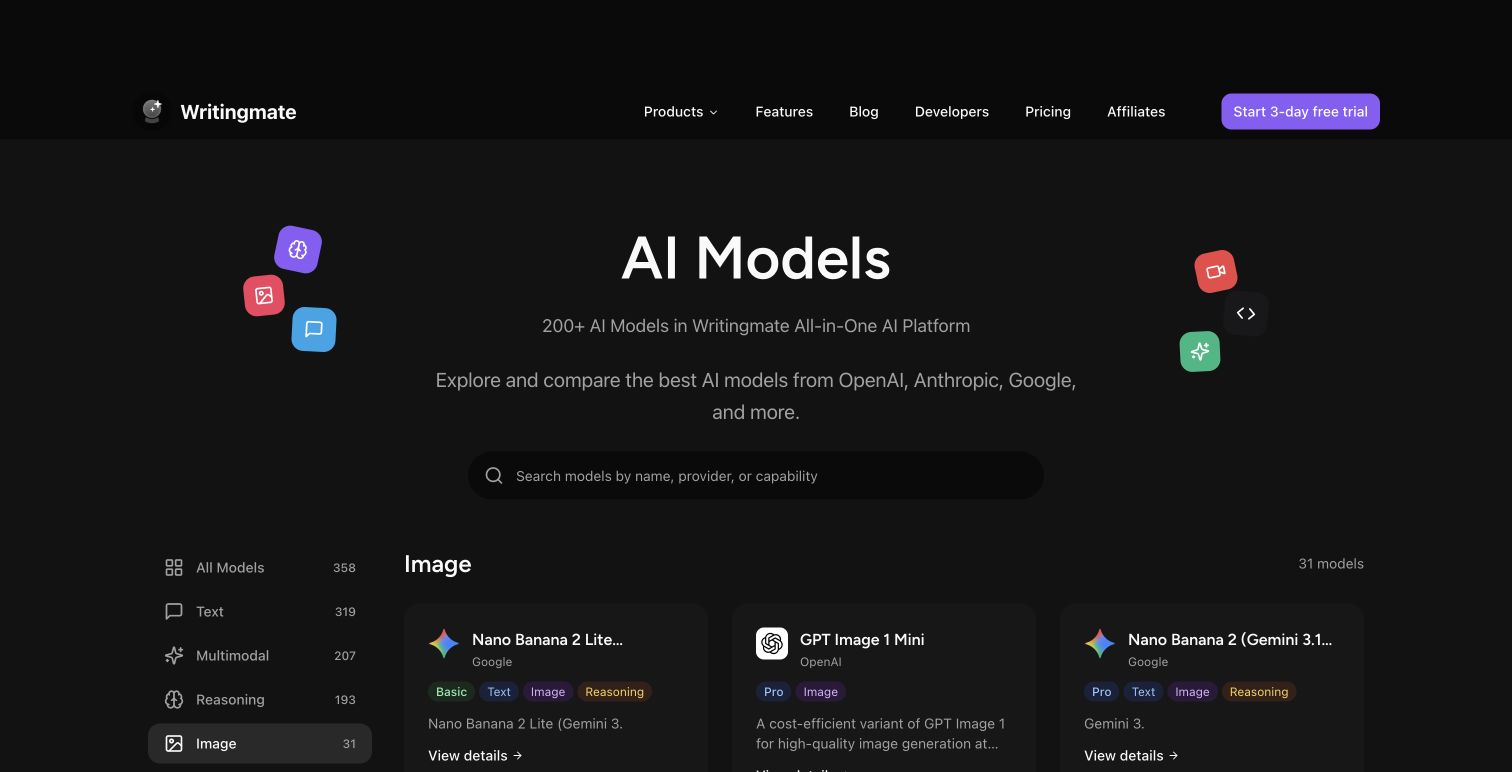
Here's the honest reality: that search isn't really about Perchance. It's about needing a frictionless path to image generation without committing to an account or a paid plan. And there are much better options sitting in a full AI image models directory that most people haven't found yet.
My name is Artem, and I run the Writingmate blog. I've spent the better part of 2025 and 2026 testing every major image generation model as part of our work building Writingmate's image models directory. What I keep finding is that people land on Perchance not because it's the best tool for what they're doing, but because it's the first one they find. This guide maps your actual use case to the model that fits it — so you stop guessing and start generating the right way.
What the Search Intent Behind "Perchance AI Image Generator" Actually Tells You
When someone searches "perchance ai image generator," they're rarely loyal to the platform. They're signaling something specific: quick images, no friction, ideally free. The search is a shortcut — it gets them to something familiar without having to evaluate a bunch of alternatives they've never heard of.
The problem is that Perchance was built as a hobbyist tool running lightweight open-source models. It works fine for casual experimentation with zero stakes. But the moment you have a real use case — portfolio work, product mockups, social media content, game concept art, anything that needs consistency across more than one image — Perchance starts showing its limits almost immediately.
Those limits are pretty specific: output resolution caps around 512–768 pixels, no model switching, no style controls, queue times that stretch into minutes during peak hours, and no history to go back to. Once you know what you're actually looking for, a proper models directory addresses every single one of these pain points.
What's Actually Inside the Writingmate Image Models Directory

The Writingmate image models directory currently lists over 15 distinct image generation models. That's not a marketing number — it's 15 different architectures with genuinely different strengths, training backgrounds, pricing structures, and output characteristics. Here's what's available as of May 2026:
- FLUX.1 [pro] — Black Forest Labs' flagship quality model. Handles photorealistic output exceptionally well, especially for people and environments.
- FLUX.1 [schnell] — The speed variant of FLUX. Four-step generation means you get a result in 2–4 seconds without a meaningful quality drop for most use cases.
- FLUX.2 Pro — Updated architecture with significantly improved prompt adherence, especially for complex multi-element compositions.
- DALL-E 3 — OpenAI's image model. Still the clear leader for concept-art-style outputs and anything requiring readable text rendered inside the image.
- GPT-5 Image — OpenAI's latest. Built for editing and inpainting workflows, not just generation from scratch — a genuinely different use case from the others.
- Nano Banana Pro — Google's image model. Exceptional photorealism with notably accurate color rendering compared to the FLUX line.
- Stable Diffusion XL and SD 3.5 — Still the best option for community-trained styles, LoRA fine-tuning, and anime aesthetics with extensive community style support.
Each model in the directory links directly into a chat interface where you can start generating immediately. You pick the model, describe what you want, and the output lands in the same conversation thread where your history is saved — no tab juggling, no re-entering your settings from scratch each time.
Match Your Use Case to the Right Model
The question most people actually have isn't "what models exist" — it's "which model do I use for the thing I'm trying to make right now?" Here's the practical breakdown for 2026:
Use Case | Best Model | Why It Fits |
|---|---|---|
Photo-realistic portraits | FLUX.1 [pro] or Nano Banana Pro | Trained heavily on photography; handles skin tones and lighting naturally |
Anime / illustrated characters | Stable Diffusion XL + anime LoRA | Massive community style library; consistent character aesthetics |
Product mockups | FLUX.2 Pro | Strong prompt adherence means product descriptions translate accurately |
Social media graphics with text | DALL-E 3 | Only major model that reliably renders readable text inside images |
Game concept art / environments | FLUX.1 [pro] or SD 3.5 | High resolution output up to 2048px; strong at architectural styles |
Editing or retouching existing images | GPT-5 Image | Built specifically for inpainting and edit workflows |
Fast iteration / concept sketching | FLUX.1 [schnell] | 2–4 second generation; fastest high-quality output available |
Free casual experimentation | Perchance AI | No account needed; zero commitment for one-off throwaway tests |
The table makes something clear: Perchance wins exactly one category. And that's fine — it's genuinely the right tool for that category. But everything else has a better-fit option, and if you're pushing Perchance into use cases it wasn't designed for, you're working against the tool instead of with it.
The Real Gap Between Perchance and a Proper Directory
I've seen this pattern repeat across almost every AI image community: someone posts their Perchance output, mentions they've spent days trying to get consistent results, and asks if there's something better. The responses are always the same — "just use FLUX" or "try DALL-E 3" — but nobody explains why those models solve the specific problem Perchance created.
"I was using Perchance for weeks trying to get my character to look the same from different angles. Finally switched to FLUX.1 pro and got consistent results on the third try. Wish someone had told me that Perchance just doesn't have the model architecture for that kind of consistency." — r/StableDiffusion community discussion
The core gap isn't raw quality — it's controllability. Perchance gives you one model with minimal parameters. A proper directory gives you multiple architectures, each optimized differently, plus real controls for aspect ratio, output resolution, sampling steps, and style guidance. That level of control is the difference between hoping you get what you want and actually specifying it.
What makes Writingmate's directory different from just bookmarking a bunch of individual tools is the unified interface. You're not jumping between different UIs with different prompting conventions and different account logins. You switch models inside the same chat thread, compare outputs side by side, and reference your full generation history without managing files across five browser tabs.
"The model-switching inside a single interface is the feature I didn't know I needed. I was keeping four browser tabs open to different image tools before — it was a mess." — X/Twitter user feedback on image model switching
How to Actually Use the Directory Without Wasting Generations
Getting started with Writingmate's image models is fast, but a few habits make the workflow significantly better:
- Start with the directory page. Go to writingmate.ai/models/category/image and scan the category. Don't just pick the most popular model — match the category label to what you're actually making.
- Test the same prompt on two models. Pick a detailed descriptor prompt and run it on your top pick and your second choice. The side-by-side output tells you more than any spec sheet. Give yourself five minutes of testing before committing to one model for a project.
- Set resolution before you generate. The default for most models is 1024×1024, which works for web use. If you need landscape, portrait, or print dimensions, set it before generating rather than cropping after — aspect ratio affects composition, not just pixel count.
- Use the thread history. Every generation saves to your conversation history. When you find a prompt-and-model combination that works, you can regenerate from it any time without re-entering settings from scratch. This is the biggest practical time saver compared to Perchance's stateless interface.
- Be specific with your prompts. Perchance's model is so limited that vague prompts still produce something plausible. FLUX and DALL-E respond to detail, which means your prompts need to be intentional. "A woman standing outside" gives you generic output. "A 30-year-old woman in a yellow raincoat on a rain-slicked urban street at dusk, shallow depth of field, cinematic lighting" gives you something actually usable.
Hard Specs: What Each Model Actually Delivers
For anyone doing a quick technical evaluation, here's the real-world spec comparison as of May 2026:
Model | Max Resolution | Avg Generation Time | Text Rendering | Primary Strength |
|---|---|---|---|---|
FLUX.1 [pro] | 2048×2048 | 8–15 sec | Poor | Photorealism, portraits |
FLUX.1 [schnell] | 1024×1024 | 2–4 sec | Poor | Speed, rapid iteration |
FLUX.2 Pro | 2048×2048 | 10–20 sec | Moderate | Prompt accuracy, products |
DALL-E 3 | 1792×1024 | 10–20 sec | Excellent | Illustrations, text in image |
GPT-5 Image | 1024×1024 | 15–25 sec | Excellent | Editing, inpainting |
Nano Banana Pro | 2048×2048 | 10–18 sec | Good | Photorealism, color accuracy |
Perchance AI | 512–768px | 5–120 sec (queue) | Poor | Free, no account needed |
The queue time variance on Perchance is the detail that most people don't account for upfront. On a busy afternoon you can wait two full minutes for a result you're not sure you'll even use. FLUX.1 Schnell at 2–4 seconds with consistent quality changes the entire rhythm of your workflow — you iterate fast, you learn fast, and you stop dreading the generation step.
When Perchance Is Still the Right Answer
I want to be direct here: Perchance isn't obsolete. There are specific situations where it's still the right first move, and I don't want to oversell the upgrade if it doesn't fit your situation:
- You have zero budget and want no account setup whatsoever
- You're generating a throwaway concept to show someone an idea in 30 seconds
- You're specifically drawn to the aesthetic range that Perchance's model produces (it has a distinct, recognizable look that some people actually want)
- You're testing and refining a prompt before running it somewhere paid
The moment any of those conditions change — you have a real project, you need the image for something public or professional, you need consistency across multiple generations, or you've hit the queue wall three times in one session — that's exactly when the directory becomes the better tool. The switching cost is zero: you don't lose anything by trying Writingmate, and you can always go back to Perchance if the use case calls for it.
So here's where I land: if you searched "perchance ai image generator" and ended up here, the most useful thing I can give you is a direct link to where the real options live. The Writingmate image models directory has every model I've covered here, organized by use case, with a free-to-start entry point. Go in with your actual use case in mind, run the same prompt on two different models, and you'll know within ten minutes whether the upgrade is worth making.
My bet is it is.
See you in the next one!
Artem
Frequently Asked Questions
Sources

Written by
Artem Vysotsky
Ex-Staff Engineer at Meta. Building the technical foundation to make AI accessible to everyone.

Reviewed by
Sergey Vysotsky
Ex-Chief Editor / PM at Mosaic. Passionate about making AI accessible and affordable for everyone.