Here's a question I get surprisingly often: "Why does Perchance AI image generator produce completely different-looking results than DALL-E, even when I use the exact same prompt?" People assume all AI image generators are basically the same thing with different price tags. They're not. The underlying technology is genuinely different, and understanding even the basics of how artificial intelligence creates images will immediately make you a better at picking tools and writing prompts.
My name is Artem, and I've been covering AI tools for the Writingmate blog for years. I've watched this space go from "upload a dog photo and get a painting" to real-time generation of photorealistic scenes from complex text descriptions. This guide explains the actual mechanics in plain language — no machine learning PhD required — and then walks you through where every major image generator fits in 2026, including Perchance, the Jellymon generator, FLUX, DALL-E, and the rest.
How Artificial Intelligence Actually Creates Images
When you type a prompt into Perchance or any other AI image generator, something specific happens on the backend. The dominant approach right now is called diffusion — and once you understand it, the quirks of every image generator suddenly make sense.
Here's the short version: a diffusion model starts with pure random noise (imagine a TV with no signal) and progressively refines it into a coherent image, guided by your text prompt. It runs this process dozens or hundreds of times, each pass making the image a little more "right." The model has been trained on billions of images paired with text descriptions, so it has learned the relationship between words and visual concepts.
This is why prompt specificity matters so much. The model isn't "drawing" your description — it's navigating a space of possibilities, and more specific prompts constrain that navigation toward what you actually want. "A cat" gives the diffusion process almost infinite room to wander. "A tabby cat sitting on a sunlit windowsill, photorealistic, shallow depth of field, morning light" narrows it dramatically.
Perchance AI runs a community-maintained diffusion model — likely a fine-tuned Stable Diffusion variant. This is why it skews toward illustrative and anime styles: whoever fine-tuned it used a training dataset heavy on that kind of art. It's not a design choice the platform made arbitrarily; it's baked into which images the model learned from.
FLUX, DALL-E 3, and GPT-5 Image all use diffusion as well, but with different architectural choices, different training data, and different amounts of compute dedicated to each generation. That's why the same prompt produces visually distinct results across tools — they're not just different interfaces over the same engine.
The Three Types of AI Image Generators You'll Encounter in 2026
Not all image generators work the same way under the hood. Here's how to tell them apart:
Open-weight diffusion models (Perchance, Stable Diffusion, FLUX.1): These are models whose weights — the billions of numbers that define how the model behaves — are publicly available. Anyone can download, fine-tune, and deploy them. Perchance is built on top of this kind of model. FLUX.1 Schnell is also open-weight (Apache 2.0 licensed). The benefit: completely free to run if you have hardware. The tradeoff: you're responsible for the full stack, and most community-hosted versions run on shared resources that create variable quality and speed.
Closed API models (DALL-E 3, GPT-5 Image, Nano Banana Pro): These are models where only the company running them knows exactly how they work. You call an API, pay per image, and get output. No access to weights, no self-hosting. The benefit: consistently high quality, maintained infrastructure, and usually better safety guardrails. The tradeoff: ongoing cost and dependency on someone else's platform.
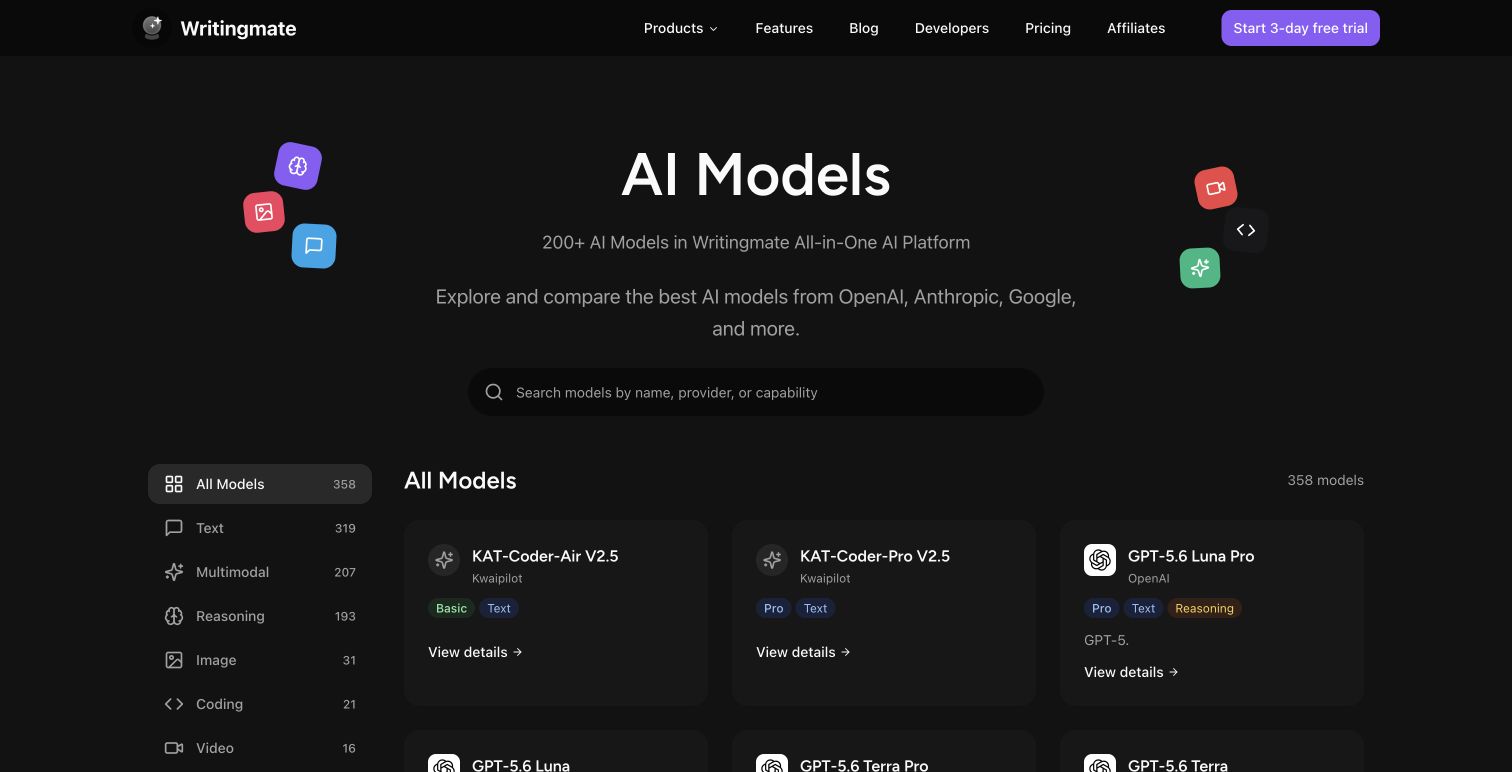
Hybrid platforms (Writingmate, Midjourney, Adobe Firefly): These are platforms that give you access to multiple model types — often both open-weight and closed API — through a single interface. You don't need to manage infrastructure or hold multiple API accounts. The Writingmate image models directory sits in this category, giving you access to FLUX variants, DALL-E 3, GPT-5 Image, Nano Banana Pro, and others from one place.
"I never understood why my Perchance outputs had that specific 'painted' quality until I realized it was running a fine-tuned SD variant. Once I understood what fine-tuning does, I stopped fighting the tool and started using it for what it's actually good at." — u/render_rabbit on r/StableDiffusion
Perchance AI Jellymon and Style-Tuned Generators: What They Are
The "perchance ai jellymon ai image generator" search is a specific one. Jellymon is a community-built generator on the Perchance platform fine-tuned specifically for anime character generation — particularly characters with expressive, rounded features that match a specific aesthetic popular in certain fanart communities.
Understanding fine-tuning is key here. When someone says a model is "fine-tuned for anime," what they mean is: someone took a base diffusion model and continued training it on a large dataset of anime images. The model's sense of what "looks right" gets recalibrated toward that style. After fine-tuning, the same prompt that previously produced a photorealistic face will now produce an anime face, because the model's "expectations" have shifted.
This is why Jellymon produces a very specific look that's hard to replicate exactly in a general-purpose model like DALL-E 3. DALL-E 3 wasn't fine-tuned on that particular anime aesthetic, so even if you write "anime style, jellymon-like character," you'll get DALL-E's interpretation of anime rather than Jellymon's specific look.
If you specifically want that style, Perchance Jellymon is actually the right tool — not because it's the best image generator, but because it's fine-tuned for exactly that output. The limitation is everything else: resolution, consistency between generations, commercial rights, and the inability to reliably generate the same character twice.

The Full 2026 Image Model Comparison
Here's where every major image generator sits as of May 2026. I've personally tested all of these on repeated prompts across different categories:
Model | Architecture Type | Best Prompt Style | Max Resolution | Commercial OK? | Speed | Where to Access |
|---|---|---|---|---|---|---|
Perchance AI | Fine-tuned SD | Short, stylistic | ~768px | No | 20–60s (queue) | perchance.org |
Perchance Jellymon | Anime fine-tune | Character descriptions | ~512px | No | 20–45s | perchance.org |
FLUX.1 Schnell | Flow matching | Dense, descriptive | 1024px | Yes (Apache 2.0) | 2–5s | Writingmate, HF |
FLUX.1 Dev | Flow matching | Dense, descriptive | 1024px | Non-commercial | 8–15s | Writingmate, HF |
FLUX.2 Pro | Flow matching | Dense, descriptive | 2048px | Yes | 20–40s | Writingmate |
DALL-E 3 | Closed diffusion | Natural language | 1024px | Yes | 10–20s | Writingmate, OpenAI |
GPT-5 Image | Multimodal closed | Natural language, complex | 1024px+ | Yes | 25–60s | Writingmate |
Nano Banana Pro | Closed (Imagen-based) | Natural language | 2048px | Yes | 15–30s | Writingmate |
SD 3.5 Large | Open-weight diffusion | Dense, structured | Configurable | Yes | Varies | Multiple platforms |
A few things jump out from this table. First: the FLUX family uses "flow matching" rather than classical diffusion — a newer architecture that generates more coherent images faster. When people say FLUX outputs look "cleaner" or "more structured" than older diffusion models, this is technically why. Second: every model in the "commercial OK" column is accessible through Writingmate's image model directory, which matters a lot if you're doing any paid client work. Third: Perchance and Jellymon are the only tools in this table that explicitly don't cover commercial use — if that's your context, the switch isn't optional.
"People don't realize that 'free AI image generator' and 'free to use commercially' are completely different things. Learned this the hard way. Check the license before you deliver anything to a client." — @digitalcreatorhq on X
How Prompt Engineering Changes by Model Type
This is the part most tutorials skip: your prompting approach should actually change depending on what kind of model you're using. Here's what works where:
For Perchance and older SD-based models: Short, keyword-dense prompts work best. Think of it like tagging: "anime girl, red hair, school uniform, cherry blossoms, soft lighting, detailed" rather than complete sentences. These models respond to tokens more than syntax. Negative prompts (telling the model what NOT to include) matter a lot here — "blurry, low quality, extra limbs" in the negative field genuinely improves output.
For FLUX family models: You can go denser. FLUX handles long, descriptive prompts well. Something like "A young woman with red hair standing under cherry blossom trees, soft afternoon light filtering through petals, warm color palette, shallow depth of field, film photography aesthetic" produces better results than the keyword version. The architecture understands relationships between concepts, not just individual tags.
For DALL-E 3 and GPT-5 Image: Write naturally. DALL-E 3 was specifically trained to interpret natural language instructions, so "make the background slightly blurred and the subject sharp" works. You can also give compositional instructions: "the subject should be in the lower left third, with the window visible in the upper right." These models follow spatial instructions better than any open-weight alternative as of 2026.
For Nano Banana Pro: This model is strong on photorealism and text-in-image. For product shots or mockups with readable copy, write the text you want rendered in quotes within your prompt: "A white coffee mug with the text 'Monday Mode' printed in minimal serif font, studio photography, white background, soft shadows." The text rendering is dramatically better than anything in the open-weight family.
Building a Practical Workflow Around Writingmate's Image Directory
Understanding the technology is useful. Having a workflow that actually saves time is what matters day-to-day. Here's the setup I use and recommend:
Concept phase — FLUX.1 Schnell: When I'm still figuring out what I want, I use Schnell. It's fast enough (under 5 seconds) that I can generate 20 variations of a concept in 5 minutes. It's also Apache 2.0 licensed, so I'm not worried about rights if one of these early concepts ends up being the final. I treat this phase like rough sketching — volume over polish.
Refinement phase — FLUX.2 Pro or DALL-E 3: Once I've found a direction I like, I switch. For photorealistic output, FLUX.2 Pro at 2048px gives me something print-ready. For illustration or concept art with complex compositional requirements, DALL-E 3 does better at following specific instructions about what goes where in the frame.
Text-in-image phase — Nano Banana Pro or GPT-5 Image: Anything where copy needs to render correctly — social media graphics, product mockups, UI concepts — goes through one of these. No other model in the directory comes close for legible text at this point.
Anime/character phase — Back to FLUX with style prompting, or Perchance Jellymon for the specific aesthetic: If I'm doing character concept art and the Jellymon aesthetic is specifically what I want, Perchance is still a valid stop. If I need more resolution or consistency, I use FLUX.1 Dev with anime-style prompting.
What makes all of this practical rather than theoretical is that Writingmate's image directory lets you switch models in the same session, with the same prompt history visible. You don't lose context switching from Schnell to DALL-E 3. That's the difference between a fragmented workflow and an integrated one — and it's the thing that actually compresses hours of testing into minutes of focused iteration.
If you've been searching for "perchance ai image generator" and working your way through a series of disconnected tools, the Writingmate image models directory is where that friction ends. Everything I've described above — Schnell, Dev, FLUX.2 Pro, DALL-E 3, GPT-5 Image, Nano Banana Pro — is in one place, with clear licensing information and no tab management required.
The technology that creates AI images has gotten genuinely remarkable in 2026. Understanding even the basics of how it works changes what you can do with it. Once you know why Perchance looks the way it does, you stop fighting it for things it wasn't designed to produce — and you know exactly when to reach for something better.
See you in the next one!
Artem
Frequently Asked Questions About AI Image Generation
Sources

Written by
Artem Vysotsky
Ex-Staff Engineer at Meta. Building the technical foundation to make AI accessible to everyone.

Reviewed by
Sergey Vysotsky
Ex-Chief Editor / PM at Mosaic. Passionate about making AI accessible and affordable for everyone.