You searched "perchance ai image generator" — and I'll bet I know why. You wanted something with no signup wall, no credit card, no waiting list. You just wanted to type a prompt and get an image back, right now. Maybe you'd heard of Perchance from a friend, or it was the first free result you found. Either way, you're here, which means you're probably already noticing its limits or you're curious whether something better exists.
My name is Artem, and I run the Writingmate blog. I've been testing AI image tools obsessively for the past two years — free browser tools, API-based professional models, everything in between. What I've found is that the people searching for Perchance AI images are almost never satisfied with what they find there for long. The tool is fine as a starting point. But once you've seen what a real models directory looks like, it's hard to go back to guessing which anonymous model is running under the hood.
This article does two things: it explains what Perchance actually is and what it's genuinely good for, and then it walks you through the Writingmate AI image models directory — what's in it, how to read it, and how to pick from it without spending an afternoon on Reddit trying to figure out which model is best for your specific project.
What the Perchance AI Image Generator Actually Is (and Isn't)
Perchance.org is a community-built platform for generative tools. It's not a dedicated AI company — it's closer to a creative sandbox where users build and share generators for all sorts of content, including images. The image generators on Perchance tap into various underlying models, but you don't get to choose which one. You type a prompt, you get an image, and if it's not quite right, you roll the dice again.
The appeal is real: no account required, no payment, immediate results. For casual experimentation and quick mood-boarding, that frictionless entry point is genuinely useful. The Jellymon generator specifically became popular in communities that wanted fast anime-style images without dealing with Stable Diffusion setup complexity.
But the limitations are just as real:
- You don't control the model. The generator chooses for you, and it may swap out the underlying model without notice.
- Resolution has a hard ceiling. Most Perchance generators top out at 512–768px, which looks fine at thumbnail size and falls apart at anything larger.
- No systematic iteration. You can't save prompt histories, compare outputs, or fine-tune your approach across sessions.
- Queue times are unpredictable. During peak hours, generation can stall for minutes — which defeats the whole "instant" appeal.
- No editing or inpainting. If one part of the image is wrong, you regenerate the whole thing.
None of this is a critique of Perchance as a project. It's genuinely a useful tool for what it is. The problem is that most people who find it are looking for something that does more than what a zero-friction community tool can offer.
"Perchance is great for vibes and quick concepts but the moment I needed actual product-quality outputs I realized I had no idea what model was even running. Switched to a proper directory and the difference is night and day — I can actually reproduce results now." — u/render_monkey on r/StableDiffusion
What a Real AI Image Models Directory Looks Like
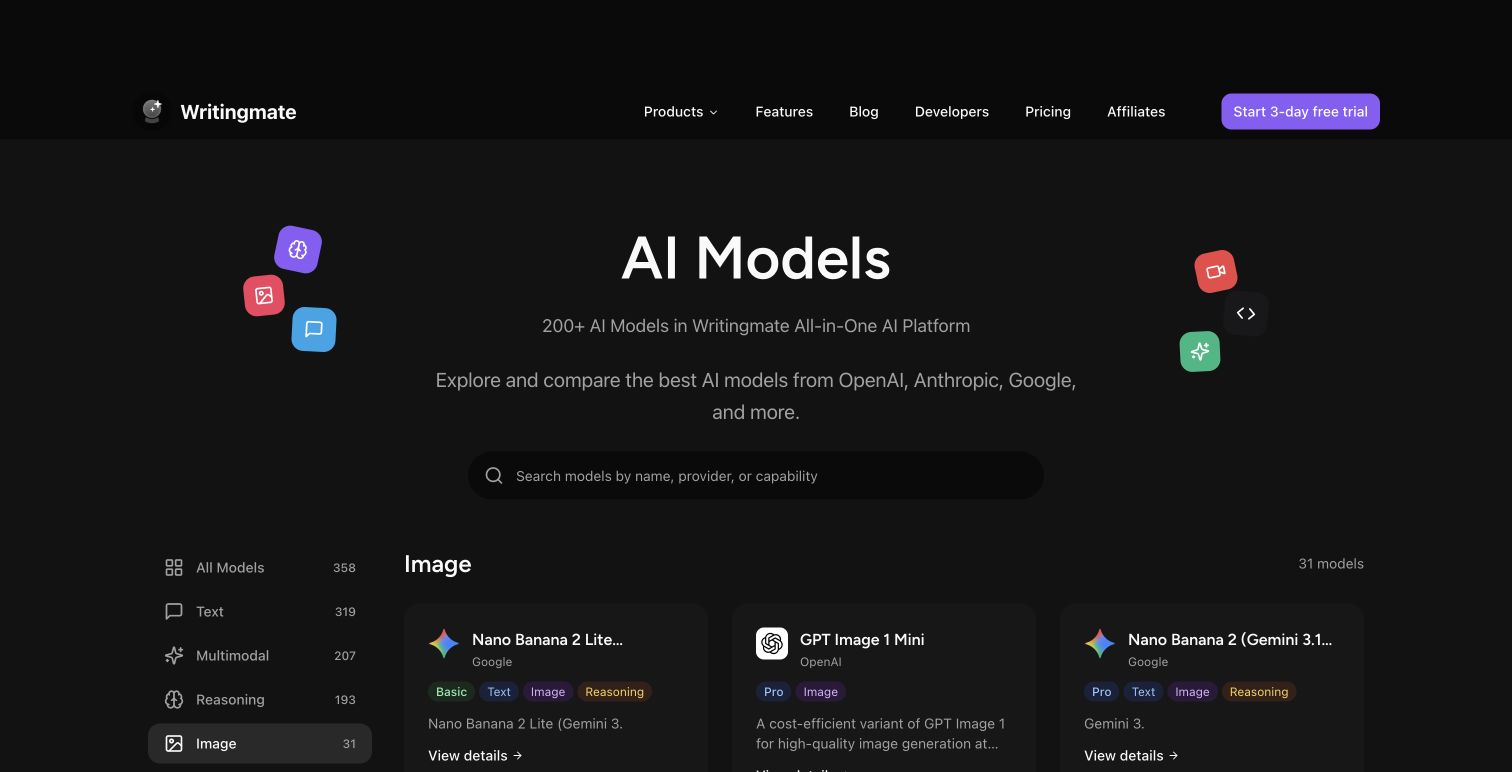
The Writingmate image models directory is the opposite of Perchance in most of the ways that matter for anyone doing serious creative work. Where Perchance gives you one mystery model with no controls, the directory gives you a structured view of every image model available through the platform — and as of May 2026, that's more than 30 models from a range of providers.

Here's what you actually see when you open the directory. Each model listing shows you:
- Provider and model name — so you know exactly what's running (FLUX.1 Pro by Black Forest Labs, DALL-E 3 by OpenAI, Stable Diffusion XL by Stability AI, etc.)
- Style category — photorealistic, stylized/anime, artistic, concept art, or general purpose
- Speed tier — fast (draft quality), balanced, or high quality (slower generation)
- Maximum output resolution — critical if you're using images for anything beyond social posts
- Approximate cost per generation — either included in your plan tier or credit-based with visible pricing
- Sample outputs — so you can evaluate the default style before committing a prompt to it
This is the part that people coming from Perchance consistently find the most useful: you know what you're getting before you generate. No mystery model, no inconsistent results from one session to the next. If FLUX.1 Pro produced the right look for your project last week, it'll produce the same style next week.
Perchance vs. the Top Image Models: An Honest Comparison
Let me put the actual differences in a table, because the contrast is easier to see when it's structured:
Model | Best For | Max Resolution | Login Required | Price | Prompt Fidelity |
|---|---|---|---|---|---|
Perchance AI | Quick experiments, free exploration | 512–768px | No | Free | Low–Medium |
FLUX.1 Schnell | Fast drafts, rapid iteration | 1024px | Yes | Included in plan | Medium–High |
Stable Diffusion XL | Artistic styles, fine-tuned outputs | 1024px base | Optional | Free to low cost | High |
DALL-E 3 | Text-heavy prompts, composition | 1024–1792px | Yes | ~$0.04 per image | Very High |
FLUX.1 Pro | Professional output, fine detail | Up to 2048px | Yes | ~$0.05–0.08 per image | Very High |
Nano Banana Pro | Photorealism, product photography | 1024–2048px | Yes | Credit-based | Very High |
GPT-5 Image | Instruction-following, inpainting | 1024–2048px | Yes | Credit-based | Exceptional |
The resolution column alone tells you a lot. If you've ever exported a Perchance image and tried to use it at full size for a social post or a design project, you know that 512–768px doesn't hold up. FLUX.1 Pro at 2048px is a fundamentally different kind of output — not just sharper, but with visible detail in textures, lighting, and faces that simply doesn't exist at lower resolutions.
The prompt fidelity column matters even more for practical use. Low fidelity means the model takes your prompt as a loose suggestion. Exceptional fidelity means what you wrote is actually what you get — right character position, right color palette, right mood. Coming from Perchance, the jump to a high-fidelity model often feels like the difference between describing your vision and actually producing it.
"Spent months trying to get consistent results from free tools. Finally tried FLUX.1 Pro for a client project. The prompt adherence alone justifies the cost — what I described is actually what rendered." — @designwithAI_ on X
How to Actually Read a Models Directory Entry
Most people open a models directory, see a wall of names and numbers, and close it within 30 seconds. Here's what you should actually be looking at when evaluating a model:
Step 1: Start with your output use case, not the model name. Ask yourself where this image will actually live. Social media thumbnail? You can get away with 1024px and a fast model. Print or large-format display? You need 2048px and a high-quality tier model. Game asset or concept art? You want a stylized model with a high style-fidelity rating. The Writingmate directory filters by these categories directly, so you're not starting from scratch every time.
Step 2: Check the speed-quality tradeoff. Every image directory worth using labels models by speed tier. Fast models (like FLUX.1 Schnell) are great for rapid iteration — you run 20 variations to find the right direction, then switch to a slower, higher-quality model for the final render. Using a slow, expensive model for every draft step wastes both time and credits.
Step 3: Look at sample outputs before you commit a prompt. This sounds obvious, but most people skip it. The sample images in a models directory show you the default style — the "personality" of that model when given a neutral prompt. If the samples look nothing like what you're going for, move on before you spend credits trying to override the model's defaults.
Step 4: Check whether the model supports the techniques you need. Some models support inpainting (editing a specific region of an existing image). Some support negative prompts. Some accept image references as style inputs. If your workflow requires any of these, the directory entry will tell you — and Perchance-style generators typically support none of them.
Step 5: Price per image vs. subscription inclusion. Some models in the Writingmate directory are included in your base plan and generate from your quota. Others are credit-based, priced per image. For high-volume work, the included models are almost always the right call for iteration, with credit-based models reserved for final outputs. The directory makes this distinction visible so you don't accidentally burn credits on draft work.
A Practical Workflow: From Perchance AI to the Right Model
Here's how I'd actually approach moving from Perchance experimentation to a proper models directory workflow, based on the type of project:
For anime and stylized illustration: Start by browsing the stylized category in the image models directory. Stable Diffusion XL has the most community-developed style fine-tunes and is the closest analogue to what you get from Perchance's Jellymon generator — but with actual control over the output. If you need character consistency across multiple images (the thing Perchance absolutely cannot do), GPT-5 Image is currently the strongest option in the directory for that specific challenge.
For photorealistic output: Nano Banana Pro and FLUX.1 Pro are both strong in the photorealism category. Nano Banana Pro has better skin tones and color accuracy for portraits. FLUX.1 Pro handles complex scenes and environmental detail better. Run the same prompt through both using Writingmate's comparison view — it's the fastest way to see which aesthetic matches your project without committing to one model upfront.
For concept art and general creative work: DALL-E 3 is the most forgiving for users coming from Perchance because it interprets prompts generously and rarely produces badly mangled anatomy or spatial errors. It's a reliable baseline. Once you've figured out what you actually want, you can try FLUX.1 Pro for higher-fidelity versions of the same concept.
For product photography and marketing visuals: This is where the gap between Perchance and a proper model directory is most visible. Nano Banana Pro produces consistent, clean backgrounds and accurate material rendering. There's no free-tier equivalent that comes close. The cost per image ($0.05–$0.10 range) is genuinely trivial compared to the time you'd spend trying to coax this quality out of a free community generator.
The workflow advantage of having all of these in one directory — rather than juggling accounts across Midjourney, DALL-E, Stability AI, and Black Forest Labs separately — is real. You keep your prompt history, your credit balance is visible in one place, and you can switch models mid-project without re-authenticating anywhere. For anyone who's spent time managing multiple AI image subscriptions, that consolidation alone is worth something.
So here's the bottom line: if you came here looking for a perchance ai image generator that does more than the original, you've found the framework for it. The Writingmate image models directory isn't a replacement for Perchance in the sense that it's free with no login. It's a replacement in the sense that it actually solves the problems Perchance creates — unknown models, limited resolution, no iteration control, and no way to reproduce results you liked. For anyone doing creative work seriously enough to care about those things, the directory is the practical next step.
See you in the next one!
Artem
Frequently Asked Questions
Sources

Written by
Artem Vysotsky
Ex-Staff Engineer at Meta. Building the technical foundation to make AI accessible to everyone.

Reviewed by
Sergey Vysotsky
Ex-Chief Editor / PM at Mosaic. Passionate about making AI accessible and affordable for everyone.