There's a reason "perchance ai image generator" gets thousands of searches every week. Perchance figured out something most AI tools got wrong: remove every barrier between the user and the first generated image. No account, no credit card, no three-step onboarding. You type a prompt, an image appears. That's it.
My name is Artem, and I've been testing AI image tools for the Writingmate blog since before most people had heard of Midjourney. I've gone through the free tier of basically everything — Perchance, Craiyon, Bing Image Creator, Adobe Firefly — and spent serious time with the paid alternatives. I've also talked to hundreds of users who started on Perchance and ended up somewhere very different six months later. This article is what I'd tell any of them at the beginning of that journey.
Here's what you'll get: prompt techniques that immediately improve Perchance results (most users leave half the quality on the table), an honest breakdown of where Perchance hits a wall, and a practical framework for deciding when free stops being the right choice. The hidden costs are real — they just don't show up on a credit card statement.
What You're Actually Getting with Perchance AI Images
Perchance started as a community platform for text-based randomizers — RPG name generators, random plot hooks, loot tables. Someone built an AI image generator on top of it, the community adopted it, and it grew into one of the most searched free image tools on the internet. As of May 2026, there are multiple image generation presets on the platform, each built and maintained by community contributors rather than a centralized engineering team.
The underlying models are mostly Stable Diffusion variants, specifically fine-tuned versions that lean toward anime and illustrated aesthetics. Output quality depends heavily on which preset you use and how well that fine-tune handles your specific prompt style. The resolution cap is around 768×1024 pixels, which rules out printing or large-format display but works fine for reference images, concept sketches, and social thumbnails.
The "no account required" appeal is genuine and specific. Most free AI image tools either require signup (Adobe Firefly, Bing Image Creator), impose very low daily generation limits (Canva AI, Craiyon), or show noticeably lower quality than paid tools. Perchance threads that needle for casual use. But the community infrastructure has a real constraint: during peak hours — typically US evenings and weekends — queue times stretch to 3–5 minutes per image. That's where the hidden cost starts accumulating.
"Perchance is honestly underrated for quick concept stuff. No account, no BS, and for anime-style characters it does a solid job. The only thing that kills me is queue times — sometimes 4+ minutes and you don't know if it'll even finish." — u/pixelwitch88 on Reddit
That's the pattern I see consistently: genuine appreciation for what Perchance does well, and real frustration with the ceiling. Knowing both sides clearly is what lets you make better decisions about when to use it and when not to.
Prompt Tips That Actually Improve Perchance Results
Most Perchance users never get close to what the model is capable of because they write prompts as sentences rather than structured descriptors. Here's what actually moves the needle.
Lead with style, then subject. Diffusion models were trained on image captions and alt text, not prose. Structure prompts as comma-separated descriptor lists, and put the style keyword first. "Anime illustration, a warrior in silver armor standing in a rainy forest" produces better stylistic coherence than "a warrior in silver armor standing in a rainy forest, illustrated in anime style." Same information, different order, noticeably different results.
Add quality anchors explicitly. Terms like "masterpiece," "highly detailed," "cinematic lighting," "sharp focus," and "8k" appear in the training data alongside high-quality examples. Appending them nudges the model toward that part of its learned distribution. They're not magic words — they're a way of pointing the model at better-quality training examples.
Use the negative prompt field. This is where most beginners leave the most value on the table. Standard starting values: "blurry, low quality, watermark, text overlay, deformed hands, extra fingers, bad anatomy, worst quality, disfigured face." The hands issue is persistent across almost every SDXL-based model — putting hand-related terms in the negative prompt consistently reduces the error rate.
Keep initial prompts under 50 words. Long, elaborate prompts are harder to debug when the result doesn't land. Start with 10–15 words to get the style and subject direction right, then add specificity in the next iteration. Shorter prompts also generate faster when queues are backed up.
Experiment with aspect ratio. Perchance lets you set output dimensions. Portrait ratios (512×768 or 576×1024) work better for character-focused images. Landscape ratios (768×512 or 1024×576) work better for environments. A significant number of composition complaints disappear just by switching away from the default square to the ratio that fits your subject naturally.
Lock seeds when iterating. When a generation has the right composition but wrong details, note the seed number and re-run with the same seed while adjusting just one or two prompt elements. You'll get more controlled variation than random generation, which is how you converge on the image you actually wanted.

These techniques will get you noticeably better results — but they also expose the ceiling faster. Once you've optimized your prompts and you're still not hitting the quality you need, the issue isn't the prompts anymore. It's the model.
Four Use Cases Where Perchance Falls Short
I want to be fair: Perchance is a solid free tool within its specific lane. But there are four situations where it's consistently the wrong choice, and knowing them saves you hours of frustrated regenerations.
Photorealistic outputs. Perchance's SDXL-based models skew heavily toward illustrated and anime aesthetics. If you need product mockups, realistic portraits, or images that could pass as photographs, you're fighting the model's defaults the whole time. Even with aggressive prompting toward realism, the results retain an illustrated quality that makes them unsuitable for product photography, marketing assets, or anything requiring photographic credibility.
Character consistency across images. Generate the same character in two separate Perchance sessions and you'll get two different people. The model has no memory between generations and no mechanism for locking character appearance. For webcomics, recurring social media characters, game asset series, or any project requiring a recognizable person across multiple images, Perchance simply doesn't have the tooling. You need seed locking with a platform that exposes it reliably, or a model specifically designed for character consistency.
Commercial and client work. Perchance's terms of service are community-generator-by-generator, and commercial rights language is either absent or ambiguous on most presets. If you're generating images for a client, for merchandise, for marketing materials, or for anything you'll sell or license, that ambiguity is a real liability. Tools with explicit commercial licensing (DALL-E 3 under OpenAI terms, Flux Pro under Black Forest Labs terms) give you a clear answer. Perchance doesn't.
Volume work with time pressure. At 3–5 minutes per image during peak hours, generating 40 images for a project takes three to four hours of active waiting — plus the time to review and regenerate failures. For anyone doing regular creative production work, that queue time represents a significant real cost. Paid tools prioritize your requests and typically deliver in 10–30 seconds regardless of platform traffic. The math on whether a subscription pays for itself gets simple quickly when you're generating at volume.
"Tried using Perchance for a freelance client project — hit 4-5 minute queue times per image and the output still needed heavy editing. Switched to Flux Pro through Writingmate and knocked out 40 variations in under an hour. The 'free' tool cost me way more in time than the subscription would have." — @aiworkflowpro on X
The Hidden Cost of Free: Mapping the Real Trade-Offs
Free AI image tools are free in money but charge you in time, quality ceiling, and legal uncertainty. Mapping those trade-offs honestly makes the upgrade decision much cleaner. As of May 2026:
Tool | Monthly Cost | Account Required | Best Style | Commercial Rights | Avg. Queue Wait |
|---|---|---|---|---|---|
Perchance AI | Free | No | Anime, illustration | Unclear (per-preset) | 3–5 min (peak hours) |
Bing Image Creator | Free (capped) | Yes (Microsoft) | General, photorealism | Limited | 10–30 sec |
Adobe Firefly | Free (limited) | Yes (Adobe) | Stock, commercial-safe | Yes (with paid plan) | 10–20 sec |
Flux Pro (via Writingmate) | Subscription | Yes | Photorealism, versatile | Yes | 10–30 sec |
DALL-E 3 (via Writingmate) | Subscription | Yes | Creative, concept art | Yes | 10–20 sec |
Stable Diffusion (local) | Free (needs GPU) | No | Any (with right model) | Depends on model | 0 sec (local) |
The pattern is consistent: free tools charge you in time (queue waits, credit limits) or legal uncertainty (ambiguous commercial rights). Paid tools charge money but deliver speed, output quality, and clarity about what you're allowed to do with results. Which trade-off is right depends on what you're making — but knowing both sides of the trade explicitly makes the decision much easier than just defaulting to "free."
One number worth holding onto: if Perchance queue times cost you two hours per week, and your time has any value at all, a $10/month subscription that eliminates that friction has paid for itself in the first week. The "free" tool has a real cost — it just doesn't appear on a credit card statement.
Finding the Right Model for Your Use Case
If you're ready to explore past Perchance, the fastest approach is testing with your actual prompts rather than reading specs. That's the practical value of Writingmate's image model directory — Flux Pro, DALL-E 3, Midjourney, and other major models are all available from one interface under one subscription, so you can run the same prompt through multiple models and compare results directly without managing separate accounts or billing relationships.
For photorealism and professional work: Flux Pro is the current benchmark. It handles lighting, face anatomy, skin textures, and scene composition significantly better than SDXL-based generators. If your Perchance outputs consistently look "illustrated" when you wanted something that reads as photographic, Flux Pro is usually the fix — the difference is immediate and obvious at first test.
For concept art and creative prompts: DALL-E 3 handles unusual prompts, abstract concepts, and complex spatial relationships better than most diffusion-based models. If you write elaborate, paragraph-length descriptions and want a model that follows them faithfully, DALL-E 3 is consistently stronger at instruction following. The aesthetic leans polished and clean rather than raw or painterly.
For anime and stylized illustration: Perchance is honestly competitive for casual use within this category. But for higher quality anime outputs at larger resolutions — sharper detail, better face consistency, more reliable style adherence — look for Flux Dev fine-tunes specifically trained on anime datasets. The quality gap versus Perchance's community presets becomes clear at resolutions above 512px.
For product and e-commerce: This is where professional tools pull furthest ahead. Models with inpainting support let you change specific elements — swap backgrounds, adjust product placement, fix artifacts — without regenerating the full image. Writingmate also has built-in image editing with mask painting, which means you can describe an edit and apply it to a specific region without leaving the platform.
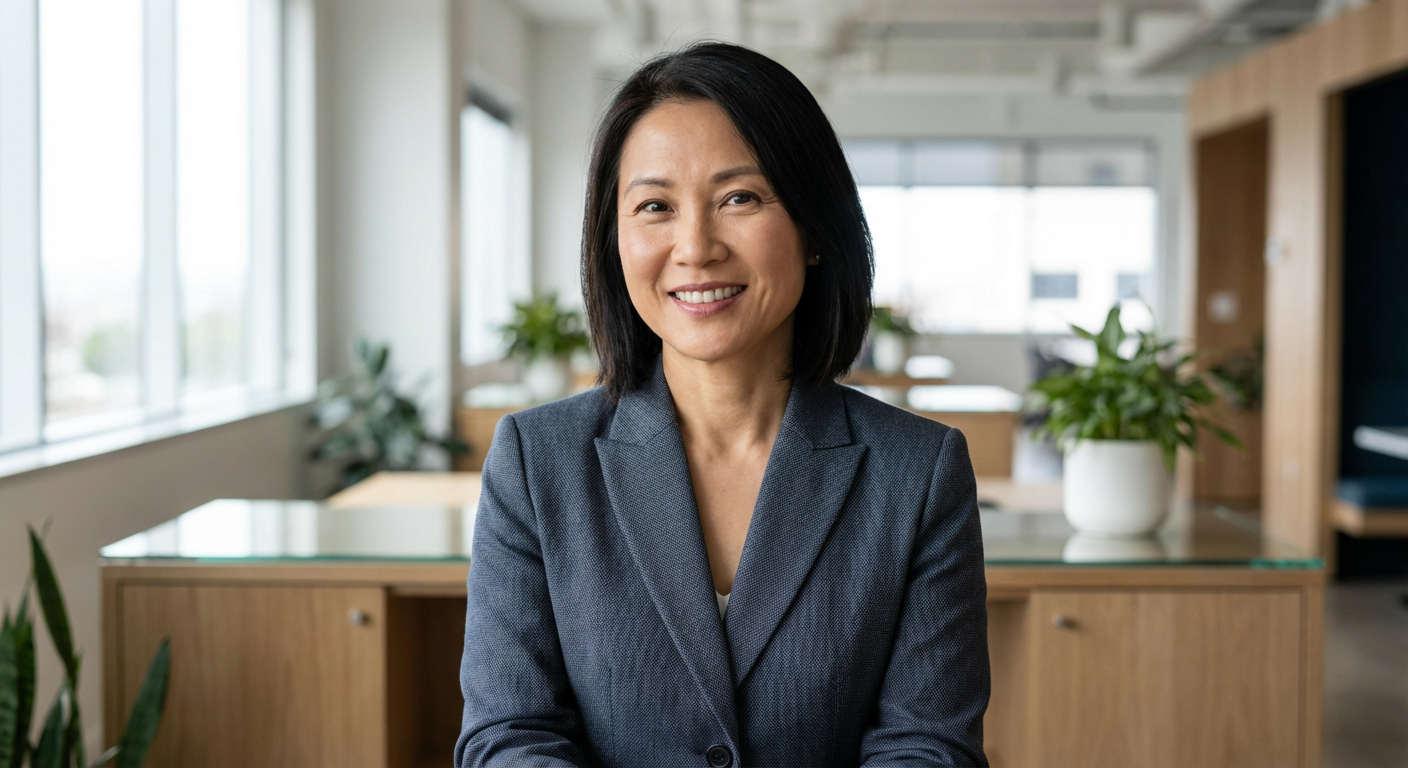
The directory approach has one underrated advantage: you're not committed to one model's aesthetic for an entire project. Use a fast, lower-cost model for ideation and quick concepts. Switch to a premium model for the final outputs that actually ship. You stay in one interface the whole time, and your comparison is based on your real prompts against your real use case — not a benchmark someone else ran.
The Honest Framework: When to Stay and When to Switch
Here's the decision framework I'd give a friend starting from Perchance.
Keep using Perchance if: You're exploring AI image generation for the first time and want to understand what's possible without any commitment. You need quick reference sketches or concept thumbnails for personal projects. You're making casual anime-style art with no deadline attached. Queue times aren't eating into time that matters to you. You genuinely can't spend money right now — it's a real free option, not a crippled demo.
Move to a paid tool if: You're working on anything commercial, client-facing, or that you plan to sell or license — the commercial rights ambiguity alone is worth resolving. Queue times are costing you more hours than the subscription costs dollars. You need photorealism and the illustrated output keeps showing through. You need the same character to look consistent across multiple images for a series or project. You're building a portfolio you'll show to clients or employers, and "good enough" isn't the standard anymore.
Perchance isn't going anywhere, and you don't need to apologize for using it. It's a genuinely useful tool within its constraints. The most important thing is just knowing what those constraints are before you run into them mid-project. A fifteen-minute test comparing your best Perchance prompt against Flux Pro in Writingmate's image models directory will tell you everything the specs won't — and it's a lot more efficient than discovering the ceiling when you're already three hours into a deadline.
See you in the next one!
Artem
Frequently Asked Questions
Sources

Written by
Artem Vysotsky
Ex-Staff Engineer at Meta. Building the technical foundation to make AI accessible to everyone.

Reviewed by
Sergey Vysotsky
Ex-Chief Editor / PM at Mosaic. Passionate about making AI accessible and affordable for everyone.