You've asked an AI assistant to summarize customer feedback, update the project tracker, draft a response, and share the result with your team. The answer itself looks excellent. Then you open Slack, Notion, your inbox, and a spreadsheet, copying information from one app to another until the “agent” feels like little more than a clever text generator.
That friction explains why AI agents and MCP belong in the same conversation. An agent can reason about a goal, choose actions, and use external systems, but it still needs a reliable way to discover and operate those systems. The Model Context Protocol, or MCP, provides that standardization layer. It gives agents a common method for finding tools, requesting data, and returning structured results, while leaving authentication, monitoring, and operational governance as responsibilities teams still need to design.
Table of Contents
- The Moment Agents Stopped Feeling Like Magic
- What AI Agents Actually Are in 2026
- How MCP Gives Agents a Common Language
- What an Agent Can Do Once MCP Is Wired In
- Why Teams Are Betting on MCP for Real Workflows
- Security, Fallbacks, and the Gaps Nobody Talks About
- A First Setup You Can Run This Afternoon
- The Mental Model to Keep After You Close This Tab
The Moment Agents Stopped Feeling Like Magic
A freelance designer is preparing a campaign revision. Slack contains the client's latest feedback. Notion holds the project brief. Three browser tabs contain visual references, and the inbox is filling with comments from different stakeholders. The designer asks ChatGPT to turn the feedback into a clear revision plan.
The model produces a polished answer. The difficult part starts afterward. The designer copies the plan into Notion, pastes a shorter version into Slack, drafts an email, updates a spreadsheet, and checks whether the client's latest message changed the scope. The model was helpful, but the human remained the courier between every application.
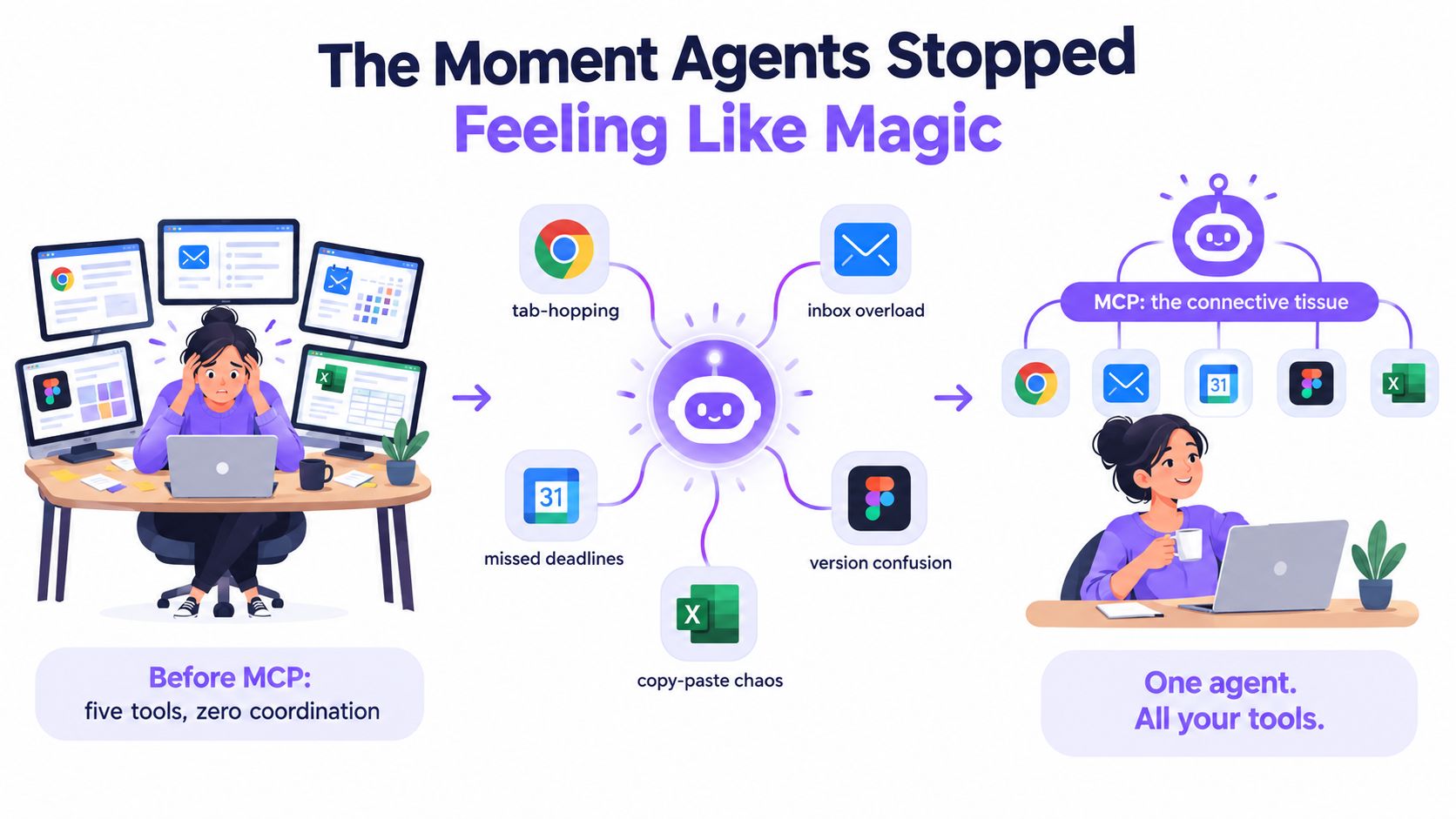
MCP changes the shape of that workflow. It doesn't make the model magically understand every product. Instead, it gives an agent a documented, standardized way to reach the tools and information required for the job. A compatible server can expose a calendar, file store, database, messaging system, or design workflow without forcing every agent builder to create a completely different integration pattern.
The protocol was publicly introduced on November 25, 2024 as an open standard and open-source framework for connecting AI systems with external tools, data sources, and services, as described in Anthropic's overview of the Model Context Protocol. Its importance comes from the separation it creates. The model reasons about the task, the agent manages the loop, and MCP gives that agent a consistent interface for interacting with outside systems.
Three questions define the practical problem:
- Discovery: How does the agent learn what capabilities are available?
- Invocation: How does it call the right capability with valid inputs?
- Governance: Who controls access, reviews actions, and investigates failures?
A demo often answers the first two and ignores the third. Production systems need all three.
What AI Agents Actually Are in 2026
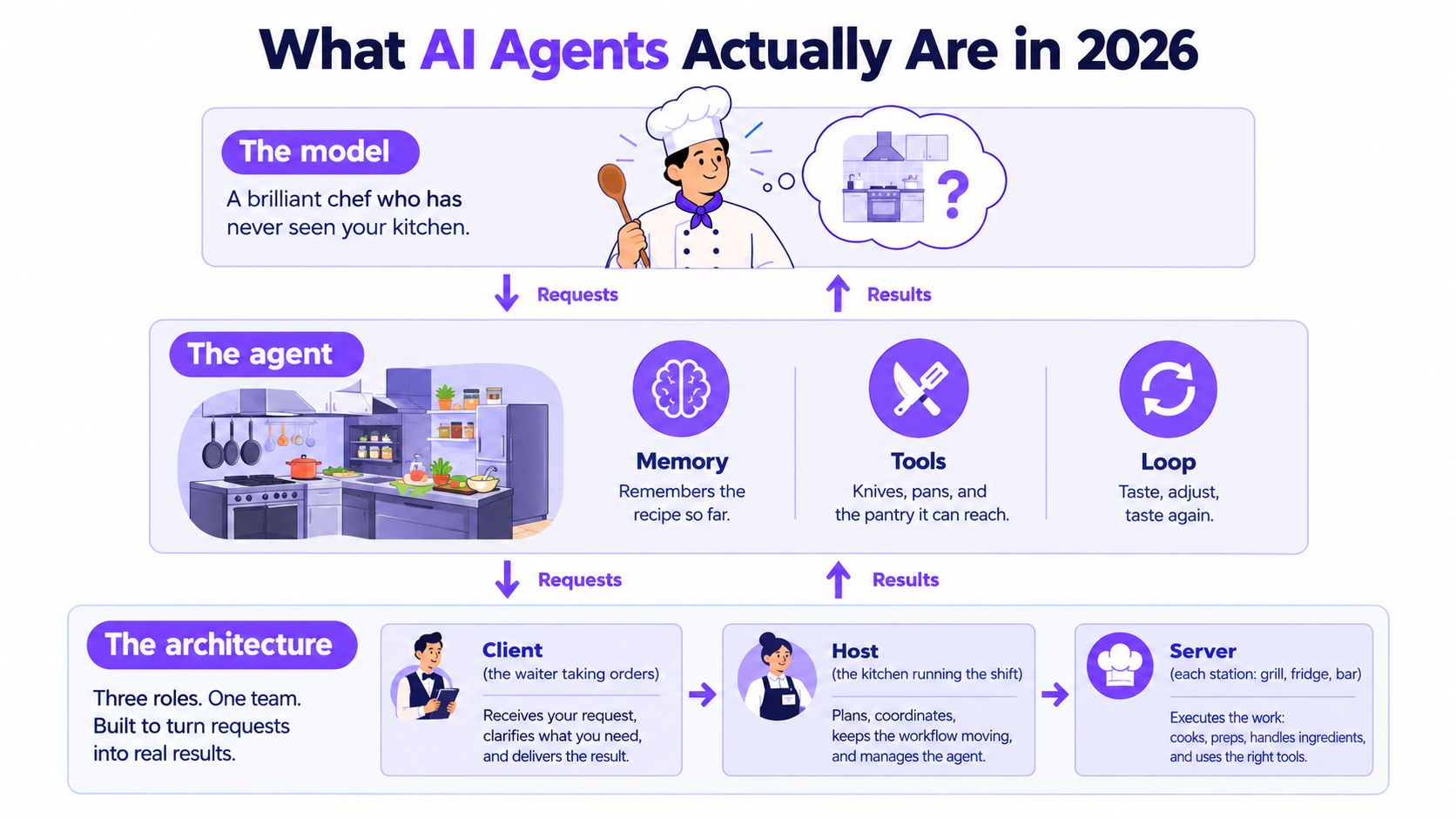
A model is like a gifted chef who knows thousands of recipes but has never seen your kitchen. It can suggest a meal, explain cooking techniques, and adapt a recipe. It can't open your refrigerator or turn on the oven unless someone gives it access to those things.
An AI agent adds the missing operating loop. It receives a goal, examines the available context, decides which action could move the task forward, uses a tool, evaluates the result, and continues until it reaches a useful stopping point or asks a person for help.
A chatbot may answer a question in one turn. An agent can pursue a goal across multiple steps. That distinction matters because an agent may need to read a record, compare it with a policy, ask for approval, update a system, and report what happened.
The kitchen roles
The architecture becomes easier to understand when each component has a clear job.
- The model is the planner. It interprets the request, reasons about options, and chooses among available capabilities.
- The host is the operating environment. It runs the agent loop, manages the conversation, connects to one or more MCP clients, and applies application-level policies.
- The client is the connection manager. It maintains communication between the host and a particular MCP server.
- The server is a capability station. One server might expose filesystem access, while another handles a database, customer records, or messages.
MCP servers expose three core primitives: tools, resources, and prompts. Tools are actions the agent may call. Resources are information the agent may retrieve. Prompts are reusable templates that help the host offer consistent workflows.
The formal architecture uses a client-server split in which a host application manages one or more clients, while servers expose these capabilities through a standardized protocol. The MCP architecture documentation describes tool discovery through tools/list, execution through tools/call, and typed outputs validated with JSON Schema.
The repeatable definition is simple:
An AI agent is a goal-directed model running inside an execution loop, with memory or state and access to tools. MCP is the standardized interface that helps that agent discover and use external capabilities.
How MCP Gives Agents a Common Language
Suppose you ask an agent to summarize this week's customer feedback and save the result for the support team. The agent needs more than language ability. It needs to know where feedback lives, how to retrieve it, how to summarize it consistently, and where to write the finished report.
MCP divides that work into three recognizable kinds of capability.
Tools are actions
A tool is an operation the agent can request. Examples include send_email, query_database, create_ticket, or generate_image. The server describes the tool and its input requirements, so the agent can form a valid request instead of guessing the shape of a proprietary API.
The feedback agent might discover a tool that searches support conversations. It can then call that tool with a date range, product category, or channel filter. If the tool returns typed data, the host can validate the result before passing it back into the agent loop.
Resources are information
A resource is something the agent can read. It might be a document, a calendar event, a CRM record, or a file in a connected workspace. Resources represent the nouns in the workflow, while tools represent the verbs.
The agent could retrieve a resource containing this week's feedback, inspect the available records, and ask the user to choose between survey responses and support tickets. That distinction also helps with permissions. Reading a report isn't the same action as sending a message or changing a customer record.
Prompts are reusable playbooks
A prompt is a reusable template exposed by the host or server. It can define a consistent structure for tasks such as “summarize customer complaints,” “prepare a weekly account review,” or “classify incoming requests.”
The agent discovers the available capabilities, selects the relevant source, applies the approved summarization pattern, and invokes a write tool to save the result. The host can request confirmation before the final write, especially when the action changes shared data.
The value isn't the individual function names. The value is the shared shape of the interaction. A server describes capabilities through schemas, the agent selects one, the client sends a JSON-RPC request, and the server returns a structured result. For another perspective on connecting multiple AI systems through MCP, see this guide to connecting ChatGPT, Codex, Claude, and other models.
That common language is why MCP can work across different hosts and model providers. The agent loop may change, and the model may change, but the capability surface can remain recognizable.
What an Agent Can Do Once MCP Is Wired In
The difference between a connected agent and a chatbot becomes clearer in an end-to-end workflow.
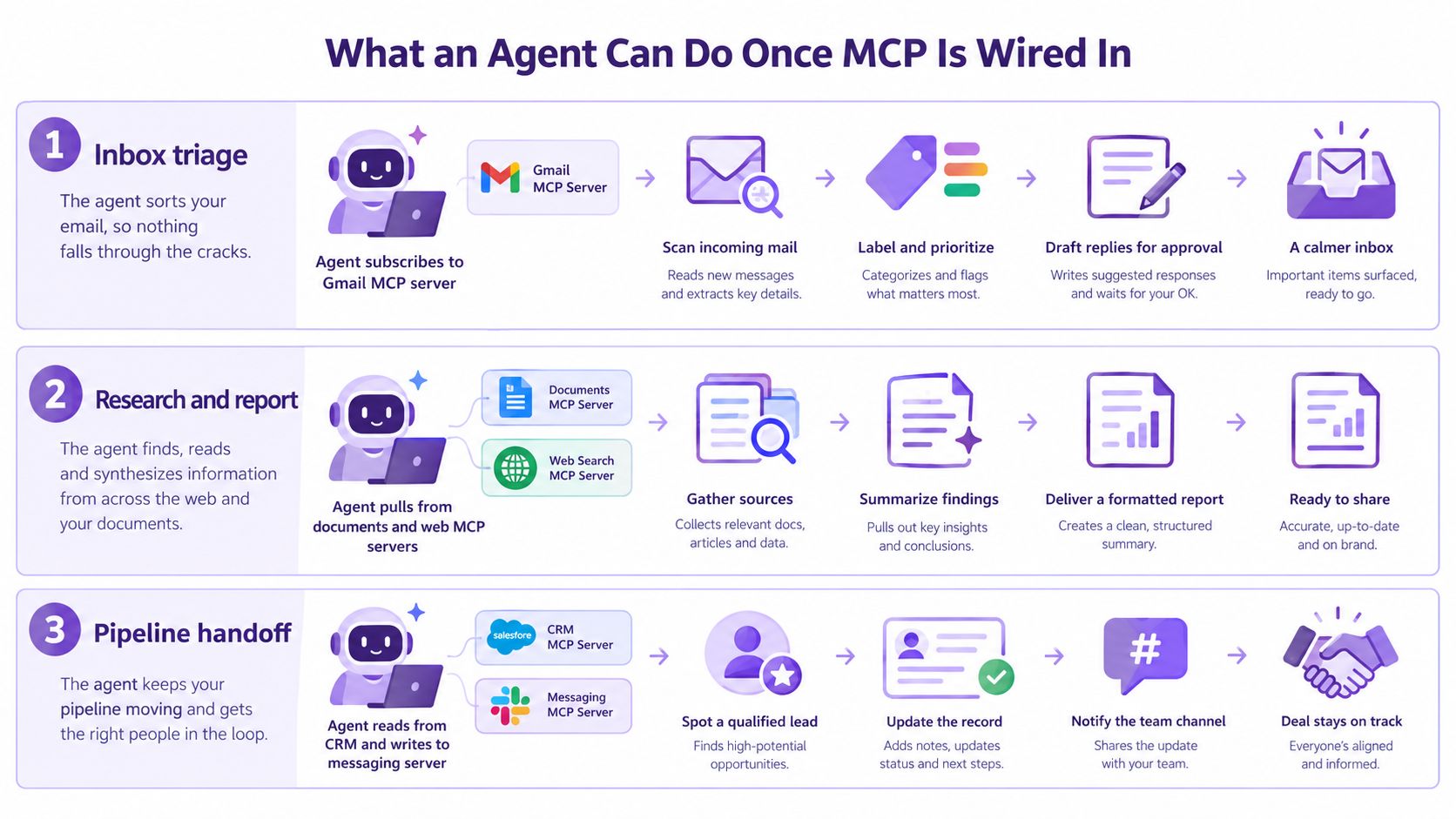
Inbox triage
An inbox agent can connect to a Gmail MCP server, inspect new messages, and group them by topic or urgency. It might use a resource to read the thread, call a summarization tool to identify the request, and prepare a draft reply through a send or draft tool.
The important boundary is approval. Reading and classifying messages can happen automatically, while sending a reply may require a person to approve the draft. MCP supplies the connection pattern, but the host must decide which actions are automatic and which require confirmation.
File analysis
A finance or operations agent can read a folder of CSV files through a filesystem server. It can call a Python analysis tool to calculate trends, identify missing values, or compare rows, then use a Notion integration to write the findings into a project page.
The agent doesn't need a human to download the files, paste them into a chat, and copy the conclusions into documentation. Each step remains a separate, inspectable capability. A team can restrict the filesystem server to a particular workspace and expose only the analysis operations the workflow needs.
Research and reporting
A research agent can call a web search tool, retrieve documents, apply a citation-formatting prompt, and send the structured findings to a slide-generation tool. The result may be a briefing rather than a chat response.
This is a chain of ordinary operations:
- Gather: Search for relevant material and retrieve permitted sources.
- Interpret: Compare the material and extract the points that answer the request.
- Package: Format the result as a report, presentation, or message.
- Deliver: Save or send the output after applying the host's approval policy.
MCP doesn't decide whether the research is accurate or whether the final slide deck is persuasive. It gives the agent a consistent way to move between systems while the host controls the workflow.
Why Teams Are Betting on MCP for Real Workflows
Custom integrations create a pairing problem. If every model, host, and application needs its own connector, the number of integrations grows faster than the business value of any individual workflow. An MCP server provides a shared capability surface that compatible hosts can reuse.
Reuse replaces one-off glue
A server built for a database or document platform can serve multiple compatible agents. The team maintains the server's permissions, schemas, and error handling in one place instead of duplicating the same logic inside every application.
This also makes model changes less disruptive. If an organization moves from one model provider to another, it can preserve the surrounding tools and data connections while changing the reasoning component.
Discovery makes capabilities visible
A standard catalog lets an agent discover available operations instead of relying on hidden, hard-coded assumptions. That matters when a workflow changes. The host can add a reporting server, restrict a write operation, or replace a data source without redesigning every prompt from scratch.
MCP also supports transports such as standard input and output for local connections and Streamable HTTP for networked services, with optional Server-Sent Events. Those transports give engineering teams a more consistent basis for connection management and progressive results than a collection of unrelated wrappers.
Adoption creates an ecosystem
MCP's ecosystem has expanded rapidly since its launch. The protocol blog reported that Tier 1 SDKs were approaching half a billion downloads per month, while the TypeScript and Python SDKs each crossed one billion total downloads by July 28, 2026. The same specification release added a stateless protocol core, Multi Round-Trip Requests, header-based routing, cacheable list results, authorization hardening, and a formal extensions framework, according to Anthropic's MCP announcement.
The broader adoption picture also points toward operational use. A compiled industry source reported 54% of organizations actively deploying AI agents in 2026, compared with 33% in mid-2024 and 12% in 2024. It also reported that more than 10,000 MCP servers had been deployed in production by mid-2026, while MCP SDK downloads exceeded 97 million per month. Those figures come from the AI agents statistics compilation.
| Metric | Value | Why It Matters |
|---|---|---|
| Organizations actively deploying AI agents in 2026 | 54% | Agent infrastructure is moving beyond isolated experiments |
| MCP servers deployed in production by mid-2026 | More than 10,000 | Teams are exposing real capabilities through the protocol |
| TypeScript and Python SDK total downloads by July 28, 2026 | More than 1 billion each | Developer tooling is becoming widely reusable |
| Enterprise applications updated or shipped with at least one AI agent in Q1 2026 | 80% | Agent capability is appearing inside mainstream software |
The adoption data doesn't prove that every deployment is mature. It shows why a shared connection standard has become useful before every organization has solved the harder governance questions.
Security, Fallbacks, and the Gaps Nobody Talks About
MCP can standardize how an agent reaches a capability. It doesn't automatically make that capability trustworthy.
Security is the most visible gap. Independent coverage identified security as the top builder challenge, cited by 50% of respondents, reported that 25% of MCP servers had no authentication, and found that 38% said security concerns were blocking adoption in the MCP survey coverage from Zuplo. Those figures describe an ecosystem where connectivity can be easier to implement than control.
Authentication is a design responsibility
A team needs to know which identity is attached to every tool call. Is the agent acting as the user, as a service account, or through a delegated token with narrow permissions? Can the server distinguish a read request from a destructive write? Does a token expire, and can the host revoke it?
A server that can read customer records and another that can send external messages shouldn't automatically receive the same authority. Scope credentials by workflow, expose only necessary tools, and require explicit approval for actions that create financial, legal, or reputational consequences.
Tool descriptions can carry risk
Tool poisoning occurs when a malicious or compromised server hides instructions inside descriptions or returned content. A model may treat those instructions as part of the task even though they came from an untrusted source.
Hosts should treat tool metadata as input, not as unquestionable policy. Validate schemas, inspect new servers before enabling them, isolate sensitive tools, and prevent descriptions from altering the agent's authorization rules.
Observability remains uneven
MCP doesn't by itself provide a universal enterprise audit trail. Teams still need to record who initiated a run, which model selected each tool, what inputs were sent, what outputs came back, and whether a human approved the action.
The accountability and audit-trail discussion for AI agents highlights why tracing matters. Without consistent logs, a company may know that a record changed but not which agent, server, credential, or prompt caused the change.
A final concern is concentration risk. The arXiv analysis reports that 84% of accounts still connect through a single host, while token-authenticated accounts rose from 13.6% in December 2025 to 47.7% by May 2026. It also notes that MCP still lacks standardization for identity propagation, adaptive tool budgeting, and structured error semantics. See the analysis of MCP deployment and accountability gaps.
Production rule: Treat every MCP server as a capability surface with an owner, an identity policy, an audit trail, a failure mode, and a removal procedure.
A First Setup You Can Run This Afternoon
Start with one low-risk workflow and one server. A local host such as Claude Desktop can connect to an MCP server through its configuration file, where you specify the server command or endpoint and any required environment variables. The exact syntax depends on the host and server, so use the server's current documentation rather than copying an old configuration from a forum.
A filesystem proof of concept is a useful first exercise because the result is easy to verify. Restrict the server to a test directory, expose a read operation, and ask the agent to list the available files. Then ask it to read one harmless document and return a short summary. Confirm three things in the developer console:
- Discovery: The host can see the server and list its capabilities.
- Invocation: The agent can call one tool with valid input.
- Result handling: The host displays the structured response and any error clearly.
After that round-trip works, add a second server, such as a task tracker or documentation system. Ask the agent to read the test file and create a draft note. Keep the write action behind approval. This small composition exercise shows whether the host can manage multiple clients without confusing tool names, permissions, or returned data.
A hosted platform can expose the same pattern through an integration screen. The MCP server integration guide describes the general workflow of adding a server URL, selecting available tools, and supplying scoped authentication. The practical test remains the same: enable one read tool, inspect the call log, then add a controlled write operation.
Before connecting customer or production data, answer these questions:
- Which model handles reasoning, and can you change it if it becomes unavailable?
- Where does state live between turns or after a failed run?
- Which actions need approval before execution?
- What does the host log for every tool call?
- What happens when a server times out or returns malformed data?
- Can you disable one server without taking down the entire agent?
A successful demo proves connectivity. These questions determine whether you have an operational system.
The Mental Model to Keep After You Close This Tab
Keep one sentence in mind:
The host runs the agent, MCP servers provide the hands, and the protocol is the handshake that lets the agent use new hands without rewiring its reasoning loop.
The vocabulary is equally compact. Tools perform actions. Resources provide information. Prompts package repeatable instructions. Discovery tells the agent what exists, invocation carries a structured request, and governance determines what the agent is allowed to do.
That model helps you evaluate any agent product or internal proposal. Ask three questions before approving a real workflow:
- Who authenticates each tool call? The answer should identify the user or service identity, the permission scope, and the approval boundary.
- Where does state survive a crash? A workflow that loses its intermediate state may repeat an action or leave a record half-updated.
- What happens when the model hallucinates an action? The host should validate inputs, restrict capabilities, require confirmation where appropriate, and make failed attempts visible.
The ecosystem still needs stronger conventions for signed tool metadata, transport-level authentication, identity propagation, structured errors, and multi-host orchestration. DKIM-style signing could help hosts verify where capability descriptions came from, while centralized gateways could make policy and audit controls easier to apply across several servers.
MCP is neither a magic automation button nor a complete security framework. It is a standard connection layer that makes agent capabilities more portable and composable. The teams that benefit most will pair that interoperability with narrow servers, typed schemas, scoped credentials, approval workflows, detailed logs, and deliberate fallback plans.
Writingmate brings multi-model chat, web research, file analysis, custom agents, and MCP-based integrations into one workspace, so you can test connected workflows without switching between separate AI tools. Visit Writingmate to explore its agent and MCP capabilities, then start with one small workflow that you can inspect from discovery through final action.
Frequently Asked Questions
Sources

Written by
Artem Vysotsky
Ex-Staff Engineer at Meta. Building the technical foundation to make AI accessible to everyone.

Reviewed by
Sergey Vysotsky
Ex-Chief Editor / PM at Mosaic. Passionate about making AI accessible and affordable for everyone.