
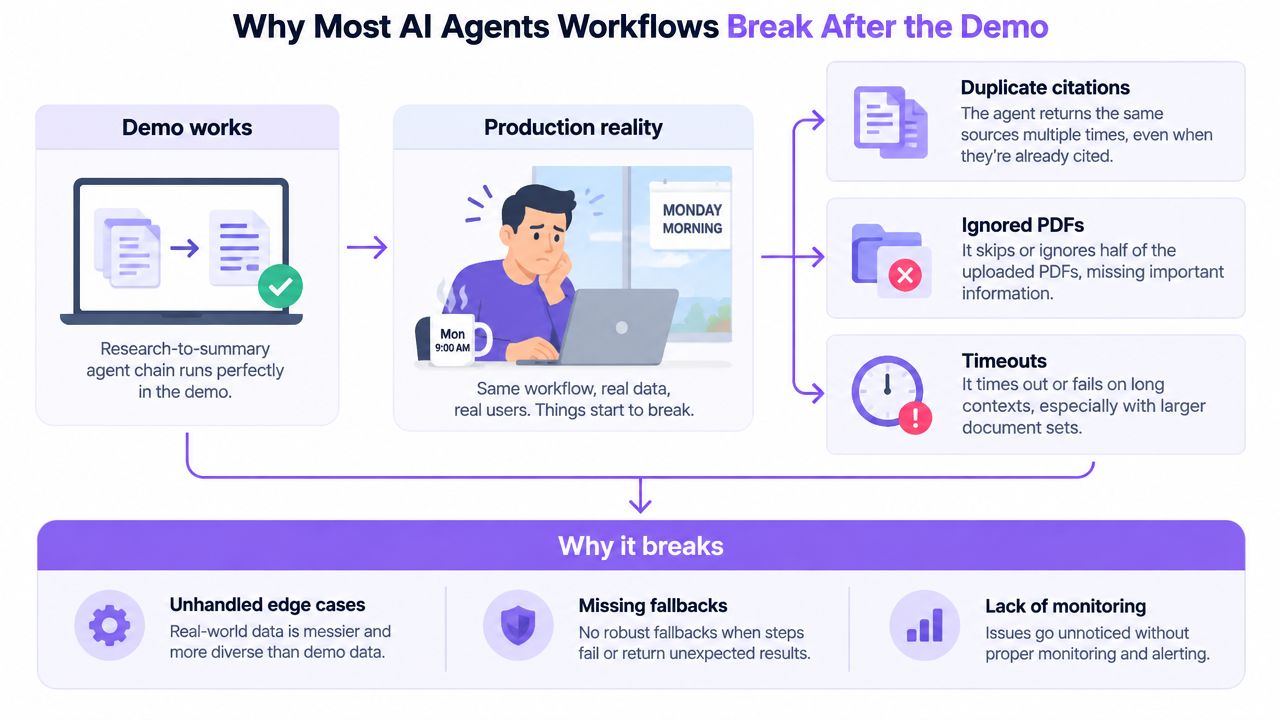
You deploy an AI workflow on Friday afternoon because the demo looked flawless. By Monday, the same workflow is returning duplicate citations, skipping uploaded files, and timing out whenever a user submits a long document. Nothing about the model changed. The difference is that production exposed the parts the demo never exercised: repeated runs, partial failures, unclear state, tool limits, and outputs nobody checked.
An AI agents workflow is dependable only when it can recover from ordinary failure. The useful question isn't whether an agent can complete a task once. It's whether the system can complete it repeatedly, explain what happened, retry safely, and hand uncertain work to a person without losing context.
Table of Contents
- Why Most AI Agents Workflows Break After the Demo
- The Four Roles Every Workflow Actually Needs
- Routing Inputs and Picking the Right Model at Each Step
- Designing Fallbacks for Rate Limits, Tool Errors, and Bad Outputs
- What Reliability Benchmarks Tell You About Your Own Workflow
- Monitoring Traces, Latency, Cost, and Quality in Production
- Putting It Together and Shipping Your First Reliable Workflow
Why Most AI Agents Workflows Break After the Demo
The first production failure usually looks embarrassingly small. A research agent retrieves the same source twice. A summarizer processes three files but ignores the fourth. A publishing step waits indefinitely because an external API returned a partial response instead of a clean error.
Those failures aren't unusual edge cases. They expose the gap between a curated demonstration and a workflow running against uncontrolled inputs. In a demo, the files are clean, the prompt is short, the tools are available, and someone is watching the result. Repeated traffic removes all four protections.
The four failures that appear first
- Missing state boundaries: The workflow doesn't clearly record what each step received, produced, or confirmed. A retry may repeat an action, or a later agent may assume an earlier action succeeded.
- Brittle tool calls: The agent expects one exact schema, response shape, or authentication state. A changed field, timeout, or partial result breaks the chain.
- Prompt drift under volume: Long histories, retrieved documents, and previous outputs gradually crowd the context. The model starts following the most recent or most prominent text instead of the actual task contract.
- No useful observability: A failed run is labeled “agent error,” even though the problem was a search call, file parser, validation rule, or downstream application.
The industry is moving toward embedded, multi-step automation. McKinsey reported that the share of organizations scaling agents in at least one function rose from 27% to 40% in its global survey, while another 2026 enterprise survey reported that organizations had automated an average of 31% of workflows with agentic AI and expected a further 33% increase in 2026. The 2026 State of AI Agents Report connects this adoption to repeatable business processes, not isolated chatbot interactions.
Production rule: Every agent step needs a defined input, a defined output, a failure path, and a record of what actually happened.
The rest of the build should follow that rule. Don't begin with a complicated multi-agent architecture. Begin by making ownership, routing, recovery, and review explicit.
The Four Roles Every Workflow Actually Needs
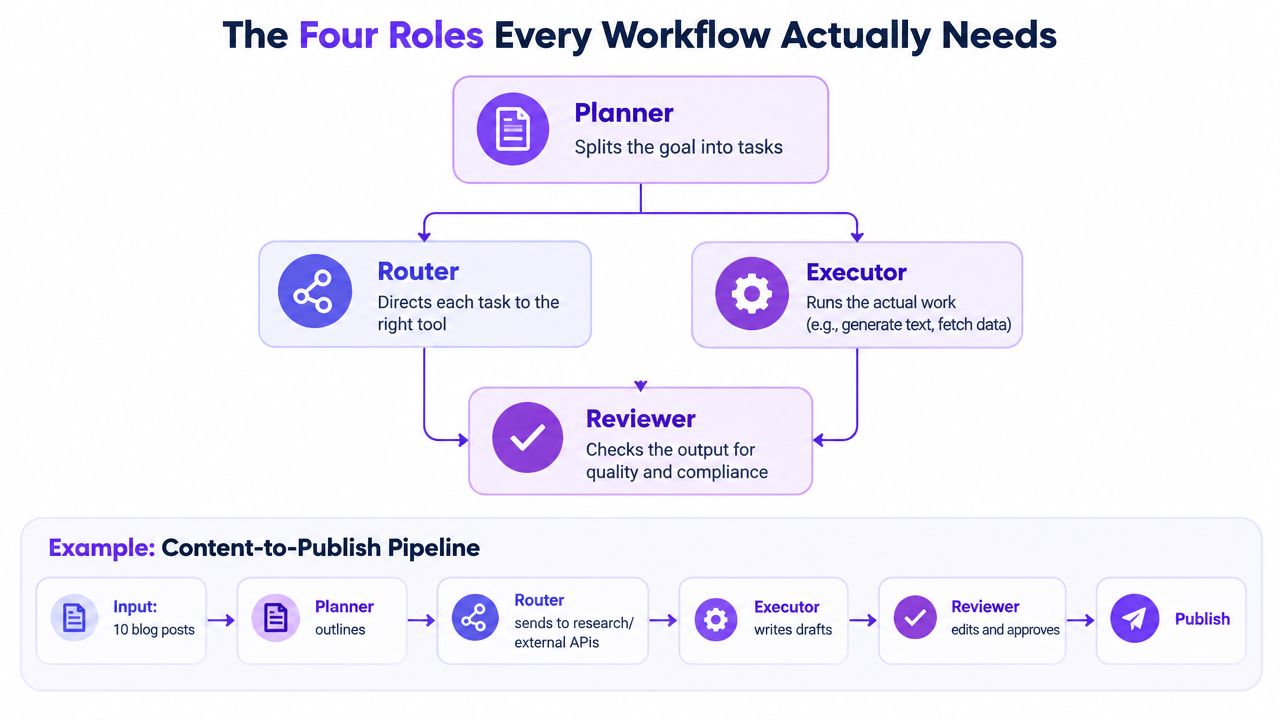
A reliable workflow separates responsibilities even when one model performs several of them. For a content-to-publish pipeline, the roles are easy to see: someone turns a brief into a plan, someone directs each task, someone performs the work, and someone checks whether the result is safe to publish.
Planner
The planner converts a broad goal into ordered tasks. Given a request to turn ten source articles into publishable posts, it should identify required research, extraction, drafting, fact checking, formatting, and approval steps.
The plan must specify inputs and outputs. “Research the topic” is too vague. “Return deduplicated sources with title, URL, publication date when available, and claims supported by each source” gives the next step something testable.
Router
The router decides which capability handles each task. It might send web research to a search tool, file extraction to a document parser, drafting to a language model, and publication to an approved CMS connector.
Routing is a responsibility, not necessarily a separate agent. Keeping the decision explicit makes it easier to change a model or tool without rewriting the whole workflow.
Executor
The executor performs the work. It generates a draft, transforms structured data, calls an API, or creates a document. Executors should return structured results instead of conversational explanations whenever possible. A draft step might return content, detected claims, unresolved placeholders, and a status value.
Reviewer
The reviewer checks the result against a rubric and chooses among ship, retry, or escalate. For the publishing pipeline, its rubric could verify source coverage, required sections, citation traceability, prohibited claims, tone, and formatting.
Skipping this role is common because the first demo appears correct. That works until an incorrect output reaches a customer, editor, or public channel. A reviewer can be another model for low-risk checks, but sensitive decisions should include a human queue with the complete workflow trace attached.
Routing Inputs and Picking the Right Model at Each Step
Don't send every task to the strongest model. Route requests according to the work each step requires. A short intent classification doesn't need the same reasoning depth as long-context synthesis, conflict resolution, or final quality evaluation.
Start with signals you can measure before the model runs:
- Input length: Long files and accumulated retrieval results may require a model with stronger context handling.
- Structure: JSON, tables, and forms benefit from strict schema instructions and validation.
- Content type: Code, legal language, technical specifications, and ordinary prose may need different capabilities.
- Tool requirements: A step that must call a CRM, search system, or file store should go only to an agent with the appropriate permission.
- Stated difficulty: If the requester explicitly asks for comparison, contradiction analysis, or deep synthesis, treat that as a routing signal.
A practical content workflow can use a fast, economical model to classify the request, then reserve a stronger model for research synthesis and review. The router should return a stable decision such as simple_summary, long_context_analysis, or needs_human_review, rather than writing a paragraph that another agent has to interpret.
| Workflow Step | Input Signal | Model Tier | Why |
|---|---|---|---|
| Intent classification | Short, structured request | Fast model | Low reasoning burden and predictable output |
| File extraction | Tables, headings, metadata | Tool-enabled model or parser | Preserves document structure |
| Draft generation | Approved outline and source bundle | General-purpose model | Produces the requested transformation |
| Conflict analysis | Contradictory sources or complex brief | Strong reasoning model | Handles ambiguity and evidence comparison |
| Final review | Rubric, draft, citations, policy rules | Strong evaluator or human | Makes the release decision |
Cache the routing decision when the input and workflow version are identical. Otherwise, the system may pay the classification cost again during retries or repeated submissions. The router itself can become the bottleneck if it makes unnecessary model calls, waits on oversized context, or repeatedly reclassifies the same item.
For a deeper treatment of selecting models by task rather than brand preference, see this guide to AI model routing. The practical principle is simple: match capability to risk, then validate the result instead of assuming the model tier guarantees quality.
Designing Fallbacks for Rate Limits, Tool Errors, and Bad Outputs
Fallbacks should be designed before the first user touches the workflow. In customer-support triage, a ticket might be classified, enriched with account data, drafted into a response, checked against policy, and either sent or placed in a queue. Each stage can fail differently, so one generic retry handler isn't enough.
Rate limits
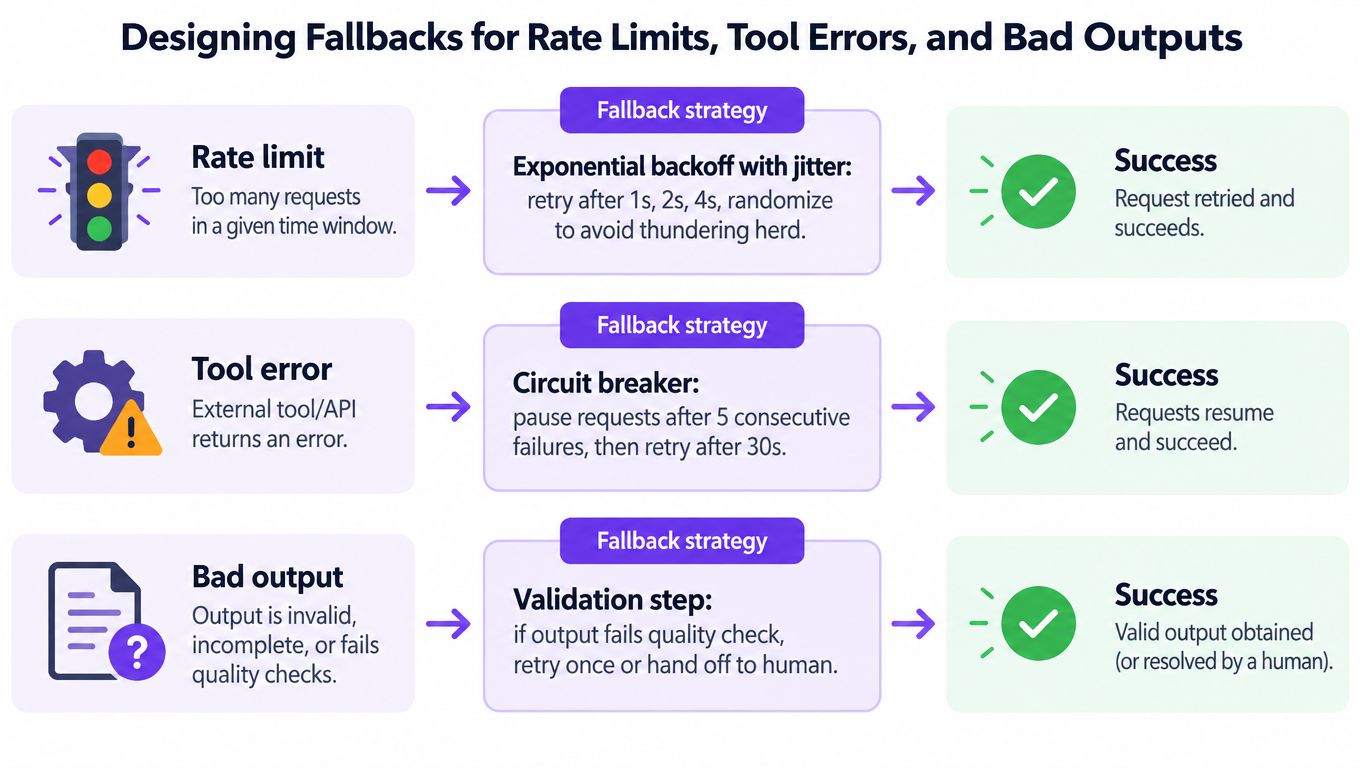
When a model provider returns a rate-limit response, retry with exponential backoff and jitter. Randomization prevents many workers from retrying at the same instant. After repeated failures, a circuit breaker should pause calls temporarily instead of allowing the queue to amplify the outage.
Keep a secondary provider or model available for non-sensitive work. The fallback must preserve the same output contract, or the next step will fail for a different reason. Record which provider handled the request so later quality comparisons remain possible.
Tool errors
Wrap external calls in typed errors such as authentication failure, timeout, schema mismatch, empty response, and partial response. Retry only errors that are plausibly transient. Use idempotency keys for actions that could create duplicate tickets, messages, records, or files.
If account enrichment fails, the triage workflow can continue in degraded mode with a clearly flagged result. It should not invent account details or treat missing data as a successful lookup. The reviewer can then decide whether the response is safe to send.
Bad outputs
A syntactically valid answer can still violate the task. Send generated replies through a reviewer that checks policy, tone, required fields, unsupported claims, and escalation triggers.
A useful fallback ladder is:
- Validate the output against a structured schema and quality rubric.
- Regenerate once with the failed rule included as a specific constraint.
- Escalate to a human with the original ticket, tool responses, draft, failed checks, and trace identifier.
- Preserve the failure for evaluation instead of deleting it after the human edits the answer.
Practical rule: A fallback shouldn't hide failure. It should reduce user impact while leaving enough evidence to fix the workflow.
This video provides a visual introduction to fallback thinking, but production implementation still requires typed errors, safe retries, and review logic around each real integration.
What Reliability Benchmarks Tell You About Your Own Workflow
Benchmark scores are useful for comparing capabilities, but they don't tell you whether your exact workflow will survive production. The task definitions, tools, prompts, context sizes, permissions, and recovery logic all differ from your stack.
A large workspace benchmark found that the best agent reached only about a 60% pass rate, while average agent performance was 45.1%, compared with 80.7% for human plus tool execution. Results across configurations ranged from roughly 27% to 60%, which is a warning against treating one successful demonstration as evidence of dependable automation. The benchmark study makes the operational implication clear: multi-step work needs validation and oversight at intermediate stages.
A separate enterprise-style benchmark reported 35.3% success on a more complex task and 70.8% on a simpler task. Its pass-to-the-eighth-trial result peaked at 0.0634, or a 6.34% chance of executing the workflow correctly across all eight trials. The enterprise agent architecture benchmark shows why repeated execution matters more than a flattering single-run score.
The math of compounding failure
If each step succeeds independently, an end-to-end run is the product of the step probabilities. That means a workflow with five steps at 60% per-step reliability has roughly 7.8% clean-run probability, not 60%. At 90% per-step reliability, the corresponding probability is roughly 59%.
Those calculations are mathematical implications of the benchmark-style pass rates, not claims that every real workflow has independent steps. In practice, failures may correlate, and retries can improve results, but shared context, tool outages, and bad state can also make several steps fail together.
| Step Pass Rate | 5-Step Completion Probability | Runs Needed for 1 Clean Run |
|---|---|---|
| 60% | Approximately 7.8% | Approximately 13 |
| 90% | Approximately 59% | Approximately 2 |
The right response isn't to chase a single impressive end-to-end average. Build a small evaluation set for every node, with representative successes, ambiguous inputs, malformed tool responses, long documents, duplicate records, and policy-sensitive cases. Measure whether each node returns the required schema, preserves evidence, handles missing data, and makes the correct retry or escalation decision.
Evaluate nodes, not just the final answer
For each step, record:
- Input validity: Did the node receive the fields and context it expected?
- Tool correctness: Did it call the right tool with valid arguments?
- State transition: Did it mark the action as complete only after confirmation?
- Output quality: Did the response meet the rubric?
- Recovery behavior: Did it retry, degrade, or escalate appropriately?
Use pass@k to ask whether one of several attempts can solve a task, and pass^k to ask whether the workflow succeeds across repeated trials. The latter is especially important for automation because a workflow that succeeds occasionally may still be unusable for a daily queue.
Integration is where capability gets lost
Full documents can overwhelm a context window. Search results can bury the actual instruction. External applications can return partial data while still producing a response that looks valid.
Use narrow, typed tool surfaces, including MCP servers where they fit your environment. Each server should expose a focused capability with explicit inputs and outputs, rather than an enormous catalog that consumes context and increases ambiguity. Keep authentication and permissions outside the model's discretion, and return actionable errors when access fails.
For files, preserve the original artifact outside the prompt. Chunk content with metadata headers, summarize long sections before synthesis, and keep page or section references attached to extracted claims. For search, deduplicate results and track which source supports each claim. Set a context budget per step so a retry doesn't add the previous failed prompt, retrieved results, and tool output again.
The workflow should be able to lose a tool mid-run without losing the original task. Persist the plan, completed steps, artifacts, tool results, and reviewer decisions separately. Then a recovery process can resume from the last confirmed state instead of asking an agent to reconstruct history from a conversational transcript.
Monitoring Traces, Latency, Cost, and Quality in Production
A workflow without traces is difficult to operate because the final error rarely identifies the first mistake. Assign a trace ID to every run and a step ID to every model call, tool call, retry, validation result, and human decision. Store the prompt version, model or provider, input references, output schema status, latency, and failure type.
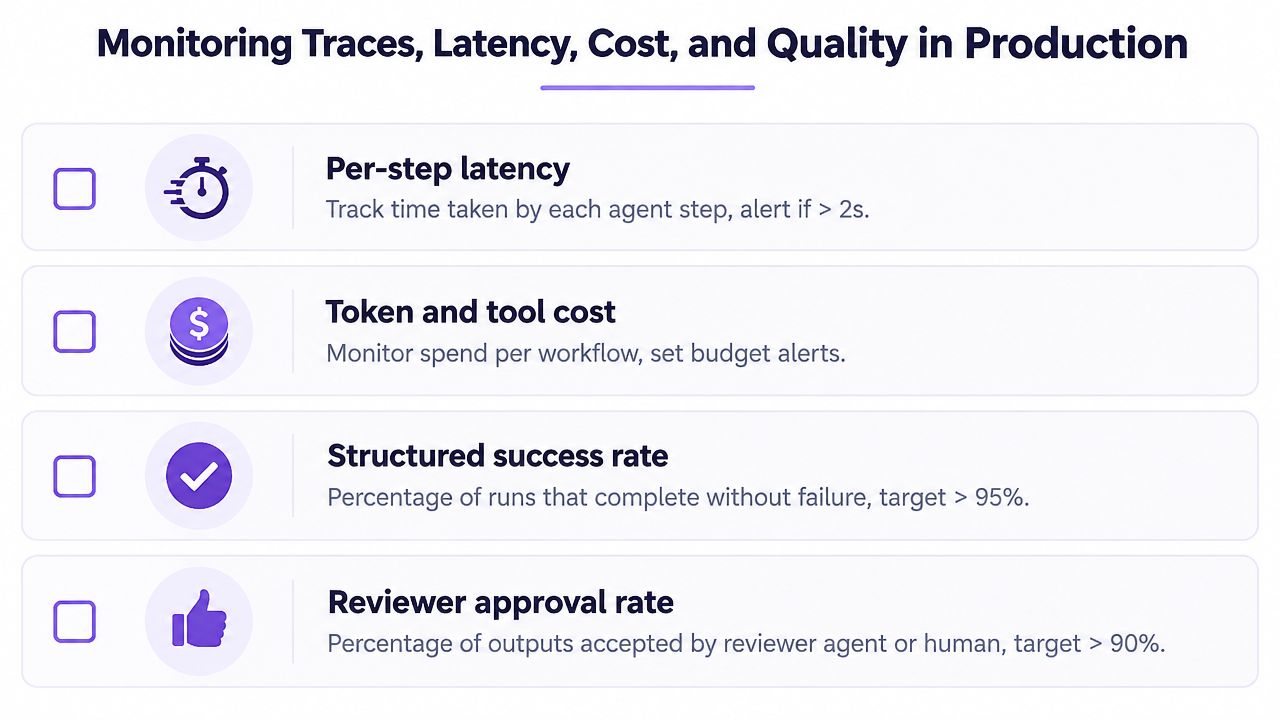
The production dashboard needs four views:
- Per-step latency: Find the slow node instead of blaming the whole workflow.
- Token and tool cost: See which routes, retries, and context bundles consume resources.
- Structured success rate: Count runs that complete with valid states and expected outputs.
- Reviewer approval rate: Track how often a model or person accepts the result without correction.
Watch for silent degradation
The dangerous failures don't always throw exceptions. Retry counts can rise while the workflow still completes. Reviewer rejections can climb after a provider update even though no prompt changed. One extraction step can become slower while the total workflow remains within a broad timeout.
Set alerts against your own baseline, not an invented universal target. Alert when high-percentile latency rises materially, cost per run crosses its budget, low-confidence outputs spike, or a single tool produces an unusual share of partial responses. Include the trace ID in every alert so an operator can replay the exact path.
Teams that need broader infrastructure visibility can get ahead of downtime with these picks and connect those signals with application-level agent traces. Infrastructure uptime won't explain a bad summary, but it can distinguish a provider outage from a prompt, parser, or reviewer regression.
Keep a weekly review. Compare early-week runs with late-week runs, inspect the worst traces, sample approved outputs, and update the evaluation set with newly observed failures. For a stronger record of decisions, permissions, and changes, use this AI agent accountability and audit trail guide as a reference point.
Operational habit: Review failures while they're still small enough to understand. A forgotten retry pattern becomes much harder to diagnose after it spreads across every workflow.
Putting It Together and Shipping Your First Reliable Workflow
The operating rule is straightforward: every step has an owner, a fallback, and a measurable output. The planner owns task decomposition, the router owns capability selection, the executor owns the action, and the reviewer owns the release decision. A single model can perform several roles, but the contracts between those roles should remain visible.
Start with one high-volume, low-stakes workflow, such as inbound support-ticket triage or meeting-note summarization. Don't add web search, file analysis, CRM writes, and publishing in the first version unless the use case requires them. Establish clean traces before adding another tool.
A practical seven-day launch
- Day one: Define the input, final output, prohibited actions, reviewer rubric, and escalation path.
- Day two: Build the planner and executor with structured state. Save every artifact outside the prompt.
- Day three: Add typed tool errors, safe retries, idempotency protection, degraded mode, and human handoff.
- Day four: Create node-level evaluation cases for normal, incomplete, duplicated, and adversarial inputs.
- Day five: Add trace IDs, latency records, cost accounting, structured success events, and reviewer outcomes to a dashboard.
- Day six: Run the workflow against recorded examples and inspect failures manually.
- Day seven: Hold the first retrospective. Fix the most common failure, then treat the resulting measurements as your baseline.
The common launch mistakes are predictable. Teams skip the reviewer because the output looks persuasive, deploy without cost caps because early volume is low, and call the first week “finished” instead of using it to discover missing states and bad assumptions.
Choose the implementation surface carefully. A hosted agent platform can shorten setup for creators and small teams, while an SDK gives developers tighter control over state, permissions, testing, and deployment. This AI agent platform versus SDK build guide can help frame that decision.
Shipping isn't the end of the project. It's the moment the workflow starts producing evidence about where it breaks, which routes deserve stronger models, and where a human should remain in control.
Writingmate brings multi-model chat, web research with citations, file analysis, integrations, and saved agents into one workspace for repeatable tasks. If you want to prototype an ai agents workflow before wiring every provider and tool yourself, visit Writingmate and test the workflow with real inputs, explicit instructions, and a review step.
Frequently Asked Questions
Sources

Written by
Artem Vysotsky
Ex-Staff Engineer at Meta. Building the technical foundation to make AI accessible to everyone.

Reviewed by
Sergey Vysotsky
Ex-Chief Editor / PM at Mosaic. Passionate about making AI accessible and affordable for everyone.