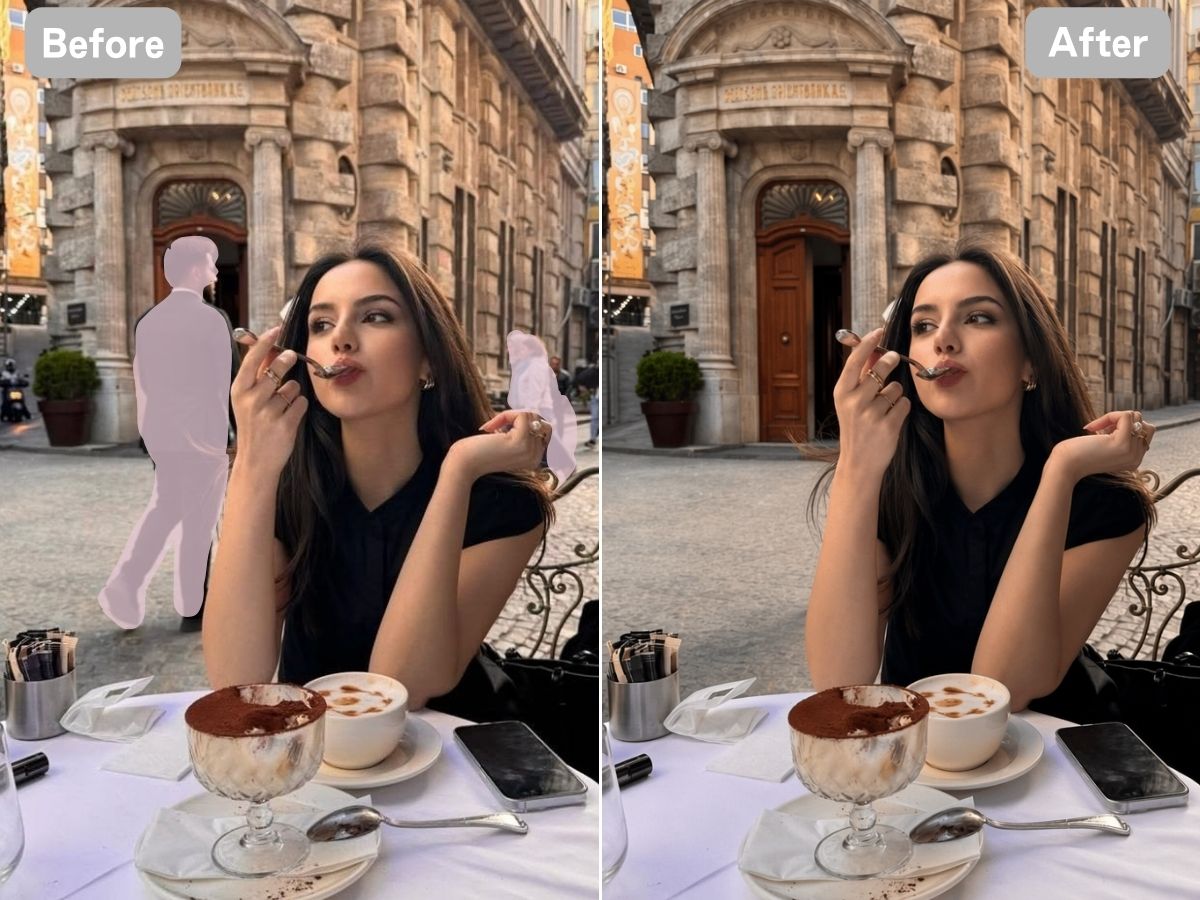
Sometimes, the easiest and most practical way to improve a photograph is not to crop someone out. Cropping can drastically change the framing, cut into the main subject, or leave you with a completely different composition from the one you originally captured. This is particularly frustrating in travel photos, street photography, and group shots where the background matters almost as much as the main subject itself.
AI-powered removal tools offer a much more flexible approach to modern image editing. Instead of simply deleting a person and leaving a blank void, advanced algorithms attempt to intelligently reconstruct the space behind them based on surrounding pixels and textures. The final results, however, depend heavily on the complexity of the scene and the specific technology each software utilizes. Below, we compare six popular options to remove person from photo and analyze where each one fits best.
1. BeautyPlus
Removing a person from a photo often sounds like a simple editing task, but the background left behind is what determines whether the final image actually looks convincing. BeautyPlus approaches this problem with a dedicated AI tool designed specifically for removing unwanted people and other distractions.
The workflow is straightforward. Users upload a photo, select the person they want to remove, and allow the AI to process the surrounding area. This makes it particularly practical for situations such as removing tourists from travel photos or clearing a passerby from an otherwise well-composed shot. BeautyPlus also offers a broader watermark remover, which may be useful when an image requires more than just removing a person.
Where It Works Best
BeautyPlus is most suitable for people who want a quick solution without getting into professional retouching. It can be useful for travel photography, social media images, and everyday photos where one or two unwanted people are distracting from the main subject.
Advantages
- Dedicated tool for removing unwanted people.
- Simple workflow that does not require advanced editing knowledge.
- Also provides other cleanup functions for different image-editing needs.
- The object removal tool supports high-resolution output.
Limitations
- Geared more toward quick visual cleanup than complex, multi-step editing workflows
Pricing
The dedicated people-removal page presents the tool as free to use.
2. Picsart
Picsart takes a broader approach to removing people from photos. Rather than positioning the feature as a standalone editing task, it places AI removal within a larger creative editing environment.
The basic idea is familiar: upload an image, identify the unwanted person or area, and let the AI handle the removal. Users can then continue working on the same image with other editing tools, which is useful when removing a person is only one step in the editing process.
This makes Picsart particularly relevant for social media creators. A creator might remove a stranger from the background, adjust the image, add text, and prepare the final version for publication without moving between multiple applications.
Where It Works Best
Picsart makes sense for users who need more than a simple “erase and download” tool. It is a better fit when people removal is part of a larger social media or creative editing workflow.
Advantages
- AI-assisted removal of people and unwanted objects.
- Can handle other elements such as text, logos, and watermarks.
- Combines removal with a broader set of creative editing functions.
- Available across web and mobile environments.
Limitations
- The large number of available features may feel unnecessary if the only goal is to remove one person from one photo. Some additional editing and AI functions may also require a paid plan.
Pricing
The people-removal feature can be tried for free, while additional features are available through Picsart's paid options.
3. Adobe
Adobe takes a more controlled approach to AI-powered removal. Instead of relying solely on automatic detection, users can brush over the person they want to remove and define the exact area that needs to be edited.
Once the selection is made, Firefly uses generative AI to fill the space based on the surrounding content. This can be useful when the unwanted person is only part of a larger scene and the user wants to decide precisely which areas should be changed.
The main advantage here is control. A user can adjust the brush size and hardness before making a selection, which provides more flexibility than a completely automatic workflow.
Where It Works Best
Firefly is a natural fit for designers, content creators, and users who already work within Adobe's creative ecosystem. It is particularly useful when removing a person is part of a more involved editing process.
Advantages
- Allows users to define the removal area manually.
- Uses generative AI to reconstruct missing background areas.
- Can be used to remove individuals or groups.
- Fits into a wider Adobe creative workflow.
Limitations
- For someone who simply wants to clean up a holiday photo, Firefly may offer more functionality than necessary. As with other generative tools, complicated backgrounds can also produce inconsistent results that require another attempt.
Pricing
Access and usage depend on Adobe Firefly's current plans and generative credit system.
4. Pixelcut
Pixelcut focuses on reducing the amount of work between uploading an image and getting a cleaned-up result. Its cleanup tools are designed for users who do not necessarily want to learn traditional photo-retouching techniques.
The people-removal workflow can be useful when an unwanted person is interfering with an otherwise usable image. For example, a creator preparing social content or a small business owner working on product visuals may need to clean up an image quickly rather than spend time editing every detail manually.
Where It Works Best
Pixelcut's main strength is convenience. It is less about giving users extensive control over every part of the edit and more about making routine image cleanup accessible.
Advantages
- Quick approach to removing unwanted elements.
- Beginner-friendly editing experience.
- Useful for social content and commercial visuals.
- Available through web and mobile experiences.
Limitations
- More complicated backgrounds may require additional editing or repeated attempts. Users looking for detailed manual retouching controls may also prefer more advanced software.
Pricing
Pixelcut offers free editing options, while additional AI features and usage may depend on the current subscription plan.
5. Fotor
Fotor sits somewhere between a simple online cleanup tool and a broader photo editor. Its AI-powered editing features are designed to make common adjustments more accessible to people who may not have professional retouching experience.
For users trying to remove someone from a photo, the main appeal is convenience. The same platform can also be used for other types of image editing, meaning there is less need to switch between different tools for routine photo adjustments.
Where It Works Best
Fotor is particularly useful when the user is not looking for a specialized professional workflow. Someone editing travel photos, social media content, or everyday images may appreciate having people removal alongside other familiar editing features.
Advantages
- Accessible for users with limited editing experience.
- Combines AI-powered cleanup with broader editing tools.
- Suitable for everyday photography and social media content.
- Offers free editing options.
Limitations
- The results may be less predictable when removing people from highly detailed or complicated backgrounds. Users may also need to adjust the selected area more than once to get a cleaner result.
Pricing
Fotor offers free features, with additional AI tools and usage available through paid plans.
6. Evoto AI
Evoto AI approaches people removal from a different direction. Rather than focusing primarily on quick, casual edits, the software is built around a broader AI-assisted photography workflow.
This distinction matters for professional users. A photographer working with a large collection of images may care less about removing one person from a single photo and more about having efficient editing tools that can fit into an ongoing production process.
Evoto's people-removal capabilities are therefore more relevant to users who already have a regular photography or post-production workflow.
Where It Works Best
Evoto AI is best suited to photographers and professional users who need AI assistance across a larger editing process. For a casual user who only wants to remove a stranger from one holiday photo, a simpler online tool may be more convenient.
Advantages
- Built around professional photography workflows.
- AI can reduce repetitive editing work.
- More suitable for users handling larger volumes of images.
- Provides a wider editing environment beyond a single removal function.
Limitations
- The software may have a steeper learning curve compared with simple online tools. It can also be more than an occasional user needs for a single image-editing task.
Pricing
Evoto AI offers different access options depending on the current plan and usage requirements.
Why Remove People from Photos Instead of Cropping Them Out?
While cropping is often the first instinct when dealing with an unwanted person in a frame, it is rarely the best solution. Relying solely on a tight crop introduces several major compromises that AI-powered removal tools successfully avoid:
- Compositional Destruction: Trimming the edges of a photo to cut out a tourist often forces you to sacrifice essential parts of the scenery, throwing off the natural balance and rule-of-thirds framing of your shot.
- Proportion and Scale Distortion: In landmark or landscape photography, cropping alters the perspective. Removing peripheral elements can accidentally make the main subject look isolated, cramped, or awkwardly positioned.
- The "Dead-Center" Deadlock: Cropping only works when the distraction is conveniently located near the borders. If a person is standing directly behind your subject or occupying the absolute center of the frame, cropping becomes mathematically impossible without deleting the subject entirely.
- Preserving the Original Narrative: AI object removal respects the photographer's initial intent. Instead of shrinking the canvas, it reconstructs the blocked background pixels, allowing you to keep your wide-angle framing, emotional context, and spatial depth intact.
Conclusion
The challenge of clearing a photobomber from a picture rarely lies with the subject itself, but rather with the visual elements they happen to block.
This distinction explains why different applications serve distinct purposes. A lightweight online editor works well for tourists touching up landmark photos, whereas a professional handling extensive collections requires a robust production suite. When working with simple, clean backgrounds, modern AI features make the editing process seamless, while intricate environments require a balance of intelligent algorithms and careful user control.