You give an AI assistant a short request, get a vague answer, rewrite the request with more detail, and receive something better but still inconsistent. Then the question appears: do you need a prompt generator for AI, an optimizer for an existing prompt, a template library, or a visual builder for image and video work?
A generator can turn an underspecified task into a more structured instruction. It can't verify every factual claim, guarantee identical results across models, or replace editorial review. The right tool depends on the job: generating, optimizing, discovering, reverse-engineering, or operationalizing prompts.
This comparison focuses on practical trade-offs, including workflow friction, model fit, customization, reuse, integration, and limitations. The 10 resources are grouped by what they help you accomplish, not by how impressive their feature pages sound. For foundational prompt-writing principles, TattoosAI's best practices for AI is a useful companion.
Table of Contents
- 1. ChatGPT Prompt Generator Free Tool
- 2. PromptPerfect by Beagle
- 3. AIPRM for ChatGPT
- 4. Promptomania Visual Prompt Builder
- 5. PromptHero
- 6. Lexica
- 7. FlowGPT
- 8. Jasper Prompt Library
- 9. PromptBase
- 10. Krea
- Top 10 AI Prompt Generators Comparison
- Choose the Smallest Prompt Stack That Works
1. ChatGPT Prompt Generator Free Tool
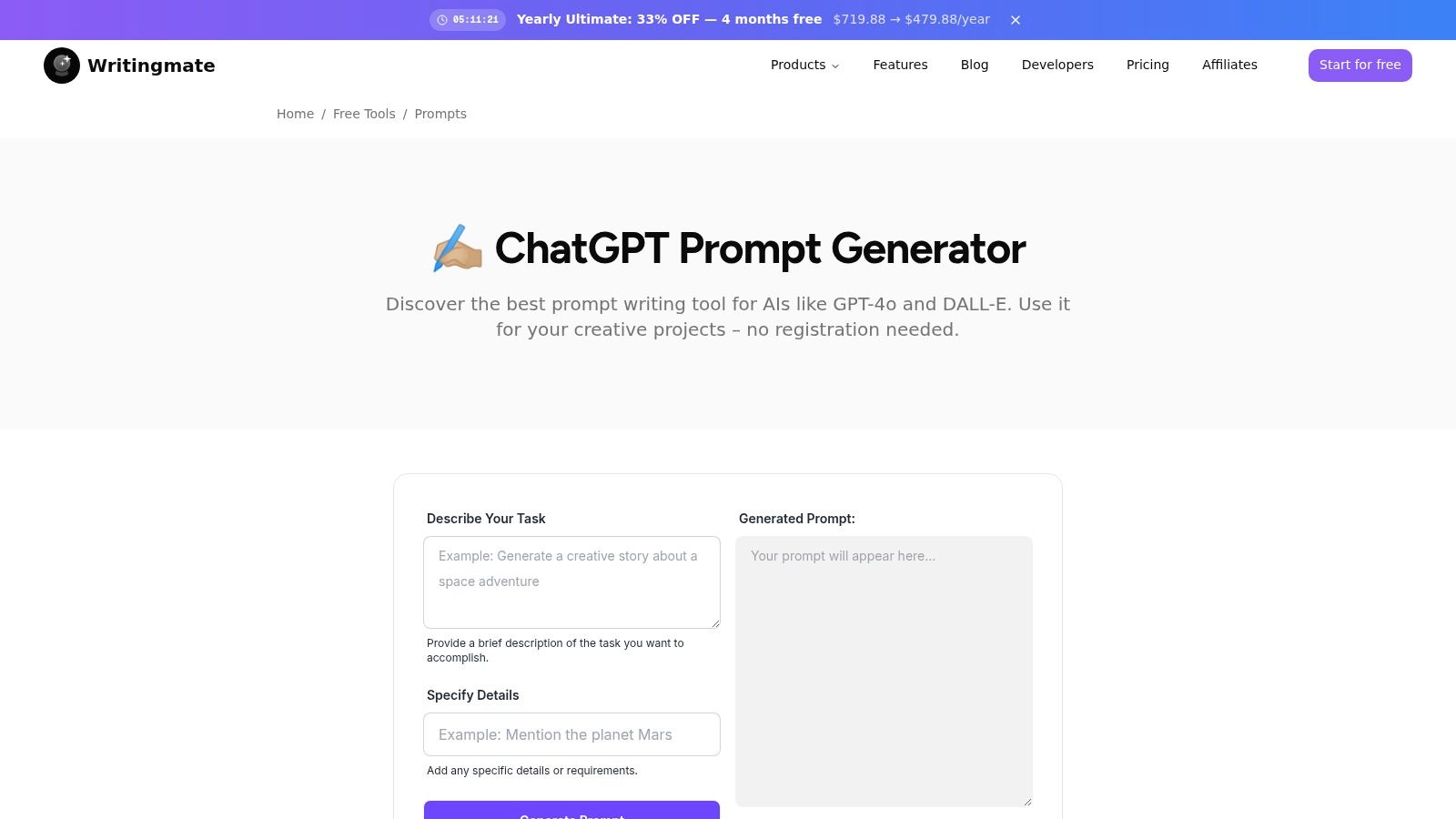
Writingmate's ChatGPT Prompt Generator is the most direct starting point when you know what you want to accomplish but don't know how to express it. You describe the task, add important requirements, and receive a more complete prompt that you can copy, test, and revise. The free web tool works without an account, which removes the usual signup barrier.
The workflow is deliberately short. It suits a marketer preparing a campaign brief, an educator designing an explanation, a developer defining a coding task, or a creator shaping an image request. It also supports both text and image-oriented prompting, including workflows aimed at GPT-4o and DALL·E.
Where it fits best
This tool is strongest at first-draft generation. It turns a plain task description into a prompt with clearer context, constraints, desired details, and output direction. That makes it useful when the problem is not prompt experimentation, but getting past the blank page.
The no-login design is also practical for one-off work. You don't need to configure a workspace before testing an idea, and you can move the generated prompt directly into your preferred AI application.
Practical rule: Treat the generated prompt as a starting specification, not as a guaranteed final answer.
The trade-off
The same simplicity that makes the tool fast limits its usefulness for prompt operations. Sessions are ephemeral, so you'll need to manually save prompts if you want to reuse them. It also doesn't provide the advanced customization, side-by-side model comparison, or automation available in Writingmate's broader paid workspace.
That makes it a good fit for individuals who need a polished prompt quickly. Teams with recurring tasks will eventually need a system for storing variables, comparing outputs, tracking revisions, and connecting prompts to other tools.
2. PromptPerfect by Beagle
PromptPerfect by Beagle addresses a different problem. You already have a prompt, but its wording is inefficient, ambiguous, or poorly matched to the task. Instead of generating from scratch, the tool rewrites the draft and explains the reasoning behind its suggestions.
That explanation matters. A prompt optimizer is more useful when it teaches you what changed, rather than producing a longer block of text that you can't evaluate. PromptPerfect includes “Learn why” explanations, task and model modes, and access through a web app, Chrome extension, and REST API.
Useful in the place where prompting happens
The browser extension lets you optimize prompts inside applications such as ChatGPT or Gmail. That reduces copying between tabs, especially when you're refining an instruction while working on an email, brief, or research task.
The REST API makes PromptPerfect more relevant to developers. An optimization step can sit inside a backend workflow instead of remaining a manual action performed by an individual user. The project is free and MIT-licensed, and its documentation says the API key remains in the browser, which may appeal to users who are cautious about sending credentials through an intermediary.
What it doesn't solve
Optimization isn't validation. A rewritten prompt can be clearer while still asking for unsupported information, omitting necessary context, or assuming that the target model understands a capability it doesn't have. You still need to test the revised instruction against representative inputs.
The project is also newer and has a smaller ecosystem than established commercial prompt tools. End-to-end runs require your own model or API usage, so the optimizer doesn't remove the operational cost of generating the response.
Use PromptPerfect when you have a prompt worth preserving but need help improving its structure. Don't use it as a substitute for deciding what a good answer should contain.
3. AIPRM for ChatGPT
AIPRM for ChatGPT is primarily a prompt discovery and reuse layer. Rather than asking you to formulate every instruction yourself, it places a library of templates inside the ChatGPT experience. The collection covers areas such as marketing, writing, SEO, and coding, with community and curated prompt packs.
That interface integration is its main advantage. You can select a template, fill in the relevant details, and continue working without opening a separate prompt database. For someone who regularly performs familiar content or marketing tasks, the reduced friction can be more valuable than a standalone generator.
A library still needs an editor
A large template collection creates abundance, not automatic quality. Community prompts can vary in clarity, assumptions, and usefulness. Some may include unnecessary role instructions, outdated model references, or constraints that don't match your actual workflow.
AIPRM works best when users treat templates as patterns to inspect. Look for how a prompt defines the audience, supplies context, specifies the output format, and handles missing information. Then remove anything that doesn't serve your task.
Paid organizational features can make the tool more relevant for teams, while the free experience offers a lower-commitment way to explore the library. Its biggest limitation is platform dependence. The smoothest experience is tied to ChatGPT's interface, so it isn't a neutral prompt workspace for teams comparing several model providers.
Choose AIPRM when your priority is finding a ready-made starting point inside ChatGPT. Choose an optimizer or builder when you need more control over how the prompt is adapted.
4. Promptomania Visual Prompt Builder
Promptomania is built for visual prompting rather than general-purpose text or code instructions. Its browser-based builder helps users assemble descriptions for image, video, 3D, and audio models through guided controls. It also provides model references and learning material for systems such as Midjourney and Stable Diffusion.
The guided interface is useful when you understand the image you want but lack the vocabulary to describe composition, lighting, camera treatment, materials, or style. Instead of staring at an empty text box, you build the prompt from visible decisions.
A good visual scaffold
Promptomania is especially approachable for non-experts. It can help a user learn which descriptive dimensions matter in visual work, then produce a prompt that can be copied into a separate generation tool.
For a more direct image-prompt workflow, the Writingmate AI Image Prompt Generator offers another route to structured prompts. Comparing the two is useful because they represent different approaches. Promptomania emphasizes guided assembly and exploration, while a generator can be faster when you want to describe the concept in ordinary language.
Promptomania doesn't generate the final image itself. You still need to transfer the prompt to the relevant model, and the resulting image may change when you switch models or settings. It also offers less value for analytical, writing, and software-development prompts.
Use it when the task is visual and you want a structured learning aid. Don't choose it as your main prompt environment for mixed text, research, and automation work.
5. PromptHero
PromptHero is best understood as a discovery gallery. It helps users browse prompts and outputs, remix ideas, and explore work across image and video models. Its web and mobile experiences make it convenient for creators who want visual references while developing a concept.
The gallery format answers a question that generators often don't: what does a finished prompt look like when paired with a specific visual result? Seeing the relationship between wording and output can help you identify useful patterns in subject description, composition, lighting, style, and model-specific syntax.
Inspiration is not a production template
PromptHero is valuable during exploration. You can search for a visual direction, inspect how other users describe it, and adapt the useful parts to your own subject. Community interaction, favorites, and comments can also help surface interesting approaches.
Quality varies across community submissions, however. A prompt may work because of a particular model version, seed, image reference, parameter combination, or creator workflow that isn't fully visible on the page. Copying it unchanged can produce a result that looks nothing like the example.
Some content and features are paid, so access isn't uniform. The practical workflow is to use PromptHero for inspiration and pattern collection, then rewrite the prompt around your own brief and test it in the target model.
That distinction protects your team from confusing a compelling example with a repeatable method. A gallery can show you what to try. It doesn't prove that the same wording will transfer cleanly to another model or project.
6. Lexica
Lexica is a reverse-engineering tool for visual prompts. Its image search pages expose the prompt associated with each public generation, allowing you to study how creators described a subject and visual treatment. The service is particularly relevant to Stable Diffusion workflows, and its API supports programmatic search and use.
This makes Lexica more analytical than a typical inspiration gallery. You aren't only looking for attractive images. You're examining the prompt structure behind them, then separating reusable ideas from details that belong to the original generation.
Learn from the prompt, not just the image
A practical review process is simple. Start with the subject, identify the visual attributes that matter, note the composition and lighting language, and remove terms that don't apply to your project. Then rebuild the instruction for your own model, aspect ratio, reference image, and desired output.
For a complementary explanation of how visual references can become structured instructions, see Writingmate's guide to image-to-prompt workflows.
Lexica is focused primarily on Stable Diffusion, and you need an external generator to use the prompts. Reproduction isn't guaranteed across models or settings. A prompt that produced a particular image may depend on model checkpoints, parameters, negative prompts, or other context that isn't portable.
Use Lexica when you need to understand how a visual result was described. It's less suitable as a universal generator for writing, coding, or business workflows.
7. FlowGPT
FlowGPT combines community prompt discovery with a visual workspace for adapting prompts and workflows. Its canvas-style interface is useful when a task involves more than one instruction, such as collecting information, transforming it, reviewing it, and preparing a final response.
The community layer gives you breadth. You can browse use cases, inspect popular prompts, and fork an approach rather than starting with a blank page. The visual workspace then gives you somewhere to modify the logic instead of treating each prompt as an isolated paragraph.
From prompt to workflow
That shift is important for repeat tasks. A good prompt may define an individual step, but a dependable workflow also needs inputs, variables, output formats, failure handling, and a review point. FlowGPT can help users think in those terms, particularly when they want to test variations quickly.
Writingmate's guide to a prompt generator for writing is useful for the same reason. A writing prompt becomes more reusable when it specifies the reader, purpose, source material, tone, structure, and acceptance criteria.
FlowGPT's community quality still requires curation. Some shared prompts are experimental, incomplete, or designed for a narrow setup. Many features are also oriented toward OpenAI-style backends, which can limit portability when your workflow uses Claude, Gemini, or other model families.
Choose FlowGPT when you want to explore and adapt multi-step LLM use cases. Before production use, strip away unnecessary instructions, define what happens when context is missing, and test the workflow with real inputs.
8. Jasper Prompt Library
Jasper's Prompt Library is designed for marketing and content teams already working inside the Jasper ecosystem. It provides ready-made prompts and guidance for areas such as SEO, advertising, social posts, and other brand-oriented tasks.
The library's strength is context. A marketing prompt isn't useful only because it sounds polished. It needs to reflect the audience, offer, brand voice, channel, compliance constraints, and desired action. Jasper's connection to its brand voice and knowledge features makes these templates more relevant to teams that have already organized that information in the platform.
Best for controlled content production
Jasper is a better fit for commercial content operations than for general prompt experimentation. Teams can begin with a maintained vendor library, then adapt prompts to their messaging standards and recurring campaigns. That can be more efficient than collecting unrelated community templates.
The limitation is equally clear. Access requires a Jasper subscription, and the library is strongest for marketing and content rather than research, programming, or technical analysis. If your organization uses several model providers or wants a neutral prompt repository, the platform's integrated approach may feel restrictive.
Use Jasper when the prompt belongs inside a broader brand-content workflow. Don't select it solely because it contains templates. The value comes from how those templates connect to brand context and production processes.
9. PromptBase
PromptBase operates as a marketplace for prompts covering text, image, and video models, including Midjourney, FLUX, Sora, and ChatGPT. It also offers subscription access through PromptBase Select, while seller tools and marketplace signals help users evaluate what other creators are publishing.
A marketplace is useful when you want to study commercial prompt packaging. Sellers often expose a prompt's intended use, model compatibility, and output examples, giving buyers a way to compare different approaches before building their own.
Buy selectively, then test independently
PromptBase can save exploration time when you need a specialized visual or text prompt and don't want to formulate the first version yourself. Its cross-model coverage also makes it more useful than a library tied to one application.
However, seller quality and prompt granularity vary. A highly polished preview may not tell you how much of the result depends on hidden settings, source images, model versions, or manual editing. Some prompts are available only through individual fees or a subscription, so purchasing a prompt doesn't remove the need for evaluation.
Treat every marketplace prompt as an asset that needs a test protocol. Record the model, input variables, output requirements, and revisions. If the prompt can't be adapted to your workflow or its results aren't consistent with your representative tasks, its apparent convenience isn't worth much.
10. Krea
Krea focuses on creative image workflows, with tools that turn reference images into structured prompts. Its Image-to-Prompt feature helps identify elements such as composition, lighting, and style, while style controls and moodboards support visual direction across a project.
This is a reverse-engineering and operationalizing tool for image teams. Instead of describing a desired look from memory, you can begin with a visual reference, extract a prompt structure, and adapt that structure into a reusable creative brief.
Strong for visual systems, narrow outside them
Krea is useful when a team needs more than a single image. Moodboards and style variables help turn visual preferences into repeatable inputs, while the API creates a path toward programmatic workflows. That makes it more operational than a simple prompt gallery.
The focus is primarily image generation, so Krea isn't a general solution for writing, code, or research prompts. Some advanced capabilities and higher-resolution modes are paid, which matters when a workflow moves from experimentation into regular production.
The most reliable use is to separate reference analysis from final generation. Let Krea help describe the visual language, then review whether the resulting prompt captures the subject, rights-cleared reference, audience, and intended use. A visually accurate description can still be unsuitable if it carries over details that don't belong in the new work.
Top 10 AI Prompt Generators Comparison
| Tool | Key features | UX / Quality | Price & Value | Target audience | Unique selling point |
|---|---|---|---|---|---|
| ChatGPT Prompt Generator – Free Tool | 3-step prompt builder for text & image; no-login ✨ | Fast, simple, ★★★★☆ | 💰 Free, ephemeral sessions | 👥 Creators, marketers, educators, devs | Instant, zero-friction onramp to Writingmate; plugs into paid suite |
| PromptPerfect (by Beagle) | Prompt optimizer + “learn why” explanations; extension & API ✨ | Transparent feedback, ★★★★☆ | 💰 Free, MIT-licensed | 👥 Privacy-conscious devs & builders | Local API key privacy; explainable rewrites |
| AIPRM for ChatGPT | Large template library; ChatGPT overlay | Seamless inside ChatGPT, ★★★★☆ | 💰 Freemium (team tiers paid) | 👥 Marketers, SEOs, content teams | One-click ChatGPT templates; 🏆 big community packs |
| Promptomania (Visual Prompt Builder) | Visual builder for image/video/3D/audio; guides | Approachable GUI, ★★★★☆ | 💰 Free | 👥 Visual creators & beginners | Guided controls + learning resources for visual prompts ✨ |
| PromptHero | Massive prompt gallery; mobile remixing; multi-model | Inspiration-rich; ★★★☆☆ | 💰 Freemium (some paid content) | 👥 Mobile creators & hobbyists | Mobile one-tap remixing + large community gallery ✨ |
| Lexica | Image search exposing exact prompts; API | Fast prompt discovery, ★★★★☆ | 💰 Freemium + API pricing | 👥 Image artists & researchers | Exact prompts for Stable Diffusion outputs, ideal for reverse-engineering 🏆 |
| FlowGPT | Community prompts + visual canvas/workflows | Canvas-driven experimentation, ★★★★☆ | 💰 Free | 👥 Power users, prompt engineers | Visual canvas to build, fork, and iterate on LLM workflows ✨ |
| Jasper Prompt Library | Business-focused prompt templates & tips | Business-ready; curated, ★★★★☆ | 💰 Paid (Jasper subscription) | 👥 Marketing & content teams | Integrated with brand voice and Jasper workflows 🏆 |
| PromptBase | Marketplace of 275k+ prompts across modalities | Large selection; quality varies, ★★★☆☆ | 💰 Pay-per-prompt or subscription | 👥 Professionals seeking high-quality prompts | Marketplace analytics and seller tools; massive catalog ✨ |
| Krea | Image-to-prompt conversion, style controls, moodboards | Style-aware tooling, ★★★★☆ | 💰 Freemium + paid features/API | 👥 Visual designers & studios | Image→prompt conversion that explains composition & style 🏆 |
Choose the Smallest Prompt Stack That Works
The best prompt stack is usually smaller than people expect. Use a generator when you have a task but no strong draft. Writingmate's free ChatGPT Prompt Generator is a practical first step for turning plain instructions into a structured prompt without creating an account. It's especially useful for quick text or image experiments.
Use an optimizer when you already have a prompt and want to improve clarity, organization, or model fit. PromptPerfect is the more natural choice in that situation because it operates on an existing draft and explains its changes. Use a library or gallery when you need ideas, not certainty. AIPRM, PromptHero, FlowGPT, Jasper, and PromptBase can expose patterns, templates, and workflows, but community or seller content still needs review.
For image-focused work, Promptomania helps assemble visual descriptions through guided controls. Lexica helps reverse-engineer prompts attached to public Stable Diffusion images. Krea goes further into reference analysis, style direction, moodboards, and API-enabled visual workflows.
The operational distinction matters. A prompt that produces an interesting result once isn't automatically a reusable production asset. Before you standardize it, record the model, input context, variables, expected output format, and revision notes. Keep the original prompt and the edited versions together so your team can identify which change affected the result.
Build a testing habit
Test templates against representative tasks, not only ideal examples. Include ordinary inputs, incomplete context, difficult edge cases, and requests where the model should admit that information is missing. Clearer prompts can improve consistency, but they don't remove the need to verify facts, inspect sources, and review outputs before publication.
Prompt engineering becomes more than template collecting. The field's mainstream breakthrough is commonly traced to the GPT-3 paper published on May 28, 2020, which described a 175-billion-parameter model adapting to new tasks from examples embedded in prompts, as summarized in this history of prompt engineering. By March 2023, GPT-4 expanded the pattern with larger context windows and multimodal applications. Prompting became an interface, but interfaces still need testing and governance.
For teams that want prompt building, reusable libraries, multi-model comparison, files, web research, agents, and integrations in one workspace, Writingmate is a relevant option. Its unified environment can help compare outputs across models and turn successful prompts into repeatable helpers, although teams should still evaluate whether its workflow, integrations, and model coverage match their requirements.
The market is expanding, but that doesn't mean every prompt generator deserves a place in your stack. Independent reporting cites LinkedIn prompt-engineering postings rising 434% since 2023, while one estimate projects the prompt-engineering market from USD 222.1 million in 2023 to USD 2,060.8 million by 2030, with a 32.8% CAGR, as reported in these prompt-engineering market statistics. Growth supports better tooling, not blind adoption.
Start with the smallest workflow that solves your actual bottleneck. Generate a draft, optimize it when necessary, borrow inspiration carefully, benchmark the result, and only then automate it.
Writingmate brings prompt builders, reusable prompt libraries, multi-model comparison, file analysis, web research, image and video generation, agents, and integrations into one workspace. Visit Writingmate to turn promising prompts into tested, repeatable workflows instead of keeping them as scattered copy-and-paste experiments.
Frequently Asked Questions
Sources
- TattoosAI's best practices for AI
- ChatGPT Prompt Generator
- PromptPerfect by Beagle
- AIPRM for ChatGPT
- Promptomania
- Writingmate AI Image Prompt Generator
- PromptHero
- image-to-prompt workflows
- FlowGPT
- prompt generator for writing
- Jasper's Prompt Library
- PromptBase
- history of prompt engineering
- prompt-engineering market statistics
- Writingmate

Written by
Artem Vysotsky
Ex-Staff Engineer at Meta. Building the technical foundation to make AI accessible to everyone.

Reviewed by
Sergey Vysotsky
Ex-Chief Editor / PM at Mosaic. Passionate about making AI accessible and affordable for everyone.