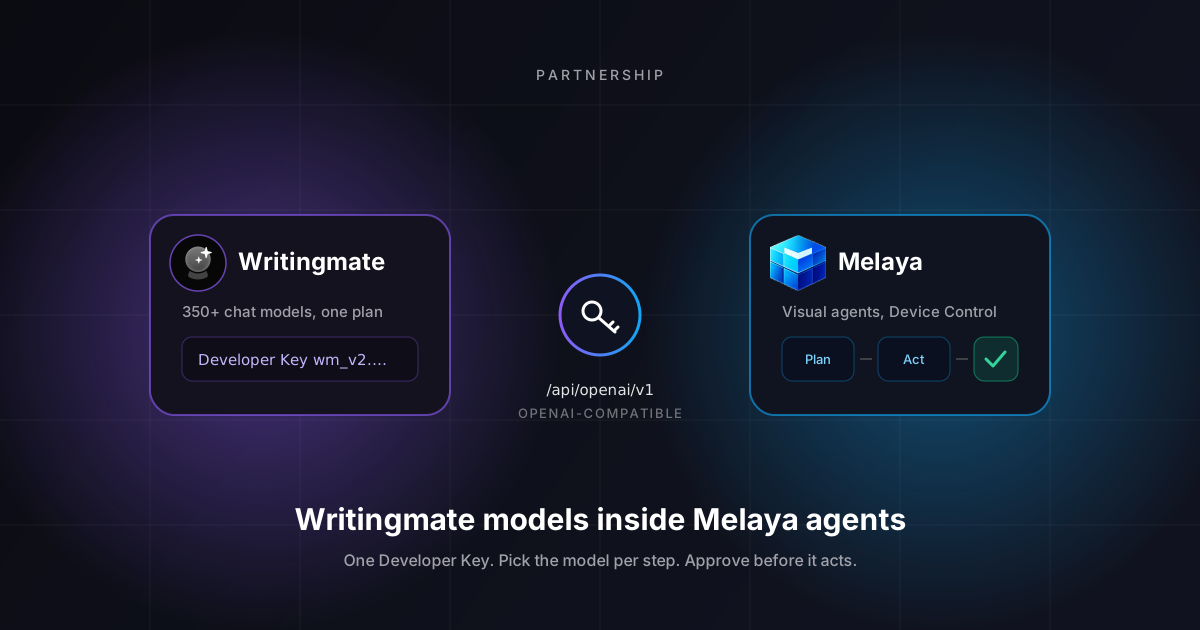
Pick the model that fits the task in front of you. Then give the answer somewhere useful to go. That is the whole idea behind our partnership with Melaya.
Writingmate gives you many AI models in one subscription. You can compare answers, switch models mid task, and keep one bill. Melaya builds visual agents that use tools, ask for approval before they act, and repeat the same steps next week. As of today you can plug your Writingmate account into Melaya as a model provider and use both together.
Choosing a model is one decision. Deciding what that model can read, which tools it can use, and what needs a human sign-off are separate decisions. A good workflow makes all of them visible. This post walks through how the two products connect, three workflows we think are worth starting with, and the limits you should know before you build anything on it.
One subscription, several models
Writingmate is built around one simple thing: you should not need a separate subscription for every model you want to try. Your plan covers models from OpenAI, Anthropic, Google, xAI, and open-weight labs. You pick per chat, or per message, and compare answers side by side. The dashboard docs cover how model selection and comparison work.
That covers the choosing part. Melaya covers what happens after. The pattern looks like this:
Step | What you do | Where |
|---|---|---|
Choose | Pick a model that suits the task from the ones in your plan. | Writingmate, or the Writingmate provider inside Melaya |
Compare | Run the same brief through two or three models. Check the answers against the facts you already have. | Writingmate chat |
Act | Hand the reviewed result to a Melaya agent that can use tools, wait for approval, and run again later. | Melaya |
Two things to be clear about up front. Your Writingmate subscription is a Writingmate product. It does not include Melaya, and it does not give you a direct account with each underlying model provider. And "one subscription" is not "unlimited". Each plan comes with a monthly credit pool and rate limits. The plan comparison lists the current numbers.
What Writingmate brings, what Melaya brings
The two products do different jobs. That is why the pairing is useful.
Writingmate | Melaya |
|---|---|
350+ chat, image, and video models under one plan | A visual builder for multi-step agents |
Side by side comparison of answers to the same brief | Tools and subagents the agent can call |
An OpenAI-compatible API and a personal Developer Key | Device Control, which runs actions inside real Android apps |
Credits and limits managed in one workspace | Approval steps and scoped permissions before an agent acts |
Documented API terms and scope | Run history you can inspect afterwards |
How the connection works
Melaya has added Writingmate to its list of model providers. Melaya says the connection validates your Developer Key and then lists the chat models your account can use. Setup is short:
- In Writingmate, open Profile Settings, then API Keys, and create a Developer Key. Copy it when it is shown. The full value appears only once. Keys look like
wm_v2.<key-id>.<secret>.<signature>. - In Melaya, add Writingmate as a model provider. If you are asked for an OpenAI-compatible base URL, use
https://writingmate.ai/api/openai/v1. Paste the Developer Key as the API key. - Pick a chat model for each agent step. Examples that work today:
anthropic/claude-sonnet-5,google/gemini-3.8-flash,openai/gpt-5.5. The full list is on our models page. - Set which tools the agent may use and which actions need your approval. Then run it.
The Writingmate × Melaya partner page has the same steps with more detail, plus a list of what is and is not covered. The OpenAI-compatible API docs have the endpoint list, headers, and SDK examples.
One practical note. Your brief, your review checklist, and the place the result ends up can all stay the same when you swap models. Model names change often. Process should not.
Workflow 1: compare launch copy, then move the chosen version forward
Start with a short launch brief. Product facts, who it is for, the action you want, and claims you can actually back up. Keep that brief identical across models. If you change the brief between runs, you will confuse a difference in inputs with a difference in model quality.
Run the brief through two or three models in Writingmate. Read each answer with the same questions. Does it name the reader's problem? Does it describe the product correctly? Is the next step obvious? A punchier answer is not automatically a better one.
Once you pick a version, hand it to a Melaya agent for the surrounding work. Build the review pack, attach it to the right project, draft the FAQ, and propose follow-up tasks through whatever connectors you have allowed. Keep anything that publishes externally behind an approval step.
Say a solo founder compares two landing page intros, picks the clearer one, and lets Melaya assemble the supporting FAQ, an internal review note, and a publish checklist. That is a workflow example. It is not a claim about conversion rates.
The part worth keeping is the rubric. Save the original brief, the factual fixes, and the reason you chose the final version. Next launch starts with a better process instead of a blank prompt box.
Workflow 2: research a question, then verify the answer
Internal research needs a question narrow enough to answer and sources strong enough to act on. Write down what changed, who it affects, and what evidence would change your recommendation. Do that before you pick a model.
Different models organize the same material differently. One might give you a clean outline. Another might surface an assumption worth checking. Use that spread to sharpen your review. Do not treat agreement between models as proof of anything.
Then move to Melaya. Give the agent only the context and tools the task needs. Have it prepare a summary for the intended reader. Check every link, date, and quoted number against the original source. Separate what the sources show from what your team concludes.
- Define the question. Audience, sources, and what "done" looks like.
- Choose a model. Pick one from your plan that suits the material.
- Compare and verify. Run alternatives and check them against the evidence.
- Review the result. A person approves the conclusion and the audience.
- Connect the follow-up. Let the agent organize the next action with the tools you allowed.
A good output is a one page decision brief. The question, source links, what the sources support, what is still uncertain, and proposed next steps. That format is easy to challenge and easy to update. It also gives the next agent run a better starting point than a loose chat transcript.
Workflow checks improve how evidence is handled. They do not make every model output correct. You still read the sources.
Workflow 3: a repeatable personal operations brief
Recurring work follows a stable shape. Gather the inputs you have access to, summarize what changed, list actions, and ask the owner what should happen next. A personal ops brief is a good first agent because success is easy to see.
In Melaya, pick a chat model through the Writingmate provider. Give the agent one narrow job, like a daily summary from a project source you have explicitly connected. Decide which tools it can touch and which accounts are in scope.
Keep observing and acting separate. Producing a list of overdue tasks can probably run on its own. Sending messages, changing records, or assigning work should wait for the approval mode you chose. With Device Control, every action inside an Android app shows up as an approval prompt before it happens. Read those prompts.
Look at the first few runs for missing context, duplicated tasks, and conclusions the inputs do not support. Keep the output short enough to actually read. If you switch models later, rerun a known example and compare it against the same checklist before you trust it for recurring work.
This helps a founder or a small team keep follow-up organized without handing a model open-ended authority. The value is in a clear process and a useful output, not in how many models are in the dropdown.
Account access and Developer Key scope
A few facts that matter before you build on this.
- Credits are pooled and finite. Current plans share one monthly credit pool across chat, images, video, and API use. Legacy and promotional accounts can have different rules. Check the limits shown in your own workspace, and read the credits documentation.
- A Developer Key is not a provider key. It lets another app, in this case Melaya, use your Writingmate account. It is not an OpenAI, Anthropic, or Google API key, and it does not create accounts with those providers on your behalf.
- The API is alpha and fair use. It is meant for personal tools, local clients, coding assistants, and internal workspace workflows. Endpoints, limits, model availability, and uptime are not guaranteed.
- Customer-facing use needs a separate agreement. Building, hosting, reselling, or running production software or customer-facing services on the API is not covered by a standard plan. If that is what you want to do, email us first.
Melaya's provider connection does not change any of this. Provider access, Melaya permissions, and your account limits are three separate things. Plan your workflow with all three in mind. The Terms of Service have the full wording.
Pick a workflow that fits that scope. One person summarizing their own notes, or a team trialing an internal brief, is a very different case from a company reselling a service to customers. The fact that the connection works does not mean every use is allowed.
Start with one useful, reviewable workflow
You need less than you think to get going:
- A personal or internal task with a clear owner and a permitted purpose
- A Writingmate account and a Developer Key
- One chat model from your plan that suits the task
- Only the Melaya tools and context the task actually needs
- A review step, and explicit permissions for anything that acts
If you already use Writingmate, Melaya gives your model output a place to become tools, approvals, and a process that runs again. If you already use Melaya, Writingmate adds a model access option that covers many models on one plan, which helps when comparing answers is part of the job.
Head to the Writingmate × Melaya partner page for the setup steps, then visit Melaya to explore their agent builder and use cases. If you already work through an AI assistant that supports MCP, Melaya also publishes an MCP server for connecting its tools to compatible clients. That is a separate path from the model provider connection described here.
Begin with one question, one owner, and one clear output. Compare models when it helps the decision. Keep a person in the loop when it is time to act.
Artem
Frequently Asked Questions
Sources

Written by
Artem Vysotsky
Ex-Staff Engineer at Meta. Building the technical foundation to make AI accessible to everyone.

Reviewed by
Sergey Vysotsky
Ex-Chief Editor / PM at Mosaic. Passionate about making AI accessible and affordable for everyone.