Most advice about script writer AI starts with the wrong promise: give a machine a premise, press generate, and receive a finished screenplay. That approach can produce pages quickly, but speed isn't the same as progress. A script can have scene headings, reversals, and plausible dialogue while still lacking the private logic that makes a character feel alive.
The productive question isn't whether AI can replace a screenwriter. It can't replace your judgment about what a scene means, what a character refuses to say, or which emotional contradiction deserves to remain unresolved. The better question is where a machine can remove friction without taking authorship away from you. Used carefully, AI is most valuable as a collaborative editorial accelerator, especially for revision triage, structural diagnosis, alternative scenes, and controlled brainstorming.
Table of Contents
- Where Script Writer AI Tools Add the Most Value
- Choosing Between General LLMs and Specialized Platforms
- Prompting Techniques for Structured Drafting
- Formatting Standards and Multi-Model Editing
- Building a Sustainable AI Scripting Workflow
Where Script Writer AI Tools Add the Most Value
The strongest use of script writer AI begins after a meaningful creative decision, not at the blank page. Give the system a scene, beat sheet, or character problem, then ask it to locate weak links, test alternatives, and expose assumptions. You decide which observations belong in the script and which would pull it away from its intended voice.
That distinction matters as writing software expands. One 2026 industry estimate places the global AI writing assistant software market at $3.25 billion in 2024, rising to $3.64 billion in 2025 and projected to reach $9.09 billion by 2033, with a 12.1% CAGR, as reported in AI content creation market statistics. A separate estimate places the global AI text generator market at $758.56 million in 2026 and projects $2.77 billion by 2034, with a 17.58% CAGR. These are adjacent categories, not screenplay software alone, but they show that writing and generation tools are becoming established products. For broader context on tool categories, see these AI writing tool comparisons.

What AI handles well
AI is useful for generating scene variations once the dramatic objective is clear. Ask for a confrontation in which the character lies, one in which they deflect with humor, and one in which they leave before the argument ends. Comparing those outcomes lets you test consequences without drafting every experiment from scratch.
It can also produce dialogue variants, although the most useful result is often the diagnosis behind them. The model may point out that one character is explaining information the other already knows, or that every exchange ends with the same rhythm. Use that feedback to rewrite the scene in your own cadence, with your own omissions and subtext.
Structural diagnosis often saves more time than generated prose. Ask the model to mark scenes serving the same function, moments that introduce information without changing a decision, or sequences in which the protagonist only reacts. The result is a revision triage list. You can then spend attention where a change may affect the whole screenplay instead of polishing isolated lines.
Practical rule: Ask AI to find choices, contradictions, and missing consequences. Keep the creative decisions in human hands.
The field's history also challenges the idea that automated screenplay generation appeared fully formed. A 2026 academic review of AI scriptwriting traces public experiments back at least to 2016, including Andy Herd's TensorFlow-based system trained on the full text of Friends and the later Benjamin project associated with Oscar Sharp and Ross Goodwin. These projects established script generation as a recognizable creative-AI subfield. Demonstrating generation, however, does not demonstrate emotional authorship.
Why first drafts flatten voice
A general model has learned patterns of language and narrative. It can reproduce surface signals of tension, wit, grief, or menace, but it does not know why you chose one image over another. A request for a scene “in the style of a gritty psychological thriller” often produces familiar shorthand instead of a specific human perspective.
The problem grows when the model handles the first meaningful choices. It tends to make the protagonist legible too early, resolve ambiguity too neatly, and arrange conflict according to recognizable genre patterns. The pages may read competently, yet competence without personal pressure produces interchangeable scenes.
A stronger division of labor is straightforward:
- You define the premise: Write the logline, central contradiction, protagonist's wound, and ending before asking the model to expand the idea.
- AI generates options: Request alternate scenes, complications, reversals, and questions that challenge the outline.
- You select the pressure points: Keep the option that makes the story more personal, costly, or surprising, even when it is less tidy.
- AI audits the draft: Ask for continuity errors, inactive scenes, exposition clusters, repeated beats, and unresolved setup.
- You rewrite the emotional material: Preserve the odd phrasing, cultural specificity, silence, and subtext that make the script yours.
The workflow described in this analysis of AI scriptwriting and screenplays supports that division. Brainstorming, alternative scenes, dialogue variations, and structural diagnosis are more productive uses than handing over authorial control. The practical gain is shorter revision triage and faster testing of possibilities, while the writer retains the choices that give the screenplay its identity.
Choosing Between General LLMs and Specialized Platforms
The decision between a general-purpose LLM and a specialized script platform depends less on which tool has the longest feature list and more on what phase your project is in. A general model is often enough when you're testing a premise, exploring character dynamics, or comparing structure options. A dedicated platform becomes more useful when the draft has to move through production-oriented tasks, such as script formatting, scene breakdowns, revision tracking, or maintaining a consistent voice across repeated deliverables.
General models such as ChatGPT, Claude, and Gemini can handle standard screenplay requests and dialogue exercises. They offer flexibility, which matters when your task shifts from a logline critique to research questions or a thematic comparison. Their weakness is workflow continuity. You may need to provide the same character information, formatting rules, and project context repeatedly, and the model may treat each request as a fresh exercise.
Specialized tools narrow the environment around screenwriting. They may provide screenplay-aware formatting, character bibles, scene organization, coverage-style feedback, production breakdowns, or export options. Those features don't automatically improve the story, but they can remove administrative work that distracts from revision.
The market is also moving toward a hybrid choice. Recent coverage describes general models reaching parity for standard script formats, while purpose-built platforms retain an advantage when creators need brand-voice consistency or production workflows, as discussed in this 2026 comparison of AI scriptwriting tools for creators. The same source reports workflow compression of roughly 30% to 45% in some market analyses, but that figure should be treated as a market-reported range rather than a guaranteed result for every writer or project.
Match the tool to the task
| Use Case | General LLMs | Specialized Platforms |
|---|---|---|
| Premise development | Flexible brainstorming and questioning | Useful when ideas need to stay attached to a project workspace |
| Alternative scenes | Strong for rapid variations and tonal experiments | Strong when variations must remain organized by scene |
| Dialogue exploration | Good for testing subtext, conflict, and voice constraints | Better when character profiles and style rules persist |
| Screenplay formatting | Requires explicit instructions and careful checking | Usually built around screenplay conventions and export |
| Production breakdowns | Possible with structured prompts and uploaded material | Often includes scene, cast, prop, and location organization |
| Revision triage | Useful for diagnosing patterns across supplied pages | More practical when feedback connects to the script's structure |
| Team workflows | Flexible, but context can become fragmented | Better suited to shared project organization and repeatable processes |
A practical buyer's test is simple. If you're still asking whether the story should be a thriller or a family drama, don't pay for production features yet. Use a general model to challenge the premise and produce competing structures. If you already have a script and need consistent formatting, searchable project context, or breakdown support, specialized software can justify its place in the workflow.
You should also compare the models themselves rather than assuming one response represents objective truth. A guide to finding the right LLM can help you think in terms of task fit, context handling, and output quality instead of treating model selection as a popularity contest.
Where specialization earns its cost
Specialized platforms pay off when the same operational problem appears throughout a project. If every revision requires rebuilding a character reference, reformatting scene elements, and manually sorting notes, a script-specific workspace can keep the process coherent. It also gives a team a common structure for discussing changes.
They don't pay off when they encourage you to outsource the story's central decisions. A button labeled "generate next scene" can be tempting during a stalled draft, but continuation is not the same as development. The tool may preserve surface continuity while weakening the conflict, repeating the same emotional beat, or resolving a question that should remain active.
The right tool should shorten the distance between your judgment and the page. It shouldn't create distance between you and the story.
Prompting Techniques for Structured Drafting
A script writer AI can produce pages quickly, but speed is rarely the main obstacle in a screenplay. The harder task is deciding which problem to solve first. Use prompts to expose structural weaknesses, test alternatives, and sort revision priorities. Keep the story's central choices and language under human control.
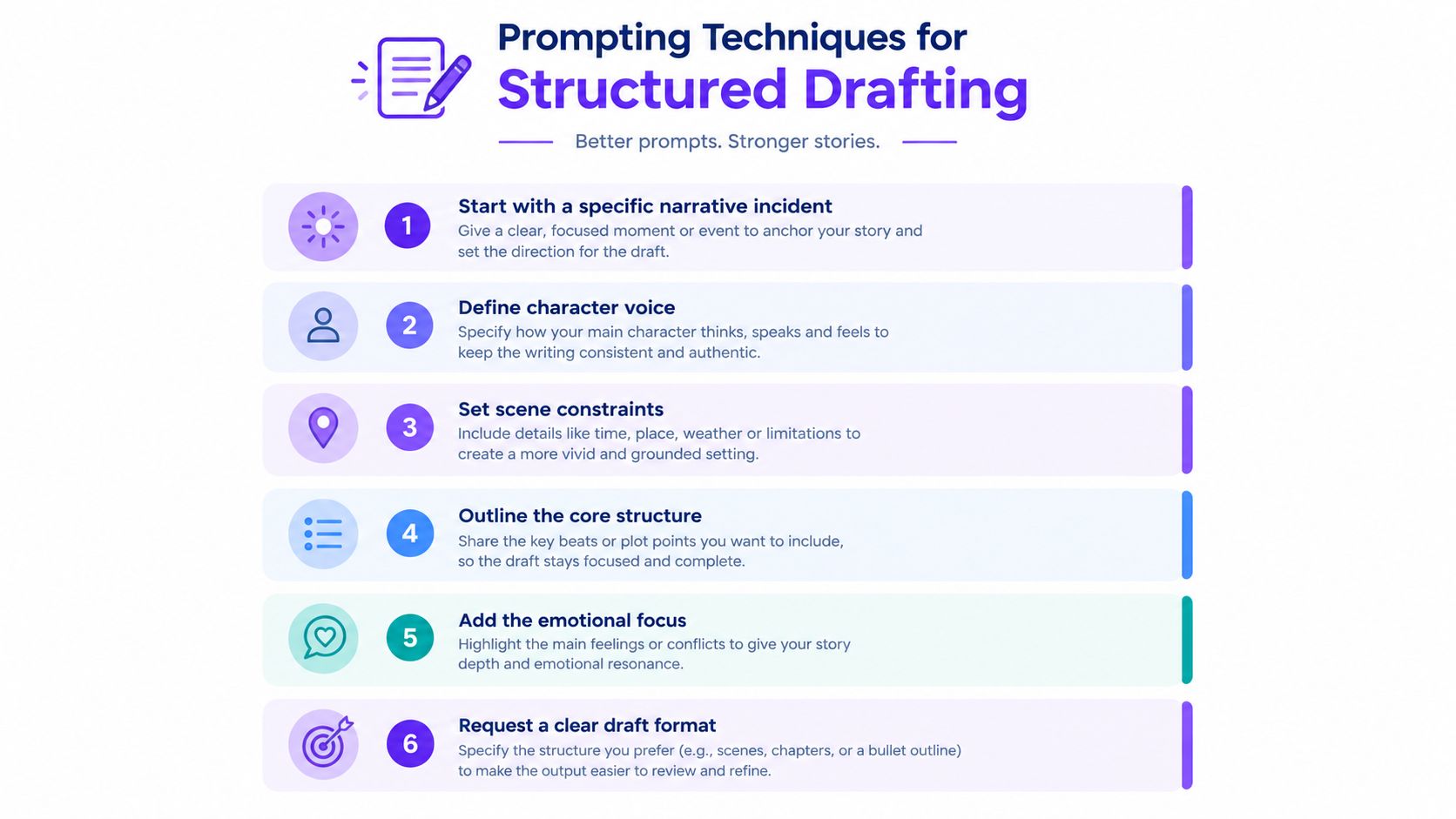
A vague prompt forces the model to invent the project's priorities. “Write a compelling horror screenplay about a haunted temple” supplies genre signals but no dramatic test. Start with a specific incident that forces a character to choose, then ask the model to examine the consequences.
That workflow matches the five-stage method described in a practice-based study of generative AI-assisted screenplay development: familiarization, prompt initiation from a disorienting incident or situation, critical reflection and prompt refinement, AI-assisted self-assessment, and further screenplay refinement. The model functions as part of an iterative editorial loop, not as an autonomous writer.
Start with the incident
Begin with the moment that destabilizes the story instead of requesting a complete plot. For example:
A paramedic arrives at an apartment after a silent emergency call. The patient is missing, but the body camera shows the paramedic entering the room twice.
The incident gives the model a setting, an unanswered contradiction, and a possible investigation. Follow it with focused questions:
- What does the protagonist believe happened on arrival?
- What information should remain hidden from the audience?
- Which choice makes the situation worse?
- What personal history makes the protagonist unable to walk away?
- What physical rule governs the apparent impossibility?
At this stage, the model should widen the field, not select the premise. Reject familiar options and ideas disconnected from the protagonist's emotional problem. The useful output is a set of pressure points for revision, not a ready-made sequence.
Lock character voice before requesting dialogue
“ sarcastic detective” is too broad a character brief. Give the model constraints that affect behavior and language. State what the character wants in the scene, what they refuse to admit, which subject they avoid, how they respond under pressure, and what sentence rhythm fits them.
A useful prompt might read:
Write three possible responses for Mara after her brother accuses her of hiding evidence. Mara wants him to leave, refuses to admit she is afraid, and uses precise practical language when emotional. She never explains her feelings directly. Each version should change the power balance without resolving the argument.
The prompt asks for dramatic alternatives under pressure, not finished dialogue in your voice. Compare the versions for action, subtext, and power shift. Extract the underlying move, then rewrite the words yourself. That preserves authorial voice while still using the model to break a stalled scene into workable choices.
Force structure into the request
DramaBench evaluated 8 state-of-the-art LLMs on 1,103 drama scripts across six dimensions: Format Standards, Narrative Efficiency, Character Consistency, Emotional Depth, Logic Consistency, and Conflict Handling. The evaluation pipeline produced 8,824 total evaluations, 252 statistical significance tests, and human validation on 188 scripts, as documented by the DramaBench benchmark.
The practical warning matters more than any overall ranking. Weaknesses clustered around out-of-character dialogue and logic consistency. A single request for “high-quality screenplay feedback” combines too many judgments, so separate the audits and ask for evidence from the supplied pages.
Use a prompt such as:
Review this sequence in four passes. First, identify screenplay-format problems. Second, mark scenes that do not advance the narrative. Third, list every contradiction in character knowledge, motivation, or action. Fourth, identify dialogue that sounds interchangeable between characters. Do not rewrite the scenes yet. Quote only short phrases from the supplied text and explain the dramatic risk.
Then run a separate conflict pass:
For each scene, state who wants what, who controls the immediate exchange, what changes by the end, and what new obstacle appears. If nothing changes, explain whether the stillness is intentional or inert.
This separation turns the model into a revision-triage tool. It can identify where to look first, while the writer decides whether a flagged issue is a flaw, a deliberate delay, or part of the script's voice. A script can follow formatting rules and remain dramatically static. It can also move efficiently while giving every character the same voice.
The five-stage approach in the study also reports 7% to 10% overall improvement when model-generated feedback is used to refine scripts. Treat that finding as support for iterative feedback, not as a promise that every project will improve by the same amount.
Use constraints instead of adjectives
“Make it cinematic” gives the model little to solve. Constraints create a defined dramatic problem:
- The scene takes place in a stalled elevator.
- The protagonist must lie without stating a false fact.
- The antagonist knows more than the protagonist, but cannot reveal how.
- No character may explain the backstory directly.
- The scene ends with a decision, not an emotional summary.
- The central object must change hands twice.
Constraints protect specificity and give revision a clear test. Ask the model to mark which requirements the scene meets, which it misses, and where compliance weakens the character's intention. That produces more useful notes than another broad request for stronger writing.
For a longer workflow, consult this guide to creating a first AI prompt for a prompt-building foundation. Adapt its principles to the project instead of copying one generic template into every scene. Keep a short project brief beside each request so the model receives the relevant premise, character limits, and current revision question.
The video below offers another visual reference for approaching structured prompting:
Formatting Standards and Multi-Model Editing
Formatting is where AI can save time and create new problems at the same time. A screenplay needs consistent scene headings, action lines, character cues, dialogue blocks, parentheticals, transitions, and page behavior. A model may understand those labels in theory while still producing a document that requires manual correction.
Start by separating content review from format review. Don't ask one model to judge whether a scene works emotionally while also checking every indentation. Those tasks compete for attention and produce vague feedback.
Build a formatting pass
Give the model a clear formatting specification and a limited task:
Identify incorrect scene headings, inconsistent time markers, action paragraphs that contain dialogue instructions, character names that change spelling, and transitions that aren't justified. Return a table with the page or scene reference, the issue, and the suggested correction. Do not rewrite the story.
Then check the results against your actual screenwriting software. AI can flag likely problems, but your final document still needs to be opened and inspected in a tool designed for screenplay layout. Formatting rules vary by workflow, and visual pagination can reveal issues that a text-only review misses.
A disciplined export sequence looks like this:
- Keep the working draft in a screenplay-aware editor.
- Export a clean copy for review rather than editing the only master.
- Open the exported file and inspect scene headings, dialogue blocks, page breaks, and character-name consistency.
- Run a final spelling and continuity pass after formatting changes.
- Save a version with a clear revision label so you can restore earlier decisions.
Compare models by job
Multi-model editing works when each model receives the same material and a narrowly defined brief. Ask one model to test continuity, another to examine dialogue distinction, and a third to challenge pacing. Side-by-side responses reveal disagreement, which is more useful than a single confident verdict.
For example, provide a sequence and ask:
- Model A: Which scene contains the strongest change in power?
- Model B: Which lines could be spoken by any character?
- Model C: Where does the sequence repeat information the audience already understands?
- Model D: Which setup lacks a later payoff?
Don't average the answers mechanically. Disagreement points to a question for the writer. If one model calls a quiet scene inert and another identifies it as the emotional hinge, read the scene again and decide what the silence is doing.
A guide to AI model routing is useful when you're deciding how to assign different tasks across models. The principle is straightforward: route the task to the model or workflow that fits the job, rather than expecting one system to be equally strong at ideation, critique, formatting, and research.
Add research without surrendering judgment
External research can deepen a script, but it can also introduce false confidence. If the story relies on law, medicine, history, geography, or a specialized profession, upload your notes and ask the model to distinguish supplied facts from speculation. Request citations or source references where available, then verify important details independently.
A safe research prompt is:
Use only the uploaded documents for factual claims. Separate confirmed information, reasonable inference, and unanswered questions. Flag anything that requires checking against a primary source. Do not invent quotations or fill gaps with confident guesses.
That instruction is especially important for fictional worlds inspired by real communities or histories. AI may produce fluent material that compresses distinct cultures, repeats stereotypes, or treats uncertain details as established fact. Your editorial role includes deciding what the story is allowed to borrow and what it needs to represent with greater care.
Formatting and multi-model review should make the draft easier to read and revise. They won't decide whether the story deserves to exist. That decision remains yours.
Building a Sustainable AI Scripting Workflow
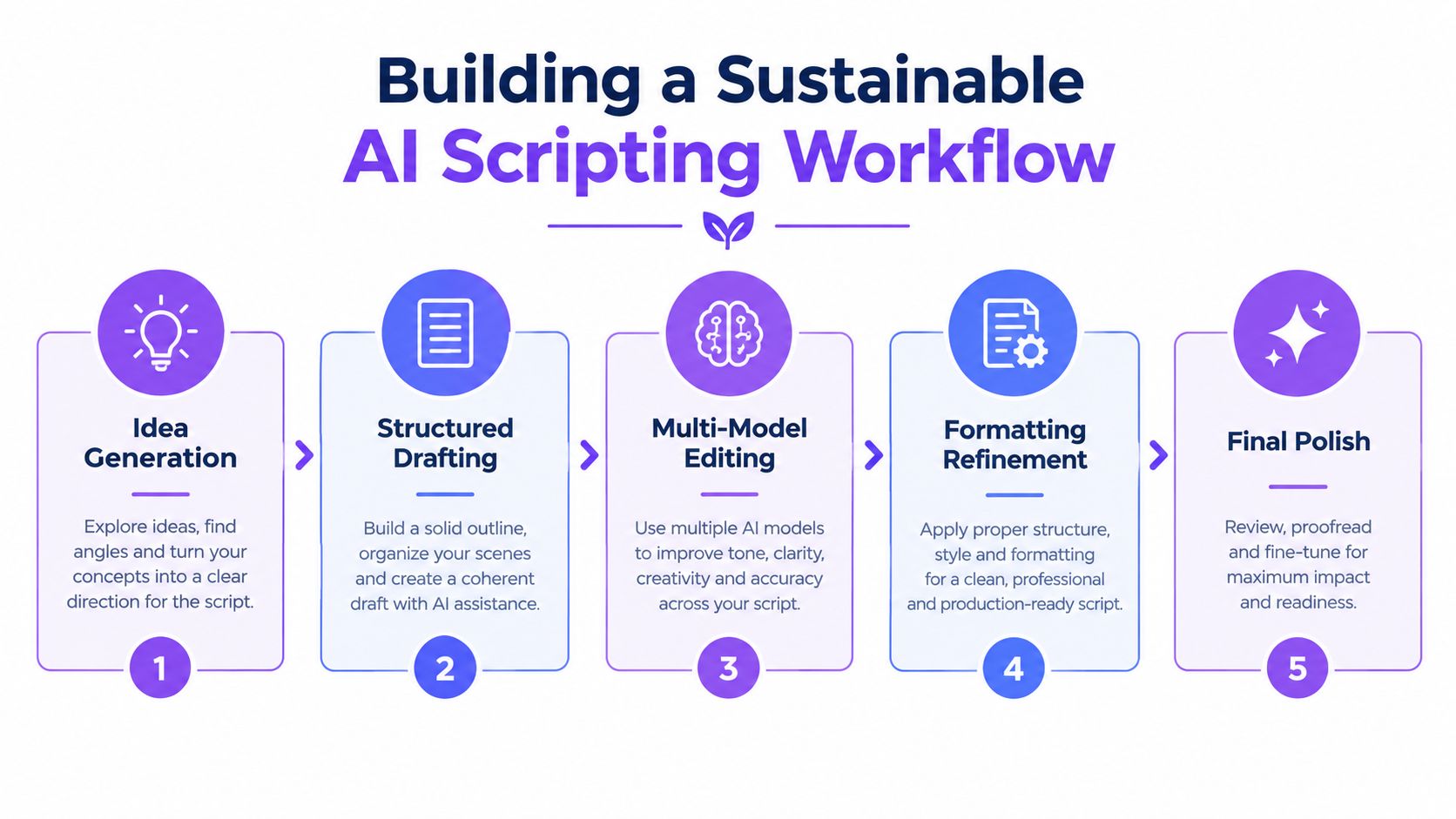
A sustainable AI scripting workflow keeps authorship with the writer and assigns machines the work they handle well. The writer supplies intention, taste, lived observation, and final judgment. AI supplies alternatives, classification, pattern detection, and patient repetition. The tool becomes useful when it accelerates revision triage and structural diagnosis. It becomes risky when it selects the story's most consequential turns on its own.
The five-stage methodology from screenplay development research offers a practical foundation: familiarization, incident-based prompting, critical reflection, AI-assisted self-assessment, and further refinement. Applied carefully, it works for a feature, pilot, short, video script, or game narrative. The routine below treats AI as an editorial collaborator, not as the project's first-draft author.
Start with familiarization
Read your material before asking a system to improve it. Mark the passages that feel alive, the areas you do not understand yet, and the questions you are avoiding. Collect the logline, character notes, research, scene list, and thematic ideas in one workspace.
This keeps the model from becoming the first reader of the story. You need an opinion about the draft before receiving a fluent external opinion. Otherwise, a well-organized response can overpower the less tidy instinct that may contain the script's originality.
Create a short project brief containing:
- The central dramatic question.
- The protagonist's immediate want and deeper contradiction.
- The ending you currently believe in.
- Elements that must remain ambiguous.
- Scenes or images you consider necessary.
- Areas where you want challenge rather than encouragement.
The brief gives later prompts a boundary. It also gives you something to compare against when an AI suggestion sounds persuasive but pulls the script toward a different story.
Initiate from a destabilizing situation
Feed the system one incident at a time. Ask it to explore consequences rather than write the entire narrative. If a woman receives a voicemail in her own voice describing a crime that has not happened, ask what she does next, what she believes, and what evidence could contradict her. Do not request a complete screenplay before you know which version of the incident creates the strongest pressure.
Ask for options that move in distinct directions:
- A version driven by external danger.
- A version driven by a relationship fracture.
- A version in which the protagonist's belief is wrong.
- A version in which the apparent antagonist is protecting someone.
- A version that preserves the mystery longer.
The goal is not to collect endless material. It is to locate the choice that makes the project more specific. A useful response should sharpen your decision, not leave you with a larger pile of interchangeable scenes.
Reflect critically on the output
Read AI suggestions as raw material. Mark each useful idea with the reason it works. Mark each weak idea precisely: familiar trope, unsupported turn, false character behavior, missing setup, or thematic contradiction.
You can ask the model to classify its own output:
Sort these suggestions into useful, predictable, unsupported, and incompatible with the premise. Explain the classification without generating replacements.
This separates generation from evaluation. You can then revise the prompt around the strongest criticism. If the model repeatedly proposes a protagonist who confesses too early, specify that the character's survival depends on concealment. If every antagonist becomes secretly sympathetic, prohibit redemptive explanations and ask for material motives instead.
Keep your own reasons beside the model's classification. Its labels can expose patterns, but they do not establish what the script should value. A strange, difficult option may be more valuable than the cleanest one if it preserves the author's intended tension.
Use AI for self-assessment
Once you have a draft, request an audit rather than praise. Ask for a scene-by-scene table recording the objective, obstacle, decision, consequence, new information, and unresolved question. Run separate passes for character consistency, logic, conflict, formatting, and emotional escalation.
A useful self-assessment prompt is:
Read this sequence as an unsympathetic editor. Identify the three problems most likely to weaken audience engagement. For each, cite the scene location, explain the dramatic consequence, and suggest two different kinds of repair. Do not rewrite the pages.
The restriction protects your role as editor. If the model rewrites everything immediately, you lose the chance to decide which diagnosis is valid. Feedback should create a revision plan. It should not replace the draft before you have chosen the problem worth solving.
The evidence around DramaBench supports this segmented approach because formatting, narrative efficiency, character consistency, emotional depth, logic, and conflict represent different dimensions. A script can perform well in one and fail in another. Separate audits create a clearer triage order and prevent surface polish from hiding a structural weakness.
Refine in deliberate passes
Do not revise every problem at once. Choose the highest-impact issue and run a focused pass. If the protagonist's objective disappears in the middle, repair that before polishing dialogue. If the climax lacks setup, return to earlier scenes and plant the needed information before making the final confrontation more impressive.
A practical sequence is:
- Structural pass: Remove repeated functions and clarify cause and effect.
- Character pass: Test whether each decision follows the character's changing knowledge and desire.
- Conflict pass: Give each major exchange a power shift or meaningful refusal.
- Voice pass: Replace generic language with specific images, evasions, rhythms, and social behavior.
- Formatting pass: Correct screenplay conventions and inspect the exported document.
- Human read-through: Read aloud without AI assistance and note where your attention leaves the scene.
Writingmate provides a multi-model workspace with chat, web research, file analysis, side-by-side model comparison, reusable prompts, and a Video Script Writer feature. These functions can support the workflow when you want to compare editorial responses, keep project material together, or turn a structured brief into a video script. Visit Writingmate to test whether its workspace fits your development and revision process.
Keep a version of the draft before every substantial AI-assisted revision. If the pages become smoother but less personal, restore the earlier version and identify what disappeared. A polished sentence is not automatically a better sentence. Preserve odd phrasing, withheld information, and uncomfortable choices when they carry the author's voice.
Use an AI tool on one contained sequence, not the entire screenplay. Write the scene's objective and constraints yourself, request a structural and character audit, and accept only feedback that leads to a more specific human choice. When you are ready to compare models, analyze files, and organize revision passes in one workspace, visit Writingmate.
Frequently Asked Questions
Sources
- AI content creation market statistics
- AI writing tool comparisons
- 2026 academic review of AI scriptwriting
- this analysis of AI scriptwriting and screenplays
- 2026 comparison of AI scriptwriting tools for creators
- finding the right LLM
- practice-based study of generative AI-assisted screenplay development
- DramaBench benchmark
- this guide to creating a first AI prompt
- guide to AI model routing
- Writingmate

Written by
Artem Vysotsky
Ex-Staff Engineer at Meta. Building the technical foundation to make AI accessible to everyone.

Reviewed by
Sergey Vysotsky
Ex-Chief Editor / PM at Mosaic. Passionate about making AI accessible and affordable for everyone.