Your team starts Monday with a full editorial calendar and ends Friday with half the work still waiting for a brief, a review, or a designer. The same people are researching topics, rewriting introductions, resizing graphics, requesting approvals, scheduling posts, and assembling performance reports. Demand keeps expanding across search, email, social, video, and product channels, but headcount rarely moves at the same pace.
That pressure makes automating content creation attractive, but faster drafting isn't the whole answer. A useful system connects planning, production, review, publishing, governance, and measurement, while keeping human judgment at the points where mistakes become expensive.
Table of Contents
- Why Content Teams Are Automating Now
- What Automating Content Creation Actually Means
- The End-to-End Automated Content Workflow
- Automating Planning Briefs and First Drafts
- Keeping Humans in the Loop for Review and Governance
- Choosing the Right Tools for Each Stage
- Measuring ROI of Your Content Automation
- Your First 90 Days of Content Automation
Why Content Teams Are Automating Now
Content teams aren't automating because writers suddenly became unnecessary. They're automating because repetitive coordination consumes the time writers need for strategy, reporting, interviews, editing, and original thinking.
A typical weekly cycle contains the same hidden work: collecting ideas from scattered documents, checking search demand, writing briefs, adapting one asset for several channels, requesting approvals, and copying links into a tracker. Each task looks small. Together, they create queues that slow every asset after it.
That pattern is why guidance on GPT writers and the future of content creation is useful only when it's applied to the wider workflow. A writing assistant can accelerate a draft, but it can't fix an unclear brief, an absent owner, or an approval process that lives in email.
The shift from pilot to production layer
Adobe's 2026 Digital Trends research found that nearly half of organizations had embedded generative AI organization-wide or across multiple functions for marketing content creation and activation. The same research found that 76% reported moderate or significant improvements in the speed and volume of ideation and production.
That adoption matters operationally. Generative AI is especially concentrated in content creation workflows compared with other customer-experience functions, so content has become one of the first business areas where organizations are deploying automation broadly rather than testing it in isolation.
The commercial market reflects that shift. Grand View Research estimates that generative AI in content creation was a USD 14.8 billion market in 2024 and projects it to reach USD 80.12 billion by 2030, with a projected 32.5% CAGR from 2025 to 2030. Those figures describe a market, not a guarantee for any individual team, but they show why the category has moved into mainstream planning.
The practical question is no longer whether AI can produce text. It's where automation removes waiting without allowing unchecked output to reach customers.
What Automating Content Creation Actually Means
Automating content creation can describe three very different operating models.
Task assistance means a person opens an AI tool to brainstorm headlines, summarize research, restructure a paragraph, or create an image prompt. The tool helps with one activity, but the surrounding workflow remains manual.
Partial workflow automation connects stages with deliberate handoffs. A research record can trigger a brief, a brief can generate a draft, and a completed draft can notify an editor. People still approve important decisions, but they no longer move every file and instruction by hand.
End-to-end automation treats content like an assembly line. Inputs enter through a defined system, rules determine what happens next, assets move through production and review, and performance data feeds future planning. The line isn't fully autonomous. It's controlled, observable, and designed with human stops.
A useful maturity test
Ask where your team loses time:
- Planning: Are ideas, keywords, audience details, and business goals stored in one structured brief?
- Production: Can one approved brief produce a draft and format variations without repeated copying?
- Media: Can your team create consistent visual or video assets from reusable inputs?
- Approval: Does the right reviewer receive the right version with the relevant checks?
- Distribution: Can approved assets move into the CMS, email platform, or scheduler without manual re-entry?
- Measurement: Do results return to the planning system, or disappear into a separate report?
The business case is substantial. Grand View Research reports that software represented over 76.0% of market revenue in 2024, while text generation held the largest application share. That aligns with how teams typically begin, using software to accelerate research, drafting, and formatting before expanding into multimodal production.
AI-generated media also creates a verification requirement. Editors working with synthetic images, video, or audio should understand deepfake detection content explained, especially when provenance, disclosure, or audience trust matters.
Practical rule: Automate the movement of approved work before you automate the decision about what deserves approval.
The End-to-End Automated Content Workflow
A reliable pipeline resembles a factory with quality control, not a vending machine that produces publishable work from a single prompt.
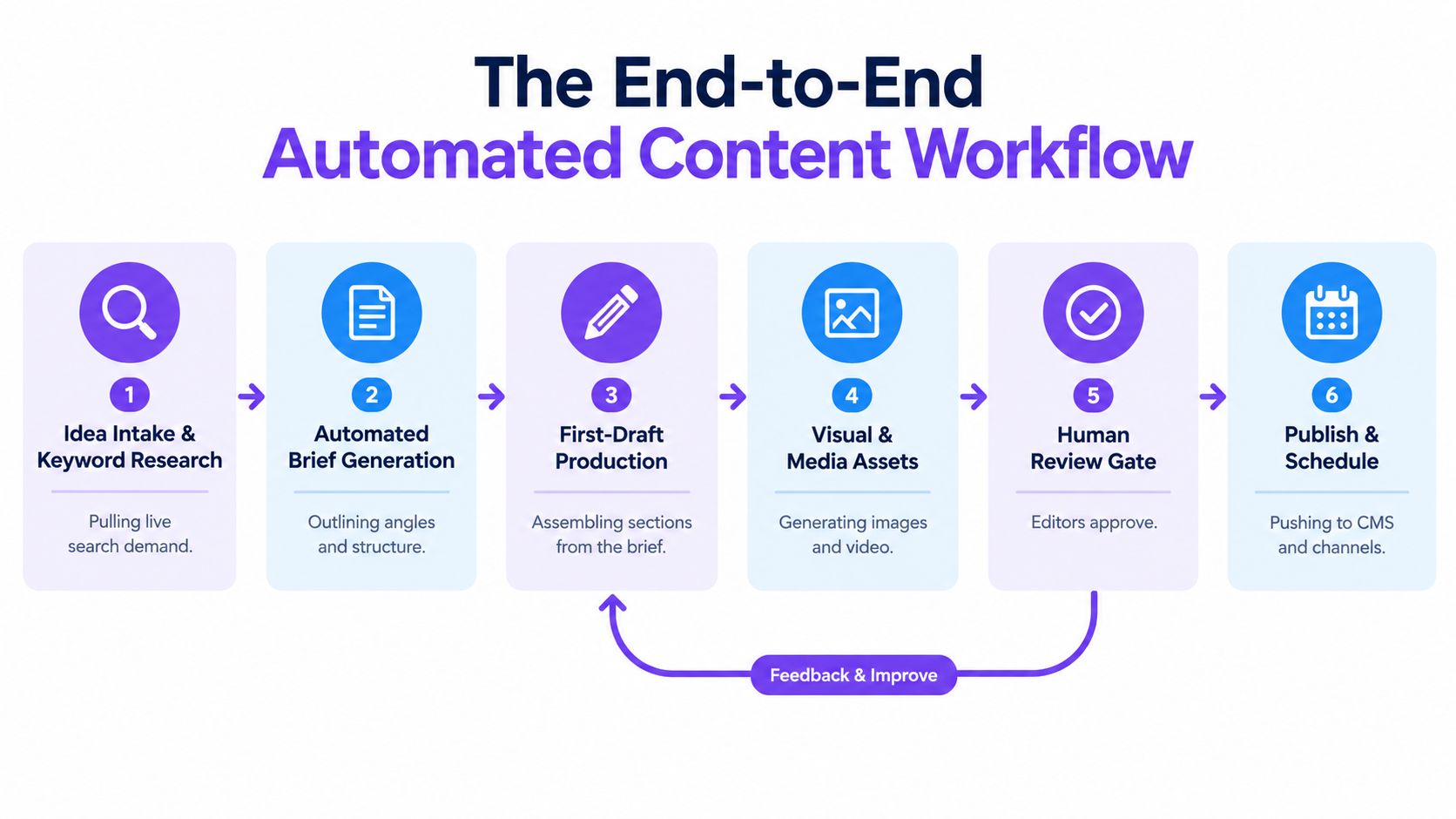
1. Capture ideas and research demand
Start with a structured intake form or database. Capture the proposed topic, audience, business objective, format, priority, source material, and owner. Research tools can enrich the record with live search observations, related questions, competitor coverage, and internal data.
Automate collection and clustering. Keep topic selection, positioning, and claims about audience needs with a strategist.
2. Generate the brief
A workflow can turn the intake record into a brief containing search intent, working angle, outline, evidence requirements, internal links, conversion goal, tone, and media needs. The brief should also identify what the writer must verify.
The editor or strategist approves the brief before drafting begins. This checkpoint prevents the team from producing polished work against the wrong objective.
3. Produce the first draft
A drafting assistant can assemble sections from the approved brief, source files, terminology rules, and reusable prompts. It can also create alternative introductions, metadata, email excerpts, social adaptations, and image directions.
The handoff should be a clearly labeled first draft, not an implied final asset. A writer checks reasoning, originality, evidence, voice, and omissions.
4. Create visual and video assets
Templates work well for repeatable graphics, while image and video generators can support concept exploration and production variants. Store dimensions, channel requirements, accessibility text, brand rules, and usage rights alongside the asset.
A designer or content lead should review high-visibility visuals and anything containing people, products, claims, or regulated information.
A short explainer can help teams see how generated media fits into broader AI-assisted production:
5. Run the review gate
Automated checks can flag missing fields, unsupported claims, prohibited terms, broken links, inconsistent metadata, and incomplete alt text. They can't reliably decide whether a message is strategically sound or culturally appropriate.
Route exceptions to a named reviewer. Don't let a failed check vanish into a shared queue with no owner.
6. Publish and learn
Once approved, automation can send the asset to the CMS, email platform, social scheduler, or internal distribution list. Publishing rules should preserve version history and record who approved the work.
Performance data then returns to the planning system. The greatest gain often comes from reducing queue time and handoff friction across all six stages, not from shaving minutes off a single draft.
Automating Planning Briefs and First Drafts
The best starting point is a structured brief, because a good brief gives every downstream tool the same instructions. A loose prompt produces a loose asset, even when the writing model is capable.
Create a brief template with fields for:
- Audience and job: Who is this for, and what should the asset help them do?
- Search or distribution context: What query, channel, campaign, or customer moment does it serve?
- Point of view: What should the reader understand that competing content misses?
- Evidence: Which supplied sources, product facts, interviews, or internal documents can the draft use?
- Constraints: What claims, terms, formats, legal requirements, and brand rules apply?
- Conversion path: What action should a qualified reader take next?
Feed those fields into a reusable prompt. Ask the system to identify missing information before it drafts, then produce an outline with a claim-to-source map. That small pause is more valuable than asking for a longer article immediately.
A practical production pattern
Suppose the idea is a guide for a software team choosing a content workflow. The research record contains the audience, target query, product documentation, competing angles, and a desired demo action.
The automation can create an outline, draft each section against the approved structure, extract a short email introduction, produce social copy for each selected channel, and generate a visual brief. Each output should retain the same central claim and audience context, while adapting length and format.
The writer then works in passes:
- Accuracy pass: Verify every factual statement against the supplied material.
- Positioning pass: Replace generic advice with the team's actual point of view.
- Voice pass: Remove repeated phrasing and restore natural rhythm.
- Conversion pass: Check that the next action matches reader intent.
- Format pass: Confirm headings, links, metadata, accessibility, and channel limits.
Research on professional writing supports this division of labor. In the Noy and Zhang experiment, ChatGPT reduced task completion time by 0.8 standard deviations and improved output quality by 0.4 standard deviations on mid-level writing tasks. The practical lesson isn't to remove the writer. It's to use automation for drafting and restructuring, then reserve human attention for judgment.
Repurposing should happen after the core draft is approved. Otherwise, one weak premise becomes many weak assets, each requiring its own correction.
Keeping Humans in the Loop for Review and Governance
Fully autonomous content sounds efficient until the first inaccurate claim, unauthorized asset, or off-brand campaign creates more review work than the original process required.
The available evidence points toward guarded adoption. The 2025 AI and Marketing Performance Index reports that only 22% of marketers allow AI to operate autonomously for content generation or ideation, and only 19% allow that autonomy for personalization at scale. Those figures suggest that the majority of teams still see human control as necessary, particularly when content affects reputation, compliance, customer trust, or commercial decisions.
The same source reports that organizations using content automation were 24% more likely to meet content demand and saw 29% greater revenue impact from content marketing. Automation works, but those results strengthen the case for governance rather than weakening it. Teams need a system that increases throughput without turning review into a bottleneck.
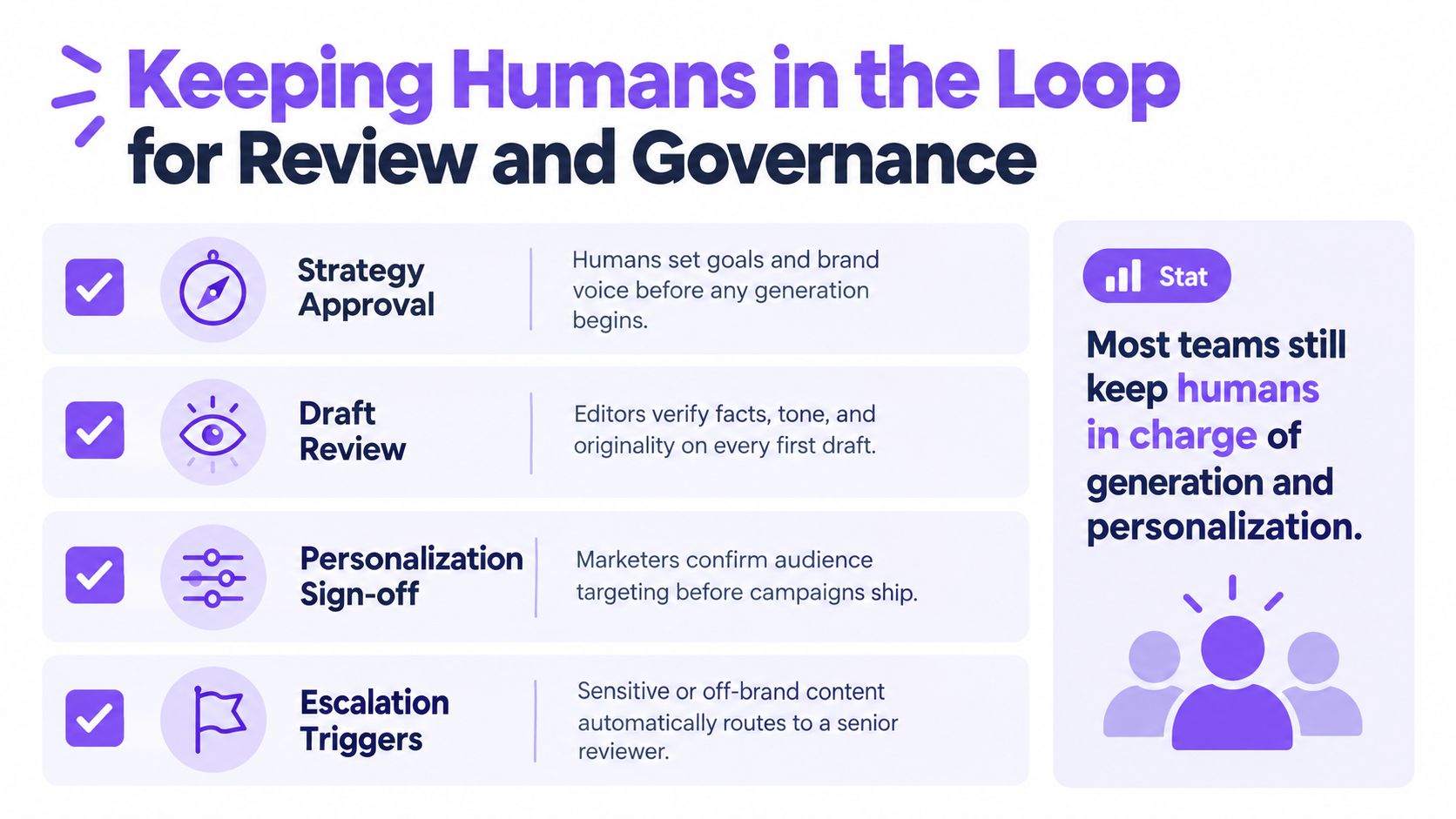
Four gates that scale
Strategy approval comes first. A human owner confirms the goal, audience, angle, offer, and brand voice before any generation begins.
Draft review checks evidence, tone, originality, inclusivity, links, and whether the output answers the brief. Automated checks can support this pass, but they shouldn't replace editorial accountability.
Personalization sign-off matters whenever the system changes messaging by audience, behavior, location, account, or customer status. The marketer must confirm that the data is appropriate and the targeting makes sense.
Escalation triggers route sensitive content to a senior reviewer. Examples include health, finance, legal claims, political topics, personal data, confidential information, named individuals, and unusual brand exceptions.
Human review belongs wherever the cost of being wrong exceeds the cost of waiting.
Governance also covers intellectual property and data protection. A 2025 study on generative AI in social media marketing highlights limitations around those concerns when teams use off-the-shelf tools. Define approved inputs, retention rules, disclosure practices, ownership, and an escalation path before increasing volume.
For a practical approach to preserving warmth and judgment in assisted writing, use this guide to making AI content human as a complementary editorial reference.
Choosing the Right Tools for Each Stage
Tool selection should follow the pipeline, not the excitement around a particular model. A research tool, drafting assistant, image generator, scheduler, CMS connector, and workflow builder solve different problems. Combining them can work, but every connection adds maintenance, permissions, failure points, and duplicated context.
| Pipeline Stage | What to Automate | Example Capabilities |
|---|---|---|
| Research and intake | Topic collection, search enrichment, source gathering | Live web research, keyword clustering, structured forms |
| Briefing | Outlines, requirements, assignments | Templates, databases, prompt-driven brief generation |
| Drafting | First drafts, rewrites, summaries, variants | Text generation, file analysis, reusable prompts |
| Visual production | Image concepts, templates, media variants | Image generation, brand templates, video creation |
| Review | Rule-based checks and routing | Claim flags, terminology checks, approval notifications |
| Publishing | Scheduling and metadata transfer | CMS connections, social scheduling, campaign handoffs |
| Measurement | Reporting and feedback | Dashboards, performance logs, content updates |

Build versus consolidate
A stitched stack gives specialists more control. For example, a team might use Notion for planning, a research product for sources, a writing tool for drafts, a separate image generator, a video platform, Make or n8n for orchestration, and Buffer for distribution. That setup can be appropriate when each stage has unusual requirements or the team already has strong technical ownership.
The downside is context fragmentation. Prompts, brand rules, files, model settings, and review history may live in different systems. Teams also pay for overlapping capabilities and maintain more integrations.
Writingmate is one consolidation option. It combines chat, web research with citations, file analysis, text generation, image and video creation, reusable prompts, and agents in one workspace, with access to multiple models and fallback options. Its AI tools for content creation can support teams that prefer a shared environment for experimentation and repeatable production, while publishing and formal approvals may still remain in dedicated systems.
Choose the architecture that makes ownership clear. The cheapest tool stack isn't useful if nobody knows which version is approved or where the source evidence lives.
Measuring ROI of Your Content Automation
Speed is an input, not proof of value. A team can publish more assets and still lose money if quality falls, corrections increase, or the content reaches the wrong audience.
Before changing the workflow, record a baseline for a representative content type. Track the time from approved idea to published asset, production cost, revision effort, approval delay, delivery against demand, and business outcome. Use the same definitions after automation so comparisons remain meaningful.
Four measures that reveal the economics
Hours saved per asset shows whether automation removes real work. Count research, drafting, formatting, coordination, and revision time, not just the minutes spent typing.
Cost per published piece includes tool costs, contractor or employee time, design support, review, and correction work. A low drafting cost can hide expensive downstream checking.
Content demand fulfillment rate measures how much approved demand the team delivers on time. It's more useful than raw output because it connects capacity to actual requests.
Revenue impact per campaign links content activity to a commercial outcome using the attribution method your team already trusts. Keep the method consistent, and label influenced revenue separately from directly attributed revenue.
Deloitte's content supply chain research reports that organizations with a very high level of automation meet content demand 24% more often than peers with low or moderate automation. It also estimates AI-assisted task time reduction commonly falls in the 30% to 60% range, with content production showing 23% to 41% time savings. Treat these as external reference ranges, not promised outcomes.
A simple spreadsheet can contain one row per asset and columns for baseline time, automated time, review time, total cost, publish date, quality issues, delivery status, and outcome. Review the sheet by content type and channel. Expand automation when total production cost falls or demand fulfillment improves without a material decline in quality or performance.
Don't reward volume alone. If the system creates more drafts but gives editors a larger correction queue, it has moved work rather than removed it.
Your First 90 Days of Content Automation
Start with one repeatable content type, not the entire department.
During the first month, map every stage from intake to reporting. Choose a high-volume format, document the current handoffs, identify the approval owner, and establish a baseline for time, cost, revisions, and delivery. Fix unclear fields before connecting tools.
During the second month, create the brief template, drafting prompt, brand checklist, asset naming rules, and handoff notifications. Run the automated process alongside the existing process long enough to compare quality and total effort. Keep humans responsible for strategy, fact-checking, and final approval.
During the third month, add exception routing, publishing connections, and performance feedback. Review the baseline against the new workflow, then choose the next stage based on the largest remaining source of delay.
Avoid three predictable mistakes:
- Automating a broken process: Remove unnecessary approvals before making them faster.
- Skipping measurement: Without a baseline, speed claims are guesswork.
- Publishing on trust: Treat generated output as work in progress until a named owner approves it.
A mature system grows through evidence. It automates stable handoffs, keeps judgment visible, and expands only when quality and economics support the next step.
Writingmate brings multi-model chat, cited web research, file analysis, reusable prompts and agents, image generation, and video generation into one workspace for content workflows. Use it to prototype briefs, produce controlled first drafts, create media variations, and compare outputs before your team connects approved work to publishing systems. Visit Writingmate to explore the platform and start with one measurable workflow.
Frequently Asked Questions
Sources
- GPT writers and the future of content creation
- 2026 Digital Trends research
- Grand View Research
- deepfake detection content explained
- Noy and Zhang experiment
- 2025 AI and Marketing Performance Index
- Deloitte's content supply chain research
- guide to making AI content human
- AI tools for content creation
- Writingmate

Written by
Artem Vysotsky
Ex-Staff Engineer at Meta. Building the technical foundation to make AI accessible to everyone.

Reviewed by
Sergey Vysotsky
Ex-Chief Editor / PM at Mosaic. Passionate about making AI accessible and affordable for everyone.