Claude AI is a powerful AI chatbot by Anthropic, and I use it almost every day. When Claude 4 Sonnet was released, this became one of my favorites just as a previous Claude 3.7 was, but there are times when it is not working well. In general, those AI models hold conversations well, generate creative text formats, it codes well, Claude also translates languages, answers your questions informally (or formally!), and does so much more. However, like any online service, Claude AI experiences outages and errors.
How We Verify Whether Claude AI Is Down
When Claude fails, I do not assume it is a global outage after one error screen. My usual check is simple: I look at Anthropic’s official status page first, then I retry on a second browser, then I test another network or device, and only after that do I compare what other users are reporting. If the same failure appears across browsers and networks, and the status page or fresh user reports line up, I treat it as a real platform issue rather than a local bug.
The signal I trust most is the split between Anthropic’s surfaces. That matters because consumer access and business API access do not always fail together. During the March 2, 2026 outage, consumer-facing Claude surfaces were unavailable while the API remained operational, with nearly 2,000 user reports at peak according to Mashable’s outage report. I have seen this pattern myself: the web app can feel fully down while developers still see green indicators on API components.
I also check whether the problem is narrow or broad. A login loop in one browser usually points to cookies, cache, an extension conflict, or a session problem. A “temporary service disruption” message on multiple devices usually points the other way. Anthropic’s public status page tracks several surfaces separately, including Claude Console and Claude API, which helps distinguish a full outage from one broken entry point.
Fast read:
- Status page incident + lots of fresh reports: likely Claude outage
- Only one browser fails: likely cache, extension, or session issue
- Web app fails but API tools still work: likely consumer-surface problem
- Only one model is timing out: likely partial degradation, not full downtime
- Issue disappears on mobile data: likely your network, VPN, or DNS
How to Check if Claude AI is Down Now
Use this order if Claude is not loading or replying.
Check the official Anthropic status page first. Go to Anthropic’s status page and look for incidents affecting Claude, Claude Console, or Claude API. Do not stop at the top-line “all systems operational” banner; open the incident history if the timing still matches what you are seeing. That history matters because outages can hit some models or products before the page is fully updated.
Retry Claude on another browser, device, or network. I usually test the same prompt in my main browser, then a private window, then my phone on mobile data. If Claude fails everywhere, that is a strong sign the problem is not your cache or extensions. If it works on one device but not another, the issue is probably local.
Compare the web app with the API or another Claude-powered surface. If you use Claude through development tools, work apps, or partner integrations, see whether those still respond. This distinction is important: a green API does not guarantee the consumer chat app is healthy. Reporting around the March 2026 outage showed exactly that split, where consumer surfaces were down while business API traffic kept flowing under heavy demand, as covered by Mashable.
Check fresh user reports. I look for very recent posts on X, Reddit, and major outage trackers to see whether other users are hitting the same wall at the same time. This is most useful when the status page is still catching up. If dozens of people are reporting the same error in the last few minutes, that is usually more meaningful than one isolated complaint.
Interpret the error itself. Claude’s wording often tells you whether to wait, troubleshoot locally, or stop retrying for a while. In my experience, “Claude will return soon” and “temporary service disruption” usually mean Anthropic-side trouble. Overload-style failures usually mean traffic spikes, not a bad prompt.
Signals and what they usually mean
| What you see | Likely conclusion | Next step |
|---|---|---|
| Status page shows an incident and users are reporting the same issue now | Platform outage | Wait and monitor status updates |
| Web app fails, API or another Claude integration still works | Partial outage on consumer surfaces | Use another Claude surface if available |
| Login fails only in one browser | Local browser/session issue | Sign out, clear cache, use private mode |
| Works on mobile data but not office/home Wi‑Fi | Network, VPN, DNS, or firewall issue | Switch network or disable VPN |
| One model stalls but others reply | Partial model degradation | Switch models and retry later |
| “Overloaded” or 529-style failure | Demand spike | Wait a few minutes before retrying |
A broader pattern is also worth knowing. Public reporting on Anthropic incidents suggests repeated multi-service disruptions rather than one isolated bad day. One June 2026 incident restored affected models in stages over several hours, and later outages reportedly affected multiple models again, as summarized by TechTimes. That does not prove every failure is on Anthropic’s side, but it does mean a short outage is plausible when Claude suddenly stops working for many people at once.
By the way, if you are interested in Claude 4 Sonnet or Claude 4 Opus benchmarks and full capabilities or chatbot new features, look into this guide I have done just a couple of days ago.
But Was My Chat Saved?
You can also wonder if your conversation is safe. Does claude ai save chats? If Claude stops working in the middle of you chatting with it, and does not reload well, you may be worried that information was not saved. But Claude conversation history is automatically saved to your account, both in native chatbot and on Writingmate. This means you don't need to worry about this most of the time. Also, there are tools that can help you continue the conversation that was not exported or saved, because they allow to use multiple AI models at once. I am going to mention this way of me dealing with this issue below as well.
Why Might Claude AI be Down?
Several factors could contribute to Claude AI experiencing downtime, including:
Internal server error: Like any online service, Claude AI relies on servers to function correctly. Server outages or technical difficulties are often a reason to such unfortunate service interruptions in the middle of your work day :(
Maintenance and Updates: Anthropic regularly performs maintenance and updates, it does it real often! Why? Because it improves Claude AI's performance, security, and features like nothing else. So these updates may require temporary downtime to implement.
Traffic Overload: If an unexpectedly high number of users try to access Claude AI simultaneously, it can strain the system's resources and lead to slowdowns or temporary outages.
Bugs and Errors: Software bugs or coding errors can sometimes cause unexpected problems, including service disruptions.
If you see error like "Claude will return soon", or "Claude.ai is currently experiencing a temporary service disruption. we’re working on it, please check back soon." from my experience it means that there are issues on Anthropic side and you are better of using another chatbot with Claude 4 access or downright another suitable model, perhaps one of those that are also available on https://writingmate.ai together with Claude.
Here is an older video of ours about Claude 3 Opus, but I would say most of it is still relevant but with more recent numbers of versions :) New Claude 4 in my experience beats most of what GPT4o and other OpenAI models are capable of.
What to Do When Claude AI is Down
If Claude is not working, move through these fixes in order. Follow this sequence before deciding the problem is on Anthropic’s side.
Refresh and retry once or twice. A single failed generation is not enough to diagnose an outage. I often see one stalled response recover after a page refresh, especially during busy hours.
Sign out and sign back in. If the chat UI loads but messages fail, or if you keep getting bounced back to login, your session may be stale.
Clear cache or open a private window. This is the fastest way to rule out bad cookies, cached scripts, and session leftovers without changing your main setup.
Switch browsers. If Claude works in Safari but not Chrome, or vice versa, the issue is usually local. Browser-specific failures are common when extensions interfere with scripts or authentication.
Disable extensions and VPNs. Ad blockers, privacy tools, script managers, and some VPN routes can break login, streaming responses, or file upload behavior. When I see Claude hang at load with no status-page incident, this is one of the first things I test.
Try another network. Move from office Wi‑Fi to mobile data, or from home broadband to a hotspot. If Claude suddenly works, the problem is likely tied to DNS, firewall rules, VPN routing, or a local ISP issue.
Check whether one model is failing or all Claude services are failing. If one workflow breaks while another still works, you may be seeing a partial degradation rather than a full outage.
Wait and retry during overload windows. Messages like overload errors, 529-style failures, or temporary disruption notices usually resolve faster than account issues. In my experience, these often clear without any user action after a short pause.
Common causes when Claude is not working
- Maintenance: short, planned or semi-planned service interruptions
- Traffic spikes: too many users at once, often causing overload behavior
- Rate limiting: too many requests in a short period, more common in API or heavy usage cases
- Account or session issues: expired auth, login loops, stuck cookies, or corrupted local storage
- Browser conflicts: extensions, privacy settings, or blocked scripts
- Network problems: VPN, DNS, firewall, captive portals, or unstable connections
If you are deciding whether the issue is yours or Anthropic’s, use this rule: if the same failure appears on multiple devices and networks, and recent reports match it, the problem is probably on Anthropic’s side. If the issue disappears in private mode, another browser, or another network, it is probably on your side.
If you need a temporary fallback while Anthropic sorts out an incident, tools that let you switch models without rebuilding your workflow can be useful. Writingmate is one option for that, and if you want a broader look at how Claude compares with other support-focused models, there is also more from SupportGPT.

If you need to imply switch between models saving your chats and conversations with no need to export or copypaste, try using Writingmate here: https://writingmate.ai
Common Claude error messages and what they usually mean
When Claude shows an error, the wording often gives you a better next step than random retrying.
“Claude will return soon”
This usually signals an Anthropic-side outage or service degradation rather than something you broke. You usually cannot fix this locally. Check the status page, wait, and retry later.“Claude.ai is currently experiencing a temporary service disruption. we’re working on it, please check back soon.”
This is one of the clearest signs that the problem is platform-side. I have seen this appear during broader instability windows, and troubleshooting your browser rarely changes the outcome. Your best move is to stop repeated retries and monitor incident updates.Overload or 529-style errors
These usually point to traffic spikes or capacity pressure. Anthropic has publicly tied some consumer-facing issues to demand surges, and the official status page is the best place to confirm whether it is isolated or widespread. Usually there is nothing to repair on your device; waiting is the practical fix.Generic internal server error
This can mean several things: a temporary backend failure, a model-specific issue, or a problem processing the request. Retry once, then switch browser or network to rule out local problems. If the same internal error appears everywhere, assume service instability.Login loops or blank-loading screens
These are more ambiguous. Sometimes they happen during outages, but just as often they come from cookies, blocked scripts, or extensions. Try private mode, sign out and in again, and test a second browser before concluding Claude is down everywhere.
Exploring Writingmate as a Claude Alternative
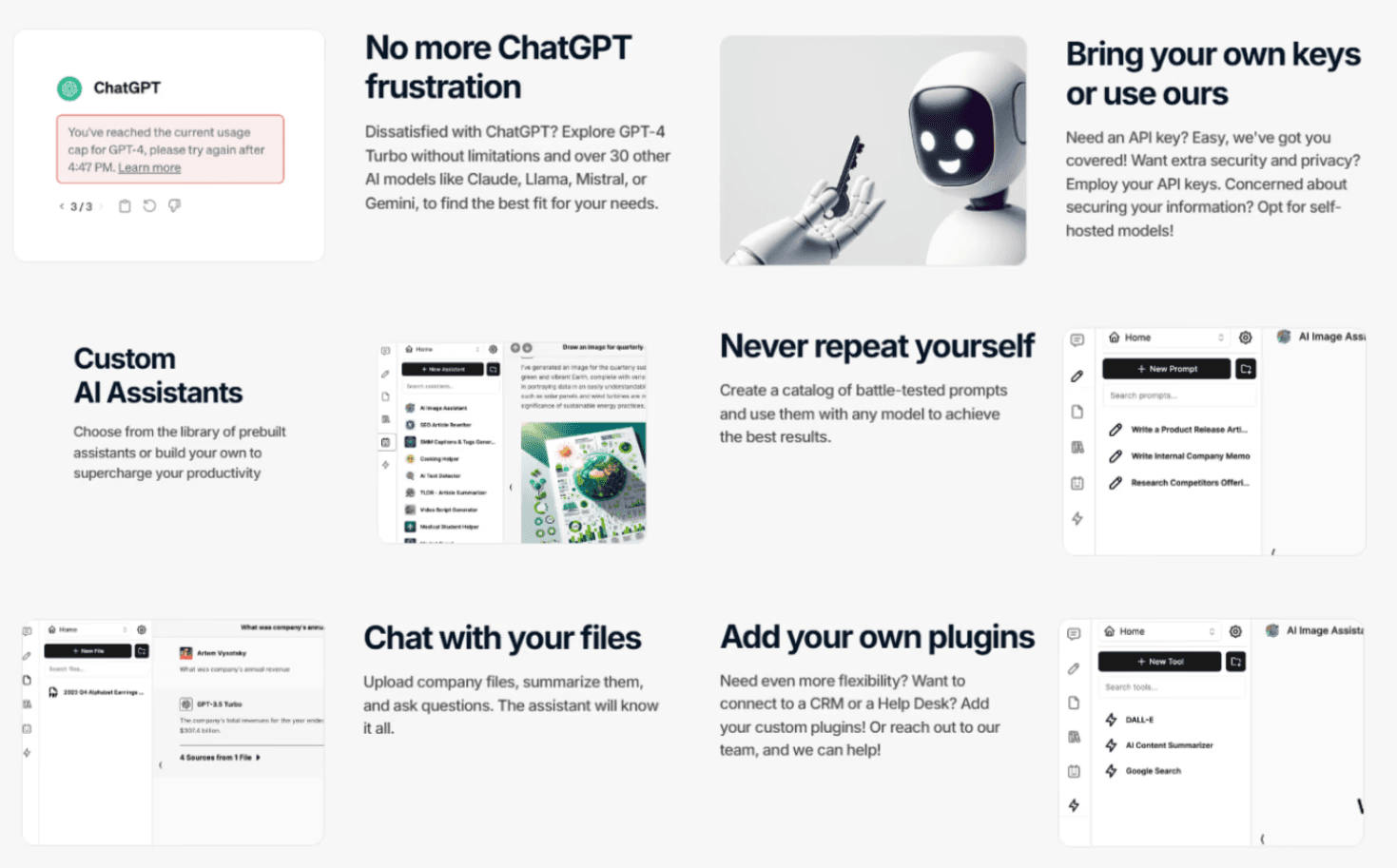
While you wait for Claude AI to be back online, Writingmate presents an excellent alternative platform to explore. Here's why:
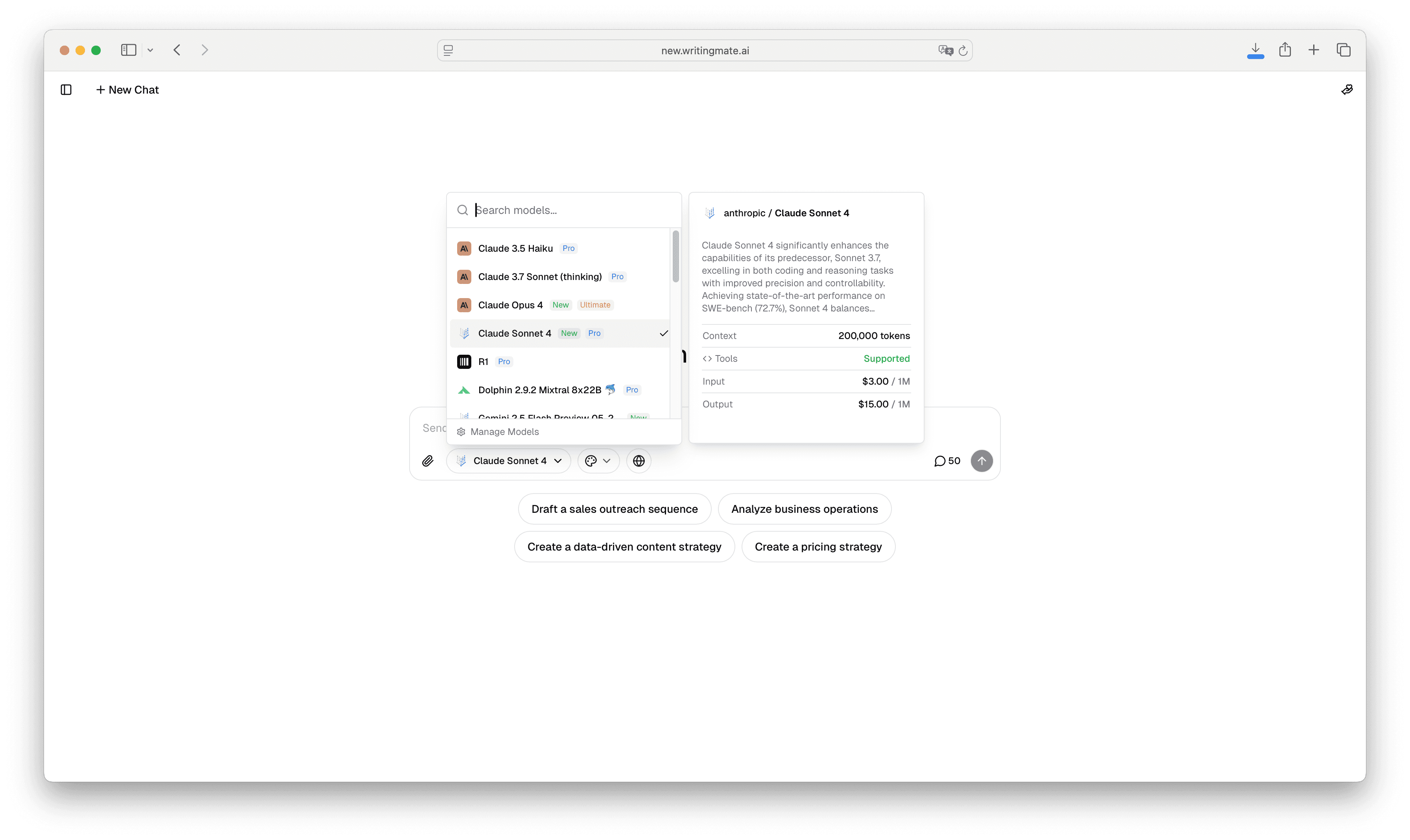
Access to all Claude Models at once: Writingmate gives access to a variety of Claude AI models, including new Claude 4 Sonnet and Opus, also Claude 3.7 and Claude 3.5 Sonnet / Claude 3 Opus. There are also 200+ other models for any needs you may have. Such a variety lets you experiment with different versions and capabilities.
You can even compare any model with another one through side-by-side model comparison. For example, you can take any task or prompt that you have and see how both Claude 4 Sonnet and GPT4o work on it at the same time. Compare input and technical data (f.e. tokens used, speed etc.)
200+ AI Inside one chatbot, no API needed: Writingmate is not just Claude and has a diverse selection of top-tier AI models. That of course includes GPT models (like GPT-4o and GPT-4 + mini), o3 mini, Mistral, LLama 4 Maverick and Scout, and many more.
Image generation capabilities: Writingmate also lets you use vast image generation features and make unique visuals alongside any text-based projects. Writingmate uses DALLE-3, Stable Diffusion and Flux1 ai, that work right outside the box as a chat extension. No installation or prompt heavy-lifting, because other built-in models tend to make your prompts better in an instant.
Other useful tools and features: Like prompt library, assistants, plugins and web builders.
Writingmate.ai uses the power of various AI models to provide a single, user-friendly web app. It remains a very useful platform for any of your AI needs and tasks you would like AI to assist with.
I have also written a couple of other articles about Claude and its capabilities, it may be useful.
- The first is on enhancing earlier model Claude 3 in the easiest ways possible: Writingmate.ai.
- The second one is about whether you can generate images with this AI model: https://writingmate.ai/blog/can-claude-generate-images. Spoiler: now you can :)
Claude AI Updates and Checks
In my experience it is helpful to stay informed about Claude AI's status and potential downtimes. That will let you have a smooth user experience. Remember to:
Bookmark the Anthropic Status Page: Keep the Anthropic status page bookmarked for easy access to real-time updates on Claude AI internal server errors and operational status.
Explore Alternative AI Tools: Get to know other AI chatbot options like https://writingmate.ai that give you access to a variety of models including Claude 4. Just to make sure you have backup solutions available during potential downtime.
Follow Anthropic on Social Media: Stay connected with Anthropic on platforms like Twitter to receive announcements about maintenance schedules, updates, and other important information.
For detailed articles on AI, visit our blog we make with a love of technology, people, and their needs at https://writingmate.ai/blog.
- See you in the next articles!
Frequently Asked Questions
Is Claude down today right now?
The fastest way to tell is to check Anthropic’s status page, then test Claude on another browser or network. If the status page shows an incident and other users are reporting the same failure, it is likely a live outage.
Why is Claude AI not working?
The most common reasons are maintenance, traffic spikes, temporary backend errors, account/session problems, browser-extension conflicts, or network issues. If Claude fails on multiple devices and networks, the issue is more likely on Anthropic’s side than yours.
How do I check Claude’s status page?
Open the official Claude status page and review both the current system status and recent incident history. If you use both chat and API tools, check whether the issue affects only one surface or all of them.
Will my Claude chats be saved during an outage?
Usually, yes if the message was already saved to your account before the outage hit. If Claude goes down mid-reply, the unfinished response may not complete, but your conversation history is often still there when service returns.
Is this page about Anthropic’s Claude?
Yes. This guide is about Claude from Anthropic, including its web app, related services, and status signals.
Sources
- Anthropic
- https://status.anthropic.com/
- Writingmate.ai
- writingmate.ai/blog
- https://writingmate.ai/blog/can-claude-generate-images
Written by
Artem Vysotsky
Ex-Staff Engineer at Meta. Building the technical foundation to make AI accessible to everyone.
Reviewed by
Sergey Vysotsky
Ex-Chief Editor / PM at Mosaic. Passionate about making AI accessible and affordable for everyone.
Frequently Asked Questions
Sources

Written by
Artem Vysotsky
Ex-Staff Engineer at Meta. Building the technical foundation to make AI accessible to everyone.

Reviewed by
Sergey Vysotsky
Ex-Chief Editor / PM at Mosaic. Passionate about making AI accessible and affordable for everyone.