A common moment for teams is this one. You already have content on your site, maybe docs, a help center, product pages, or a private knowledge base, and now someone asks for “search.” Then a second request lands right after it: the same search should also feed an AI assistant, support citations, and stay usable if a provider changes or deprecates a feature.
That's where many website search API discussions stop being useful. They explain query parameters, but they don't help you decide what kind of search system you're building. A search box for people, a retrieval layer for language models, and a low-latency lookup service for agents may all use HTTP and JSON, but they have different constraints.
This guide treats a Website Search API as a reference system, not just a syntax recipe. The useful questions are usually about fit: what should rank, how much content should come back, whether results need provenance, how pagination stays stable, and what happens when an upstream platform removes functionality you depended on.
Table of Contents
- Introduction to Website Search API Reference
- Categories of Website Search APIs and When to Use Each
- Core Concepts and Search Resource Model
- Endpoints and Request Methods for Search Operations
- Parameters Filters Sorting and Pagination Explained
- Example Requests and Responses with Excerpts
- Integration Patterns Citation and Markup Best Practices
- Quick Reference Glossary and Cross Referenced Index
Introduction to Website Search API Reference
A developer usually starts with a narrow need. “We need /search?q=refund policy.” A week later, product wants highlighted excerpts. Support wants filters by content type. The AI team wants evidence-rich passages, not snippets. Analytics wants to measure what users searched for and what they clicked.
At that point, “website search api” stops meaning one thing.
The practical situation most teams are in
Take a typical documentation site. Human visitors want fast keyword search, familiar ranking, and pagination that doesn't jump around. An internal assistant wants a different shape of result: fewer links, richer excerpts, clear source fields, and enough context for grounded answers. A monitoring job may want broad retrieval across many pages with deterministic filtering and sorting.
Those are related tasks, but they're not the same integration.
Practical rule: Treat search as infrastructure, not just a widget. The endpoint shape, response payload, and provider category should follow the job the results need to do.
That's why a reference-style approach helps more than a “top APIs” list. If you're building for people, you care about usability and stable navigation. If you're building for AI retrieval, query formulation and excerpt quality matter more. If you're building a bridge layer that hides multiple providers, durability and migration effort matter earlier than expected.
How to read this guide in real work
If you're evaluating tools, start with the category comparison. It will help you decide whether you need human-oriented search, AI-oriented retrieval, or a bridge API that normalizes multiple backends.
If you're implementing endpoints, jump to the sections on request methods, parameters, and payload examples. Those parts focus on concrete API design choices such as when to use GET, when to use POST, and how to return pagination metadata that clients can trust.
If you're responsible for long-term maintenance, pay attention to the integration and durability section. Search systems are often coupled to outside platforms, and that coupling becomes visible only when a feature disappears, a format changes, or an official API narrows scope.
Terms that matter early
A few terms will recur throughout the guide:
- Query means the user or system's request.
- Index means the searchable collection.
- Document means a result item in that collection.
- Excerpt means the fragment returned to help a person or model judge relevance.
- Citation support means the response includes enough source detail to ground later output.
Those terms sound obvious, but teams often mix them up in API design. A clean search integration starts when everyone agrees on what resource is being searched and what kind of consumer receives the result.
Categories of Website Search APIs and When to Use Each
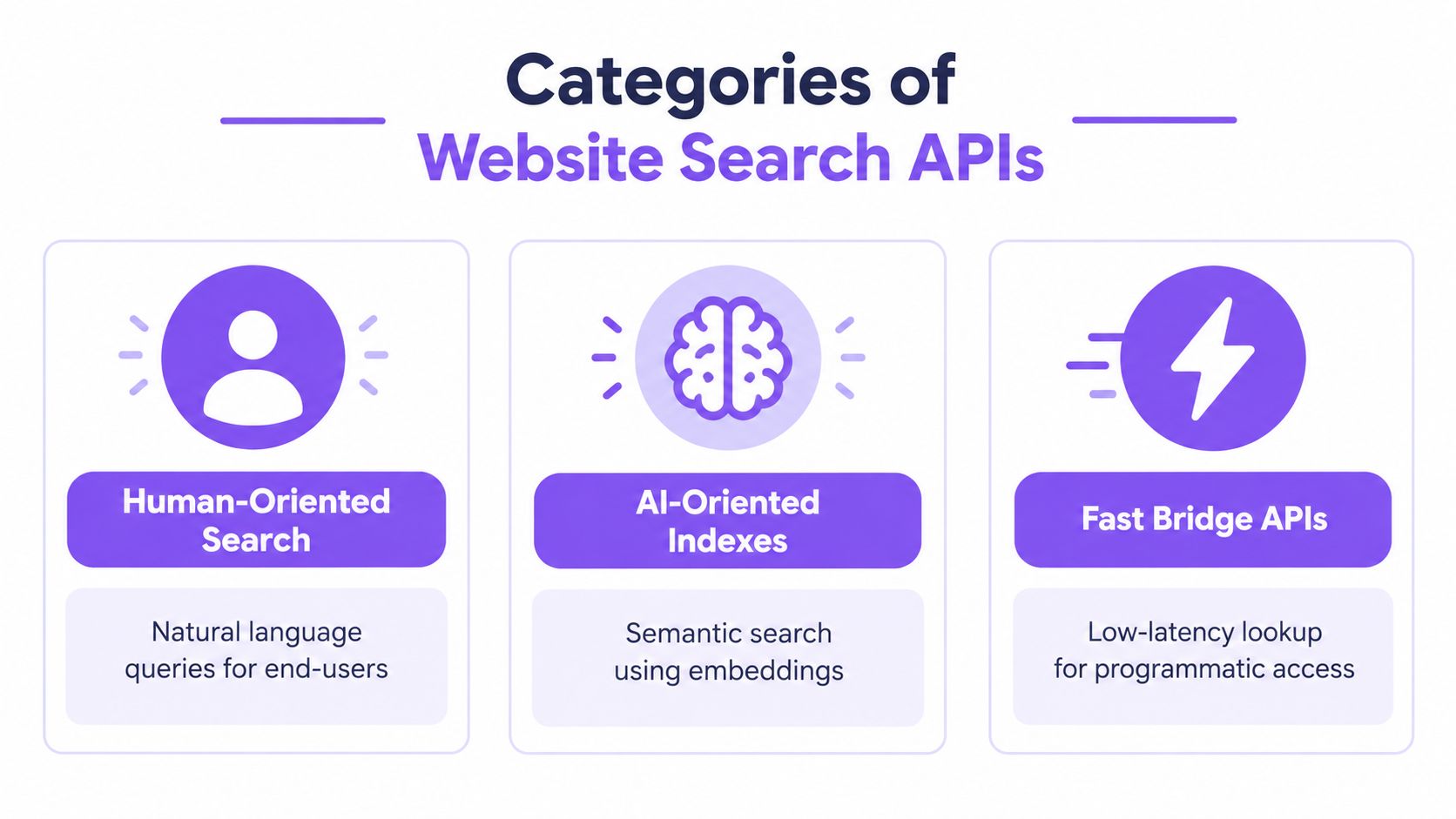
The market is easier to understand when you stop asking “which API is best?” and start asking “best for what?” A 2026 search API benchmark from Proxyway describes three segments: human-oriented search, AI-oriented indexes, and fast bridge APIs. It also notes that the top four APIs were statistically indistinguishable on relevance and quality, which makes category fit more useful than generic rankings.
Human-oriented search
This category serves people first. Think site search bars, documentation portals, knowledge bases, and content libraries where users scan titles and choose among visible results.
The API tends to return:
- Visible result metadata such as title, URL, content type, and short excerpt
- Predictable ordering so the same query feels stable across pagination
- UI-ready fields like highlight fragments and badges
This is usually the right choice when your primary consumer is a browser interface and the user expects familiar search behavior.
AI-oriented indexes
This category serves models and retrieval pipelines first. Query interpretation is often broader, and the returned payload is shaped for downstream reasoning rather than for a person clicking through a result page.
The API tends to emphasize:
- Longer excerpts because language models need evidence-rich context
- Natural-language query handling instead of exact keyword matching alone
- Source grounding so generated answers can point back to documents
For teams working with embeddings, semantic retrieval, or retrieval-augmented generation, this category usually aligns better with the consumer. If you need background on vector retrieval choices, this overview of embedding models for retrieval systems is a useful companion.
Fast bridge APIs
Bridge APIs sit between your application and one or more search providers. Their job is abstraction, normalization, and often lower integration friction.
They're useful when:
- You need provider flexibility because requirements may change
- You want one contract across several search backends
- You care about migration cost and operational insulation
A bridge layer can also help when one part of your stack needs traditional human-facing search behavior and another part needs AI retrieval with citations.
Use category fit as the first filter. Latency, freshness, extraction depth, and citation support matter more than leaderboard-style comparisons.
A simple selection rule
Use human-oriented search when users browse results directly.
Use AI-oriented indexes when a model consumes the output and needs enough evidence to answer safely.
Use fast bridge APIs when your architecture values interchangeability, unified contracts, or insulation from provider churn.
That distinction sounds simple, but it prevents a common design mistake: choosing an API because the demo looks good, then discovering the result shape doesn't match the job.
Core Concepts and Search Resource Model
A common failure mode looks like this. One team adds q for keyword search, another adds type=docs, a third starts passing ranking hints inside the same field, and six months later nobody can explain what a search request means without reading application code. The problem is usually not ranking quality first. It is the absence of a stable resource model.
Query, index, document, excerpt
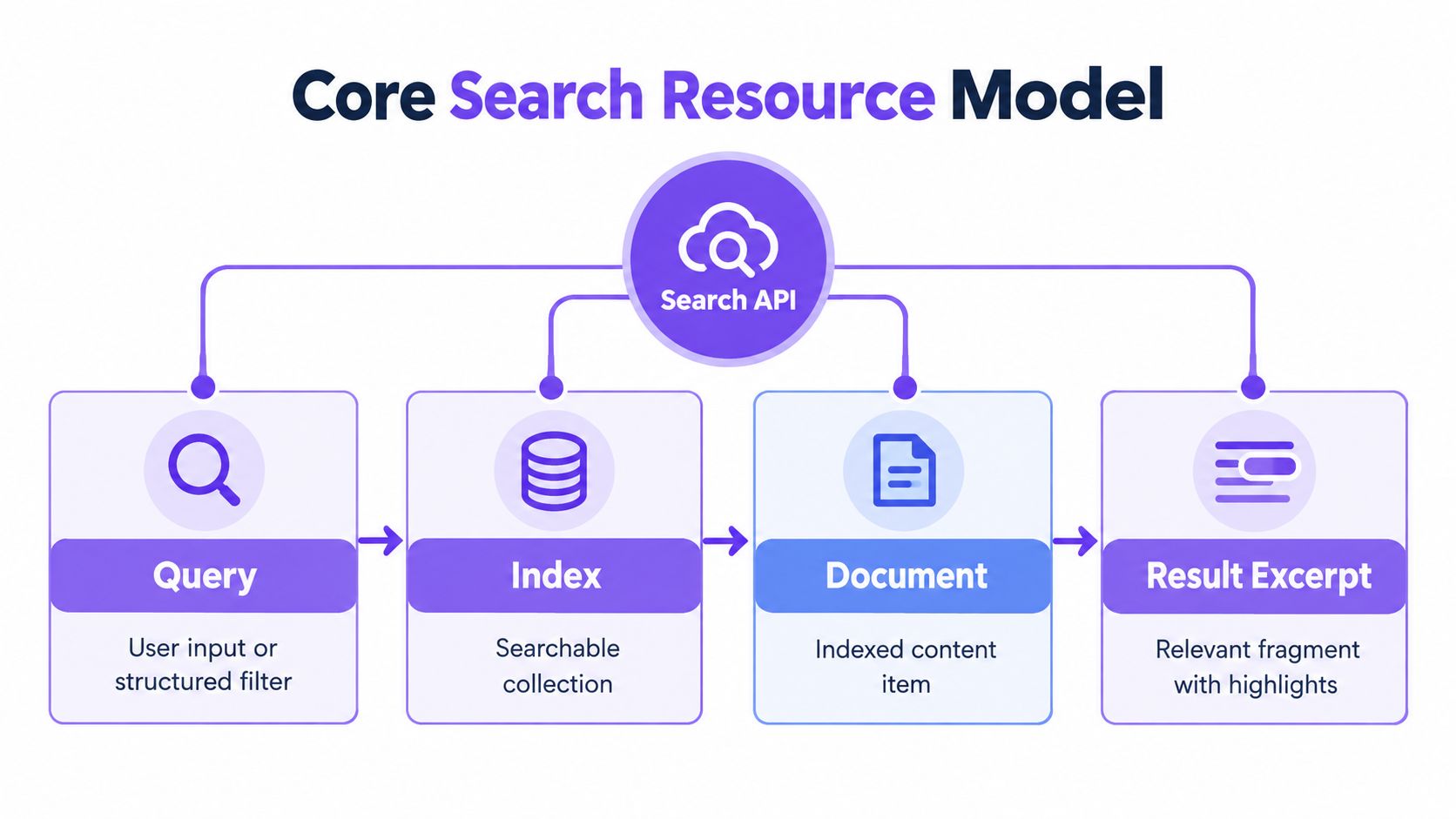
Start with four objects.
A query expresses intent. For a human-facing search box, that may be a short phrase such as "reset password". For AI retrieval, it may be a longer task description or a rewritten retrieval prompt. If your stack uses embeddings, the query may also produce a vector representation before execution. A short overview of embedding models for retrieval systems is useful background for that part of the pipeline.
An index is the searchable representation of content, not the raw content store itself. That distinction matters because indexing chooses what survives into search: fields, tokenization, language handling, freshness policy, permissions, and sometimes vector data. Two systems can point at the same website and still produce very different indexes because they optimize for different jobs.
A document is the retrievable unit inside that index. On a website, a document might be a page, article, help entry, product record, or extracted section. The right document size is a tradeoff. Large documents help browsing and preserve context. Smaller chunks often work better for AI retrieval because they reduce irrelevant surrounding text.
An excerpt is the evidence returned with the match. For human search, it helps a user judge relevance before clicking. For AI retrieval, it often becomes the citation payload, grounding text, or follow-up fetch target. If excerpts are weak or unstable, answer quality usually drops even when ranking still looks reasonable.
A simple flow looks like this:
- A client sends a query.
- The service evaluates it against one index or several indexed views.
- Candidate documents are ranked.
- The API returns identifiers, scores or ordering, and excerpts or snippets.
- The client renders results, fetches full content, or passes the evidence into another system.
Search as a first-class resource
Treat search as its own resource with a defined contract, usually exposed through /search or a versioned equivalent. That contract should survive backend changes. If you swap a hosted keyword engine for a hybrid retriever, clients should not need to relearn the meaning of basic request fields.
This separation also makes provider churn easier to handle. Search vendors deprecate features, rename ranking controls, and change excerpt behavior over time. A stable resource model acts like an adapter plate between your clients and those backend shifts.
The request usually benefits from distinct field groups:
- Query fields describe what the client wants to find
- Filter fields limit the candidate set by scope, type, language, or permissions
- Sort fields choose ordering rules beyond default relevance
- Pagination fields control result traversal
- Projection fields choose how much of each hit to return
- Context fields carry session, user, or task information
This separation follows common API design guidance for filtering, sorting, and pagination discussed earlier in the article.
Why this model holds up across use cases
The same search resource can support three different consumers, but only if the contract stays explicit.
For human search, the response needs readable titles, stable URLs, and concise excerpts. For AI retrieval, the response needs evidence-bearing text, source identifiers, and enough metadata to support citation and traceability. For a bridge API, the response also needs normalization, because one backend may call something a facet, another a filter, and a third may not support the feature at all.
That is why a flat parameter bag ages badly. Once q starts carrying search terms, filters, retrieval mode, and ranking instructions, every client becomes coupled to internal assumptions. Caching gets messy. Testing gets narrower. Migrations get expensive.
A good search contract separates intent, constraints, ordering, and evidence.
A reusable reference shape
A practical schema often includes:
- query for the user request or retrieval objective
- filters for content type, section, language, tenant, or access scope
- sort for relevance, recency, or field-based ordering
- page / limit or cursor for traversal
- fields for response shaping
- session_id or similar context keys for continuity
- mode when clients need to distinguish keyword, semantic, or hybrid behavior without encoding that choice indirectly
This model is durable because it describes the job, not the implementation. You can add semantic ranking, chunk-level retrieval, or provider failover behind the interface. Clients still send a query to a search resource and still get back documents plus evidence. That is the level of stability that matters when the underlying search stack changes faster than the applications built on top of it.
Endpoints and Request Methods for Search Operations
A developer opens your docs to wire up search in three places: the website search box, an internal support assistant, and a gateway that fans requests out to more than one backend. Those clients are asking related questions, but not the same question. The endpoint design has to make that difference clear without forcing each client to learn backend-specific rules.
Start with one stable search resource
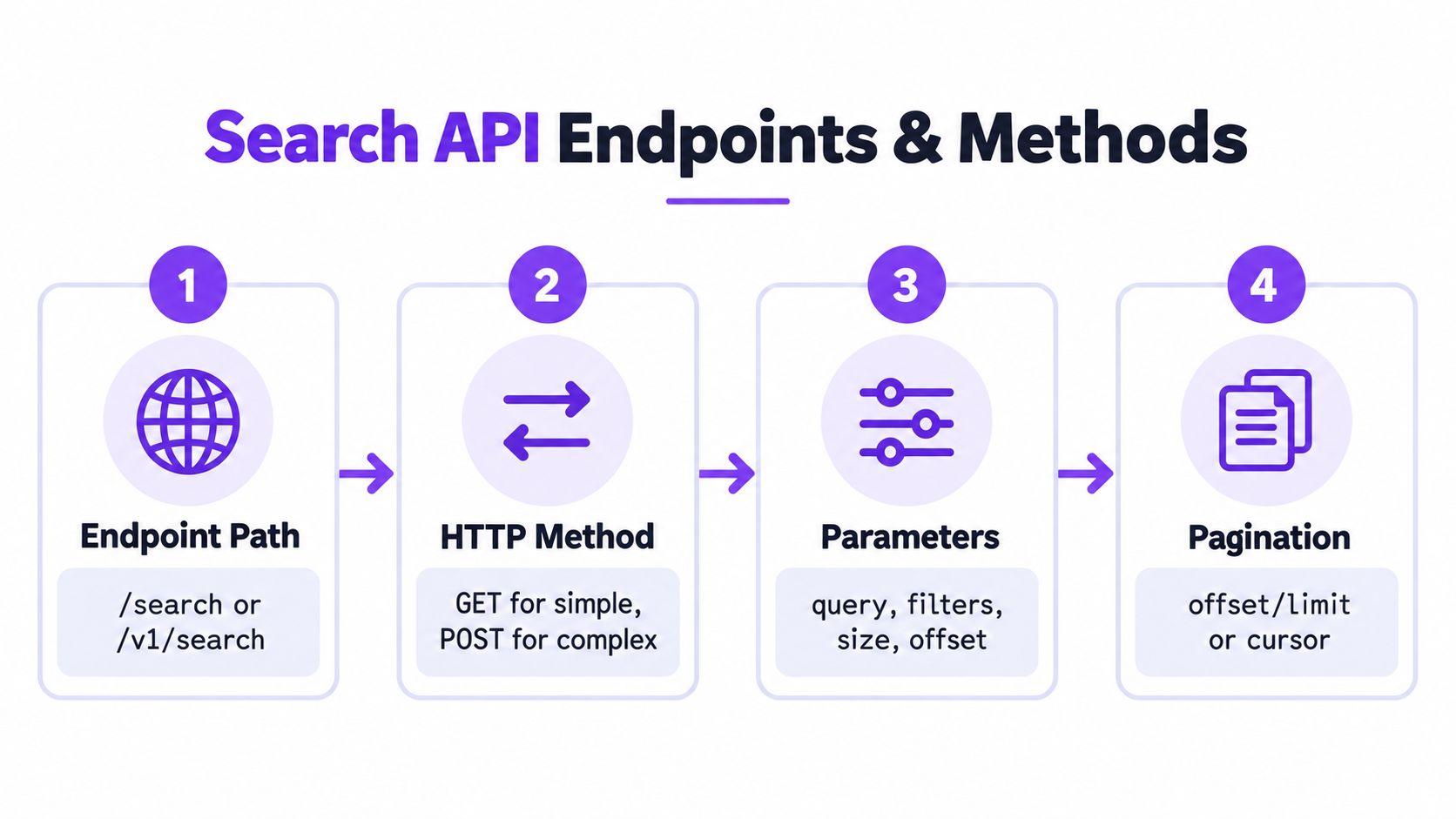
A stable path keeps the contract readable. In practice, that usually means /search or /v1/search as the entry point, even if the underlying system queries different indexes, retrieval models, or providers.
Examples:
GET /v1/search?q=api+authenticationPOST /v1/searchPOST /v1/search/docsPOST /v1/search/help-center
This choice matters for durability. Search backends change more often than client code does. A hosted engine may rename features. An analytics API may expose query data but not document retrieval. A bridge layer may swap one provider for another after a deprecation notice. If the public contract stays centered on a search resource, those changes remain implementation details instead of client migrations.
Choose methods by request shape, not by fashion
GET works well for simple, shareable searches. A browser search box, a bookmarked result URL, or a crawler-friendly query endpoint all fit this model.
POST works better once the request starts to look like a structured retrieval job. That includes nested filters, field selection, ranking mode, session context, or a request body large enough that query strings become awkward to inspect and cache.
A simple rule helps:
- Use GET for human-facing lookups with a short parameter set.
- Use POST for AI retrieval, hybrid search, and bridge APIs that normalize requests across different providers.
That split is less about style than about preserving meaning. A short keyword lookup and a retrieval request with constraints, ranking hints, and response shaping may both be called “search,” but they behave like different classes of operation.
A simple GET example:
GET /v1/search?q=refund+policy&page=1&size=10
A more expressive POST example:
POST /v1/search
{
  "query": "find documentation about API authentication failures",
  "filters": {
    "content_type": ["docs", "guides"],
    "language": "en"
  },
  "sort": {
    "by": "relevance",
    "direction": "desc"
  },
  "page": 1,
  "size": 10,
  "fields": ["title", "url", "excerpt", "updated_at"]
}
Match the endpoint shape to the kind of search
A website search API often ends up serving three patterns.
Human search favors predictable URLs and easy debugging. GET /search is a good fit when the request is small and the result page itself is part of the product.
AI retrieval favors explicit bodies. The caller usually needs filters, mode selection, citation-ready fields, and sometimes chunk-level evidence. A POST /search request keeps those controls visible and versionable.
Bridge APIs sit between clients and multiple backends. They benefit from one normalized endpoint even when one provider expects query parameters, another expects JSON, and a third lacks a feature such as facets or semantic ranking. If you are routing these requests through a broader compatibility layer, the same normalization pattern appears in an OpenAI-compatible API gateway architecture.
Return traversal metadata with every response
Search is not only about finding the first page. Clients also need to move through a result set without guessing whether more data exists or whether the ordering changed underneath them.
Return pagination metadata every time. Typical fields include the current position, page size, and either a total count or a next cursor. Cursor pagination is often a better fit once result sets are large or updated frequently. Page-number pagination is easier for simple website interfaces.
The design choice depends on the job:
- Page and size fit human browsing and numbered result pages.
- Cursor or next_token fit API consumers that need stable continuation through changing data.
- Offset pagination is easy to start with, but it becomes fragile at larger depths or with rapidly changing indexes.
Keep ordering deterministic
Pagination only works if ordering is stable. If two documents have the same relevance score, the API needs a tie-breaker such as updated_at or a document ID. Otherwise a user can request page two and see one result repeated from page one, or miss a result entirely.
A library index is a useful comparison. If books are sorted only by topic, books with the same topic can shift positions whenever the shelf is updated. If the catalog sorts by topic, then author, then accession number, the order stays reproducible. Search endpoints need the same discipline.
State the default sort. State the tie-breaker. Return enough metadata for clients to understand what happened.
Here's a short demo before implementation details:
Parameters Filters Sorting and Pagination Explained
Once the endpoint is stable, most developer questions move to parameters. The easiest way to keep them understandable is to group them by purpose instead of collecting everything into one long list.
Search fields
These express what the client wants to find. In a simple site search, this may just be q. In a richer Website Search API, you may support a natural-language query plus optional keyword terms for tighter retrieval.
Examples:
- Natural-language intent such as “find setup steps for single sign-on”
- Short keyword query such as “sso setup docs”
- Target index such as docs, blog, help center, or all content
Search fields should describe the information need. They shouldn't also carry sorting or filtering semantics.
Filter fields
Filters narrow the candidate set before or during ranking. They answer “where may results come from?” rather than “what is relevant?”
Typical filters include:
- Content type for docs, tutorials, changelogs, or policies
- Language for multilingual sites
- Section or product area for large documentation estates
- Access scope for public versus internal content
Filters are especially useful when the same search service backs both public UI and private assistants.
Sort and response control fields
Sort fields let clients ask for relevance, recency, alphabetical ordering, or another defined rule. Don't let clients invent arbitrary sort semantics unless your backend can guarantee them.
Response control fields shape payload size. They're often overlooked, but they matter for performance and downstream parsing.
Examples:
- Field selection to request only title, URL, and excerpt
- Excerpt mode to choose snippet versus extended passage
- Highlight control to include match fragments
If a client doesn't need full result objects, don't return them by default. Search APIs age better when payload size is explicit.
Pagination and context fields
Pagination fields control traversal. Keep the contract unambiguous. If you use page and size, define both clearly. If you use cursors, make the cursor opaque and stable for the client.
Context fields capture task-specific information such as session continuity. They're especially useful in AI retrieval flows where several related search requests belong to one job.
The table below works well as a quick implementation checklist.
| Parameter Group | Purpose | Example |
|---|---|---|
| Search | Express the information need | query: "find password reset steps" |
| Keywords | Add concise lexical retrieval hints | keywords: ["password reset", "account recovery"] |
| Filters | Restrict scope of candidate documents | content_type: ["docs", "help"] |
| Sort | Define deterministic ordering | sort: { by: "relevance", direction: "desc" } |
| Pagination | Traverse large result sets | page: 2, size: 10 |
| Response Control | Limit payload shape and detail | fields: ["title", "url", "excerpt"] |
| Context | Preserve task continuity | session_id: "task-123" |
A few parameter mistakes worth avoiding
- Duplicated meaning. Don't put the same constraint in both
queryandfilters. - Hidden defaults. If the API sorts by relevance unless told otherwise, document that clearly.
- Unbounded payloads. Excerpts, highlights, and field sets should have predictable limits.
- Mixed pagination styles. Avoid supporting page-number and cursor semantics in the same operation unless there's a strong reason.
If your clients can answer, “What am I searching, how am I narrowing it, how are results ordered, and how do I get the next page?” then the parameter model is doing its job.
Example Requests and Responses with Excerpts
A request example earns its place in API documentation when a teammate can copy it, run it, and learn something about the resource model from the response. Search examples are especially useful here because the same endpoint often serves three different jobs: a person scanning a results page, a model retrieving evidence, or a bridge service normalizing results from another provider. The JSON may look similar in each case, but the payload shape should reflect the consumer.
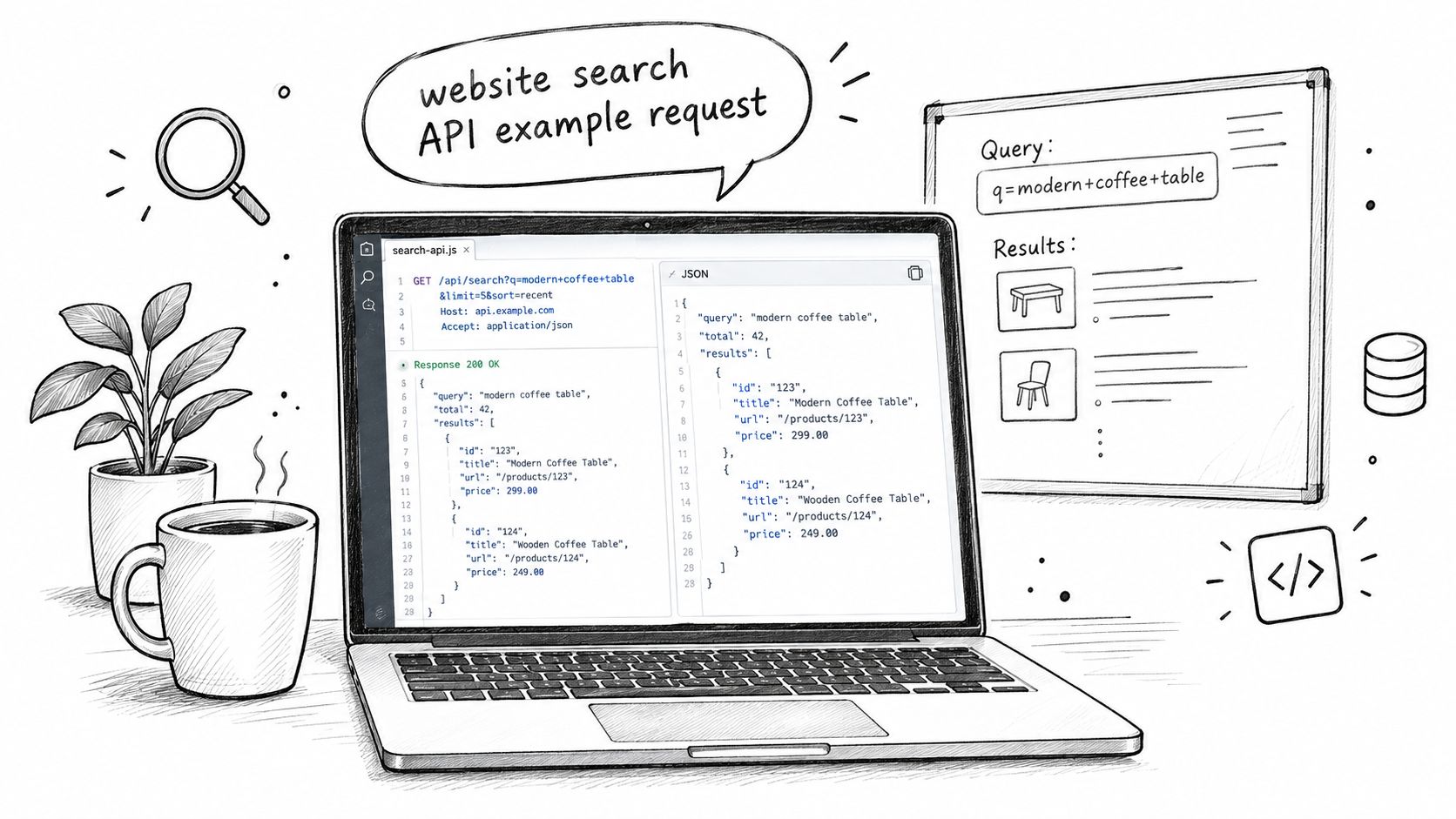
Example for a human-facing search flow
Start with a familiar case. A user searches your documentation for API key rotation and needs enough context to choose a result without opening five tabs.
POST /v1/search
{
  "query": "API key rotation",
  "filters": {
    "content_type": ["docs"]
  },
  "sort": {
    "by": "relevance",
    "direction": "desc"
  },
  "page": 1,
  "size": 5,
  "fields": ["title", "url", "excerpt", "content_type"]
}
A compact response might look like this:
{
  "meta": {
    "page": 1,
    "size": 5,
    "total_matches": "available but provider-defined",
    "total_pages": "available but provider-defined"
  },
  "results": [
    {
      "title": "Rotate API Keys",
      "url": "/docs/security/rotate-api-keys",
      "content_type": "docs",
      "excerpt": "Rotate keys from the security settings page, update dependent services, and revoke the old key after validation."
    },
    {
      "title": "Authentication Overview",
      "url": "/docs/authentication",
      "content_type": "docs",
      "excerpt": "API keys authenticate server-side requests. Rotation reduces exposure when keys are shared across environments."
    }
  ]
}
This response works like a shelf label in a library. The title identifies the item, the URL tells you where to fetch it, and the excerpt gives enough nearby text to judge relevance before opening the full document. For human search, that preview matters as much as ranking.
Example for AI retrieval
Now change the consumer. An assistant or RAG pipeline is usually not trying to pick a link for a person. It is trying to gather evidence that can survive summarization, citation, and follow-up questions. That changes what a good request looks like.
A practical pattern is to send one natural-language objective plus a small set of short keyword queries from different angles, as noted earlier in the article. The objective describes the task. The keyword list nudges lexical matching toward likely phrasing in the source content.
POST /v1/search
{
  "query": "Find current product documentation explaining how users reset passwords, including any prerequisites and admin limitations.",
  "keywords": [
    "password reset docs",
    "admin password reset",
    "account recovery steps"
  ],
  "filters": {
    "content_type": ["docs", "help"]
  },
  "excerpt_mode": "extended",
  "session_id": "reset-flow-task"
}
The design choice to call out here is excerpt_mode: "extended". Short snippets are fine for a search results page. AI retrieval often needs a larger window around the matching text so the downstream system can preserve meaning, quote accurately, or decide whether a second fetch is necessary.
A bridge API may use this same request shape even when the upstream providers differ. One source may return highlights, another may return fragments, and a third may return no excerpt at all unless asked through a separate parameter. Normalizing those differences into one response contract is useful, but it also creates durability risk. If an upstream provider changes excerpt behavior, deprecates a field, or changes pagination semantics, your bridge layer can continue returning valid JSON while degrading retrieval quality. Example responses should make those assumptions visible.
How to read the response
Read search responses in layers.
- Check
metafirst. Confirm whether paging is page-based or cursor-based, whether totals are exact or estimated, and whether the API is signaling partial results. - Read identity fields next.
title,url, and any stable document identifier are what let clients deduplicate results, cache them, or fetch the full record later. - Evaluate the excerpt last. The excerpt answers a narrower question: "Is this match useful enough to inspect further?"
That order helps during debugging. If ranking looks wrong, start by verifying scope and ordering metadata before blaming the excerpt text itself.
What to validate in tests
Search tests should check behavior that can drift over time, especially when your system depends on another search service behind the scenes.
Validate that:
- Ordering stays deterministic for the same query, filters, and sort input
- Excerpt fields match the requested mode, especially when switching between short and extended forms
- Restricted content stays excluded when optional filters are omitted
- Pagination metadata stays coherent as documents are added, removed, or reindexed
- Deprecated upstream fields fail visibly in adapters or bridge APIs, rather than falling back to empty strings that look valid
Search failures are often subtle. The endpoint still returns 200 OK. The problem is that the wrong excerpt was shortened, a provider stopped returning totals, or a bridge adapter mapped a deprecated field into the wrong slot. Good examples help prevent that kind of failure because they document not only syntax, but the contract each consumer is relying on.
Integration Patterns Citation and Markup Best Practices
A team ships a search box for docs, then later adds an assistant, and then an internal agent that cites pages back to users. The same search API now serves three different jobs. That is usually the point where result shape and citation markup stop being a presentation detail and start acting like part of the system contract.
A useful way to frame website search API integration is to treat it as a reference system. Human search needs fast scanning and clear titles. AI retrieval needs evidence that can survive summarization. Bridge APIs need normalized fields that stay stable even if the upstream provider changes behavior or removes fields.
Site search widgets and classic retrieval
For a website search box, the request flow is simple, but the output still needs structure. A user scans results the way a reader scans a table of contents. They need enough metadata to judge relevance before clicking.
In that pattern, citation markup can stay light:
- Title
- Canonical URL
- Section label
- Last updated field, if freshness matters
The user supplies the final judgment, so the API response mainly needs to support fast inspection and stable linking.
Retrieval for assistants and RAG
Assistant retrieval has a stricter burden of proof. A model cannot rely on a blue link alone. It needs a passage that preserves the sentence or paragraph carrying the claim, plus source metadata that lets the application show where that passage came from.
Excerpt length is therefore a design choice, not a cosmetic one. Short snippets save bytes but often cut away the line that makes the result usable as evidence. Longer excerpts cost more bandwidth and may increase latency, but they reduce the number of follow-up fetches and make citations easier to audit.
Session handling matters too. Use one session identifier for one user task, not one per request. That keeps related retrieval steps grouped together in logs and evaluations. If you pass many reformulated queries to a provider or bridge layer, set limits deliberately so one retrieval step does not expand into an unbounded fan-out.
A practical citation object usually includes:
- Document title
- Canonical URL
- Excerpt text
- Optional section or anchor
- Document identifier for internal traceability
Agentic workflows and durability concerns
Agentic workflows put more pressure on the reference system because they combine search, reading, reformulation, and citation in one chain. If any upstream field changes meaning, disappears, or starts arriving empty, the breakage often shows up later as a bad answer with a valid 200 OK behind it.
That is why provider durability belongs in integration planning. Google's FAQ rich results were removed on 7 May 2026, and FAQ-related support in the Search Console API was scheduled for removal later in 2026. The same Octoparse review describes Google's Custom Search JSON API as limited to defined sites and scheduled for discontinuation on 1 January 2027, while the Search Console API reports only on a site owner's own data, as summarized in Octoparse's review of Google official search API options.
Those constraints affect architecture. An official API may be suitable for a narrow reporting or site-scoped search task, but it may not remain a durable base for broader retrieval. A bridge API can absorb some provider churn by normalizing schemas, yet it also adds an adapter layer that must be maintained carefully. For teams evaluating search inside a broader assistant workflow, Writingmate's web search plugin documentation shows one example of search operating as part of a larger tools environment.
The practical rule is simple. Keep your citation schema provider-neutral where possible. Keep source identity fields stable. Treat deprecations as an expected maintenance event, not an exception.
Quick Reference Glossary and Cross Referenced Index
A reference section earns its keep during debugging. A teammate asks why one endpoint returns excerpts while another returns ranked pages, or why an assistant answer lost source attribution after a provider swap. This is the page you scan to restore the model in your head.
Glossary
Query
The input text or structured request sent by a user, service, or agent.
Index
The stored search corpus and ranking structures an API uses to find matches. In practice, this may be a website's own content index, a provider-owned web index, or a normalized layer over several backends.
Document
One retrievable unit in the index, such as a page, article, FAQ entry, product record, or chunked passage.
Excerpt
A returned text fragment that shows match context. Human-facing search often uses excerpts for scanability. AI retrieval uses them as evidence.
Filter
A constraint that narrows the candidate set, such as language, content type, section, timestamp, or access scope.
Sort
The ordering rule for matched items. Stable sorting matters whenever clients paginate, compare runs, or cite exact positions.
Pagination
The method used to move through a result set. Offset pagination is simple. Cursor pagination is usually safer when the underlying index changes between requests.
Response shaping
Controls that limit payload size or choose fields, such as field selection, excerpt length, highlight mode, or citation metadata.
Session identifier
A workflow-level identifier that ties related searches together for tracing, caching, or downstream reasoning.
Citation support
Source fields that let a client or model point back to the originating document, usually with title, URL, snippet or excerpt, and a stable document identifier.
Bridge API
An adapter that normalizes search across multiple providers. It reduces provider-specific code, but it also creates a translation layer whose schema and ranking assumptions need maintenance.
Task-to-pattern lookup
| Task | Recommended Pattern | Key Fields |
|---|---|---|
| Docs search for users | Human-oriented search | query, filters, sort, page, size |
| Assistant retrieval with grounding | AI-oriented retrieval | query, keywords, excerpt_mode, session_id |
| Provider abstraction across backends | Bridge API | normalized result schema, provider-neutral citations |
| Large result traversal | Stable pagination | deterministic sort plus pagination metadata |
| Analytics on search visibility | Historical API ingestion | grouped dimensions and batched queries |
The useful distinction is purpose, not branding. Human search optimizes for scanning and click choice. AI retrieval optimizes for evidence density and citation quality. Bridge APIs optimize for portability, often by flattening provider differences into one contract. Each choice drops some information while preserving another kind.
Historical notes worth keeping in mind
As noted earlier, Google Search Console is best treated as a visibility and reporting interface for properties you control, not as a general website search layer. Its search analytics method groups performance data by dimensions such as date, query, country, page, and search appearance.
Historical search data also varies by product type. Some APIs expose archived SERP snapshots, some expose keyword history, and some only expose recent trend windows. DataForSEO's historical search data documentation is a useful example of that split because it separates historical SERP records from keyword-oriented metrics instead of presenting "search history" as one thing.
That distinction matters during system design. A reporting API answers "how did this property perform." A retrieval API answers "what content matches now." A bridge API answers "how can we keep one client contract while providers change underneath."
Daily cheat sheet
Use these five checks during API review:
- Who consumes the results? Person, model, or automation pipeline.
- What evidence shape is required? Snippet, excerpt, passage, or full document.
- What keeps result order stable? Explicit sort, tie-breaker, and pagination token.
- How portable is the schema? Can you replace the provider without rewriting citation handling or rank interpretation.
- What breaks under deprecation? Search surface, field meaning, endpoint availability, or authentication flow.
A website search API works like a reference system. The query is only the front door. The long-term quality of the integration comes from stable identifiers, predictable pagination, usable evidence fields, and a clear boundary between human search, AI retrieval, and provider abstraction.
Writingmate gives teams one workspace for model access, web-aware answers, file analysis, and an OpenAI-compatible API, which is useful when your search layer has to support both human workflows and agent-style retrieval. If you want to test search-backed prompts, compare model outputs, or wire search into a broader tool stack, visit Writingmate.
Frequently Asked Questions
Sources
- 2026 search API benchmark from Proxyway
- overview of embedding models for retrieval systems
- OpenAI-compatible API gateway architecture
- Octoparse's review of Google official search API options
- Writingmate's web search plugin documentation
- DataForSEO's historical search data documentation
- Writingmate

Written by
Artem Vysotsky
Ex-Staff Engineer at Meta. Building the technical foundation to make AI accessible to everyone.

Reviewed by
Sergey Vysotsky
Ex-Chief Editor / PM at Mosaic. Passionate about making AI accessible and affordable for everyone.